
Key takeaways
- Find the best Cricut machine for beginners, comparing starter bundles, compact Joy models and step-up machines by what is included in the box.
What's inside
As an Amazon Associate I earn from qualifying purchases. This post may contain affiliate links at no extra cost to you.
A first Cricut is less about raw cutting power and more about how quickly you get from unboxing to a finished project you are proud of. The decision that matters is what arrives in the box, how much setup the machine asks of you, and whether its size and software feel approachable on your very first evening of crafting.
This guide is written for complete beginners choosing a first machine, for gift buyers who want the recipient crafting immediately, and for cautious buyers who want room to grow without starting on the most complex model. Each pick is drawn from the current Amazon listings, with contents and capabilities taken from those product pages. The guide also weighs how much guidance each option gives a newcomer, from included starter designs and sampler materials to the size of the learning curve waiting in the software.
Quick Picks
As an Amazon Associate we earn from qualifying purchases.
| Product | Best for | Key spec from title |
|---|---|---|
| Cricut Joy Bundle | First-timers who want everything needed in one box | Compact machine with card kit, vinyl sampler, mats and tools |
| Cricut Joy Xtra | Beginners short on space who love stickers and cards | Compact smart cutting machine, Joy Xtra model |
| Cricut Explore 3 Bundle (Blue) | Learners ready for a full-size machine and starter content | Cuts 100+ materials and includes a digital content library |
| Cricut Explore Air 2 (Blue) | Budget-conscious starters happy with an earlier generation | Earlier-generation Explore cutting machine with Bluetooth |
| Cricut Maker 3 | Beginners planning to grow into fabric and selling | Cuts 300+ materials with matless Smart Materials cutting |
How to Choose
Cutting Width and Matless Cutting, Explained Simply
Machine size decides the biggest design you can cut, and for a beginner that mostly affects shirts, tote bags and large signs rather than cards or stickers. Compact machines keep projects small and manageable while you learn, while full-size models leave more room for later ambitions. Matless cutting, offered on the Maker 3 with Smart Materials, skips the step of sticking material to a mat, which removes one fiddly stage from early projects. Whatever you choose, check the cutting width on the listing against the largest project you genuinely expect to try in your first few months.
Material Range Without the Overwhelm
Beginners often fixate on material counts, but your first month will likely involve cardstock, vinyl and iron-on rather than the toughest stock a flagship can handle. Machines here span from compact models made for everyday paper and vinyl, through the Explore line listed at 100+ materials, to Maker models listed at 300+ materials. A wider range is future insurance, not a first-week requirement. The smarter check is whether the listing confirms the two or three materials you definitely want to start with. If those are covered, the machine can teach you the craft; extra range only matters once your project list grows.
What Is in the Box: Bundle Versus Bare Machine
For a first machine, the box contents shape your first week more than the machine name does. A bundle that includes a card kit, a vinyl sampler, cutting mats and a basic tool set lets you finish real projects immediately and learn each accessory as you use it. A bare machine can look simpler, then stall your start while you work out which mats and tools to order separately. Read the contents list on the product page line by line, and picture your first project: if any essential item is missing from the box, add it to your plan before the machine arrives.
Design Space Software: Your Real Learning Curve
Every machine in this guide is driven through Design Space, so your comfort with the software matters as much as the hardware. Bundles that include a digital content library, like the Explore 3 bundle’s included images, give beginners ready-made designs to practise with before learning to create their own. Before buying, check the listing for the operating systems the machine supports, such as iOS, Android, Windows and Mac, and confirm your own device is on that list. Treat your first sessions as learning time: start with included designs, then build skills gradually instead of judging the machine by one ambitious first project.
The 5 Best Options
Cricut Joy Bundle

For a true first machine, this bundle removes the two biggest beginner obstacles: not knowing what accessories to buy, and having nothing to make on day one. The compact machine arrives with a card kit, a sampler Smart Vinyl roll, cutting mats and a tool set, so your first session can end with finished cards rather than a shopping list. Its small size also lowers the stakes, since it stores in a drawer and sets up on any table. Beginners who want to learn the basics of cutting, weeding and applying vinyl before committing to a full-size machine will find this the gentlest starting point available.
Specs
- Compact cutting machine
- Card kit included
- Sampler Smart Vinyl roll included
- Cutting mats included
- Tool set included
- Model: zJoyM21
Best for: Complete beginners who want a self-contained starter kit for cards, labels and small vinyl projects.
Watch out for: The included vinyl is a sampler rather than a full roll, so expect to restock supplies once the practice projects are done.
ASIN: B0D2Y8RYCC
Cricut Joy Xtra

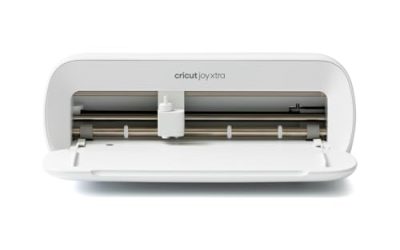
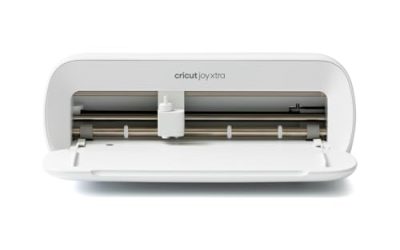
The Joy Xtra suits beginners whose craft space is a shelf rather than a room, and whose ambitions start with stickers, cards and labels. As a compact smart cutting machine, it keeps setup simple and storage painless, which encourages the short, frequent practice sessions that actually build skill. The model line is positioned around fitting full-size sticker sheets and common card sizes, covering the projects new crafters attempt most. Choose it over the Joy bundle if you prefer to select your own supplies, or over a full-size machine if you know wide designs are not on your near-term list.
Specs
- Compact smart cutting machine
- Model: Cricut Joy Xtra
Best for: Space-limited beginners focused on stickers, cards and other small-format projects.
Watch out for: Check the listing for the project sizes this model is designed for, because its compact format sets a clear ceiling on design width.
ASIN: B0CF6L9SMJ
Cricut Explore 3 Bundle (Blue)

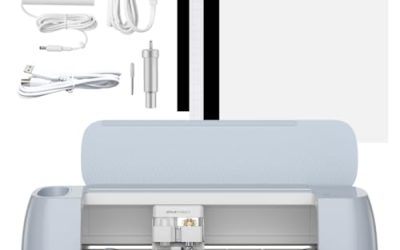
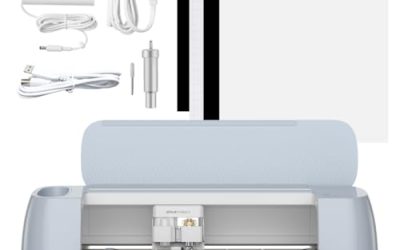
This bundle is the step most beginners should consider if they already know cutting crafts will become a regular hobby. The machine is listed as cutting 100+ materials at 2x faster speed, which covers the vinyl, iron-on and paper projects that fill most craft rooms, and the bundle includes a digital content library of 30 images in Design Space, giving learners designs to cut before they can create their own. It asks a little more of you than a Joy, in space and in learning, but it also postpones the upgrade question far longer. For committed starters, that trade is usually worth it.
Specs
- Cuts 100+ materials
- 2x faster cutting, per the listing
- Bundle edition in blue
- Includes a digital content library of 30 images in Design Space
Best for: Motivated beginners who want a full-size machine with starter designs included.
Watch out for: Work through the bundle contents list before ordering, so you know which mats, tools and materials you still need to add yourself.
ASIN: B0BJHH35DH
Cricut Explore Air 2 (Blue)
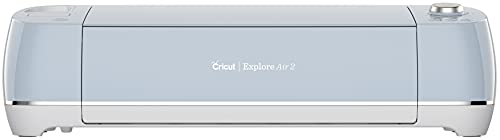
The Explore Air 2 is the earlier-generation route into the full-size Explore family, and it makes sense for beginners who want a larger machine while keeping their first purchase modest in scope. The listing describes it as a DIY cutting machine for all crafts with Bluetooth, and it belongs to the generation known for a double tool holder layout. You give up the newer generation’s headline speed claims, but for learning the workflow of designing, cutting and finishing projects, the fundamentals are all here. It suits patient learners who would rather master the craft on a proven older model than pay for the newest features first.
Specs
- Earlier-generation Cricut Explore model
- DIY cutting machine for all crafts
- Bluetooth connectivity
- Double tool holder generation
Best for: Beginners who want full-size cutting on an earlier-generation machine.
Watch out for: Confirm the included contents and supported devices on the listing, since earlier-generation bundles vary more than current ones.
ASIN: B07WGB21KR
Cricut Maker 3

Most beginners do not need the Maker 3, and that honesty is exactly why it belongs here: a minority of starters already know they are heading toward fabric projects, thicker materials or selling finished goods, and for them, buying the flagship first avoids a costly second purchase. Its listing claims 300+ materials, 10x cutting force and matless cutting with Smart Materials, which simplifies longer vinyl runs once you are ready for them. The learning curve is steeper and the setup bigger, so treat it as a deliberate long-term choice. If your ambitions are still cards and stickers, the Joy bundle will teach you more, sooner.
Specs
- 2x faster cutting compared with the previous generation, per the listing
- 10x cutting force
- Matless cutting with Smart Materials
- Cuts 300+ materials
- Bluetooth connectivity
- Works with iOS, Android, Windows and Mac
Best for: Beginners with clear plans to grow into fabric, thicker materials or selling their work.
Watch out for: Check which tools and accessories are included, since getting the most from this machine depends on extras beyond the base unit.
ASIN: B0942SQ5BD
Which One Fits Your Situation
You Have Never Owned a Craft Cutter
Start with the Cricut Joy Bundle. Its box contains the machine, a card kit, a vinyl sampler, mats and tools, so your learning happens through finished projects instead of accessory research. The compact size keeps setup to minutes and storage to a drawer. Once the basics feel easy, you will know from experience whether you even want a larger machine.
You Live in a Small Flat or Share Your Space
Choose the Cricut Joy Xtra. A compact machine respects limited storage and still covers the sticker sheets, cards and labels that dominate beginner crafting. Because it is easy to get out and put away, you will practise in short sessions that fit around work and family. Check the listing’s project sizes first, and it will handle a surprising amount of everyday making.
You Already Know This Will Become a Serious Hobby
Choose the Cricut Explore 3 Bundle. Its 100+ material range and included library of starter designs support months of learning without an early upgrade, and the full-size format accepts the shirt and decor projects beginners grow into. It is the balanced middle path: more commitment than a Joy, far less than a flagship, and a bundle that softens the first-week learning curve.
You Want to Start Small but Sell One Day
Choose the Cricut Maker 3, but only if selling is a real plan rather than a vague hope. Its 300+ material range and matless cutting with Smart Materials are production-friendly features you will eventually use. Beginners without that plan should start with the Joy bundle and upgrade later with clearer knowledge, because an oversized first machine can slow learning instead of speeding it.
Common Mistakes
- Buying a bare machine to save effort, then losing your first week to figuring out which mats, tools and materials should have been in the box.
- Choosing the flagship for its material count when your actual first projects are cards and vinyl, which every machine in this guide is listed to handle.
- Skipping the operating system check on the listing, then discovering the machine does not pair with the tablet or computer you intended to design on.
- Judging the machine by one difficult first project instead of starting with included designs and simple materials while you learn Design Space.
- Forgetting that sampler supplies run out quickly, so your second session stalls because no full roll of vinyl or spare cardstock is on hand.
Frequently Asked Questions
What is the easiest Cricut for a total beginner?
The Cricut Joy Bundle is the easiest start in this guide because the box includes the compact machine plus a card kit, a vinyl sampler, cutting mats and a tool set. That completeness matters more than cutting power at the beginning. You can finish real projects on the first day, learn the basic workflow, and decide later whether you want a larger machine.
Should a beginner buy a bundle or a bare machine?
For most beginners, a bundle is the safer choice because it removes guesswork about accessories. The Joy bundle includes mats and tools, while the Explore 3 bundle adds a digital content library of starter designs. A bare machine only makes sense if you already own compatible supplies. Either way, read the full contents list on the product page before ordering so nothing essential is missing.
How hard is Design Space to learn?
Design Space is the software every machine here uses, and the learning curve is gentlest when you begin with ready-made designs, such as the content library included with the Explore 3 bundle. Check the listing to confirm your device is supported, then expect your first sessions to be practice. Most beginners find cutting a simple included design far easier than designing from scratch immediately.
When does a beginner need the Maker 3 instead?
Only when your plans already include materials or project types beyond everyday paper and vinyl work. The Maker 3 is listed for 300+ materials with matless cutting on Smart Materials, which suits fabric ambitions and future selling plans. If your project list is still cards, stickers and labels, a Joy model will serve you better and cost you less effort while learning.
Related guides
More from Amazon
Programs that pair well with the guide above. Offers and eligibility are set by Amazon and may change.
Set up recurring deliveries of everyday items on eligible products. Terms and savings are set by Amazon.
Explore Subscribe & SaveFree shipping on eligible items, Prime Video and more. Eligible new members can start with a free trial.
Start a Prime free trialAudiobooks and podcasts to listen to on the go. Eligible new members can start with a free trial.
Try Audible freeRead from a large library of eBooks and audiobooks on any device. Check Amazon for current plans.
Explore Kindle UnlimitedAs an Amazon Associate we earn from qualifying purchases.

Write Your Review
No reviews yet. Be the first to share your experience!