
Key takeaways
- Compare five smartphone-connected blood pressure monitors with Bluetooth or Wi-Fi sync, app tracking, cuff fit, and clear displays to pick the right one.
What's inside
As an Amazon Associate I earn from qualifying purchases. This post may contain affiliate links at no extra cost to you.
A smartphone-connected blood pressure monitor changes the job from writing numbers on paper to keeping a record that lives on your phone. The real decision is not which cuff looks neatest on a shelf. It is whether the companion app keeps a clear history, whether the monitor pairs smoothly with the phone you already own, and whether the cuff fits your arm well enough for a comfortable measurement. A monitor that syncs poorly or fits badly gets used less often, and a device that sits in a drawer helps nobody.
This guide is for people buying their first connected monitor, for households that want one device to serve two people, and for anyone who wants readings stored in an app instead of a notebook. Every model below was picked from its Amazon listing title and listed specifications, with attention to app quality, phone compatibility, sync method, display, and cuff size.
Quick Picks
As an Amazon Associate we earn from qualifying purchases.
| Product | Best for | Key spec from title |
|---|---|---|
| OMRON 10 Series BP7450 | Two people sharing one monitor | Dual display with 200 readings for two users |
| OMRON Evolv BP7000 | A compact one-piece design for home and travel | Tubeless one-piece cuff with Bluetooth sync |
| Withings BPM Connect | Hands-off sync over Wi-Fi | Wi-Fi and Bluetooth sync to the Health Mate app |
| iHealth Track KN-550BT | A wide-range cuff for larger arms | Wide-range cuff for standard to large adult arms |
| OMRON 5 Series BP7250 | A straightforward single-user setup | Bluetooth sync with 60 on-device readings |
How to Choose
App Quality and Data History
The companion app is where a connected monitor earns its keep, so look at what it does with your readings. A good app shows a dated list of past measurements, draws a trend line over weeks, and lets you add notes about the time of day. Some apps let you export a report to share with a clinician, while others only show the latest numbers. Check whether the app needs an account, whether it stores data on the phone or in the cloud, and whether past readings survive a phone change. An app that is hard to navigate will discourage regular use, so favour one with a plain home screen and a history view you can read quickly.
Phone Compatibility and Sync Method
Before buying, confirm that the monitor works with your phone. Most connected monitors sync over Bluetooth to iOS and Android, but each maker publishes its own list of supported devices, and older phones sometimes fall off that list. Wi-Fi models go a step further by sending readings to the cloud without the phone nearby, which suits people who do not want to open an app after every measurement. Bluetooth models need the phone close by and the app running, at least in the background. Check the app store page for recent comments about pairing trouble on your phone model, and make sure the app is still updated.
Cuff Fit and Display Readability
Cuff fit decides whether a measurement feels comfortable and whether the numbers are taken under the right conditions, so measure your upper arm before ordering. Most upper-arm cuffs in this guide fit arms from about nine to seventeen inches, while wide-range cuffs stretch further for larger arms. A pre-formed cuff that holds its shape is easier to put on with one hand than a flat cuff that needs rolling. On the display side, look for large digits you can read without glasses, a backlight for dim rooms, and a second line that shows your previous reading beside the new one.
Memory, Users, and Power
On-device memory matters when the phone is not nearby, because the monitor stores readings and sends them later. Single-user models often hold around sixty to one hundred readings, while two-user models hold roughly double that, split between two people. If two people share one monitor, check that each person gets a separate profile in the app so their histories stay apart. Power is the other quiet detail: most monitors run on four AA batteries, some include an AC adapter, and rechargeable models need a charging routine. Pick the setup that matches how often the monitor will be used.
The 5 Best Options
OMRON 10 Series BP7450

The 10 Series suits a household where two people share one monitor and both want their readings kept separate. Its dual display shows the current reading next to the last one, and the pre-formed Easy-Wrap ComFit cuff is shaped to wrap around the arm with less fumbling. Bluetooth sync sends readings to the OMRON connect app, which works with Apple Health and Google Fit, and the monitor also works with the OMRON Health skill for Alexa-enabled devices. TruRead mode takes three consecutive measurements and shows the average.
Specs
- Upper-arm monitor with Bluetooth sync to the OMRON connect app for iOS and Android
- Horizontally designed dual display showing current and previous readings
- Stores up to 200 readings for two users, 100 per user
- Pre-formed Easy-Wrap ComFit cuff fits arms 9 to 17 inches in circumference
- TruRead mode averages three consecutive measurements
- Works with Apple Health, Google Fit, and the OMRON Health skill for Alexa-enabled devices
- AC adapter included, operates on 4 AA batteries
Best for: Two people sharing one monitor who want separate histories and a large, easy-to-read display.
Watch out for: Check the OMRON connect compatibility list for your exact phone model before buying, since older phones may not be supported.
OMRON Evolv BP7000

The Evolv is the pick for anyone who wants the monitor and cuff in a single piece, with no tubes and no separate unit to set up. The whole device wraps around the upper arm, which makes it easy to pack in a bag and quick to use at a desk or on a trip. It syncs over Bluetooth to the OMRON connect app, where readings are stored without a limit, and the on-device memory holds one hundred readings for a single user. A storage case is included, so the cuff keeps its shape between uses.
Specs
- One-piece tubeless upper-arm monitor with the display built into the cuff
- Bluetooth sync to the OMRON connect app for iOS and Android
- Stores 100 readings on the device for one user, with unlimited storage in the app
- Cuff fits arms 22 to 42 cm in circumference
- Storage case included
- Works with Apple Health and Google Fit
Best for: People who want a compact, tubeless design that is easy to carry and quick to set up.
Watch out for: The single-user on-device memory means a second person needs their own app profile to keep histories separate.
Withings BPM Connect

The BPM Connect is the most hands-off option here, because it syncs over Wi-Fi as well as Bluetooth and sends readings to the Health Mate app without the phone needing to be nearby. Its colour-coded display gives immediate feedback after a measurement, and the integrated cuff folds into a compact roll for storage. A rechargeable battery lasts for months between charges, which suits a monitor that lives in a drawer or a travel bag. Guest mode lets someone else take a reading without mixing it into your history.
Specs
- Upper-arm monitor with Wi-Fi and Bluetooth sync to the Health Mate app
- Colour-coded feedback on the display after each measurement
- Integrated cuff fits arms 22 to 42 cm in circumference
- Rechargeable battery with up to six months of use per charge
- Guest mode for readings that should not be saved to your history
- Works with Apple Health and Google Fit
- Shareable health report can be generated in the app
Best for: People who want readings to sync automatically over Wi-Fi without opening an app each time.
Watch out for: Confirm your Wi-Fi network is supported during setup, since some guest or workplace networks can block the first connection.
iHealth Track KN-550BT
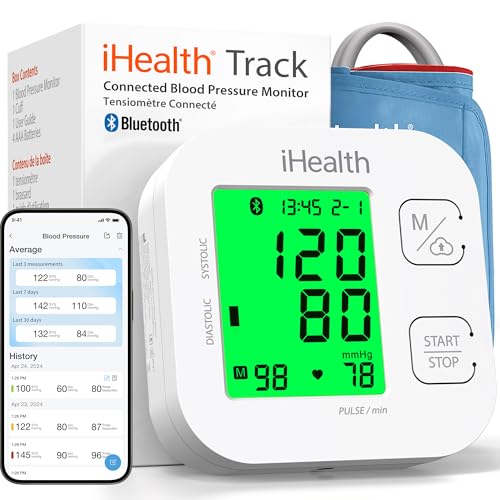
The iHealth Track is the straightforward choice for larger arms, thanks to a wide-range cuff made for standard to large adult arms. Its large backlit display shows systolic, diastolic, and pulse readings in big digits, with a colour indicator for quick context. Bluetooth sync sends each reading to the iHealth MyVitals app on iOS and Android, where past measurements are kept in a dated history. The monitor stores up to ninety-nine readings on the device itself, so nothing is lost if the phone is in another room.
Specs
- Upper-arm monitor with Bluetooth sync to the iHealth MyVitals app for iOS and Android
- Wide-range cuff made for standard to large adult arms
- Large backlit display with colour-coded indicators
- Stores up to 99 readings on the device
- Irregular heartbeat detection listed as a feature
- Runs on 4 AAA batteries
Best for: People who need a wide-range cuff and a large, bright display that is easy to read.
Watch out for: Measure your arm first, since the wide-range cuff is sized for larger arms and may feel loose on a smaller arm.
OMRON 5 Series BP7250
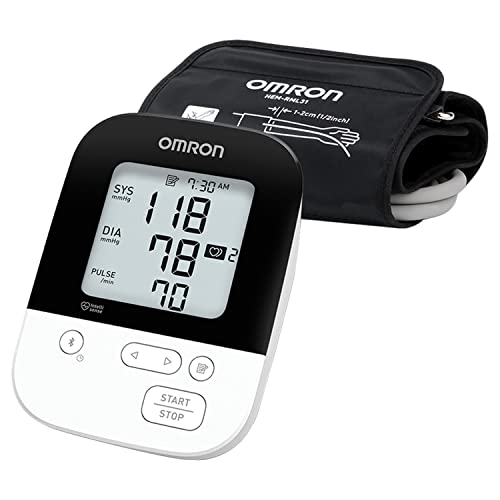
The 5 Series is the simplest connected Omron in this guide, and that is its appeal. It does one job well: it takes a reading, stores it on the device, and syncs it to the OMRON connect app over Bluetooth when the phone is nearby. The wide-range D-ring cuff fits most adult arms, and the display is plain and uncluttered. With sixty on-device readings for one user and unlimited storage in the app, it suits a single person who wants a phone record without extra modes or a second user profile.
Specs
- Upper-arm monitor with Bluetooth sync to the OMRON connect app for iOS and Android
- Wide-range D-ring cuff fits arms 9 to 17 inches in circumference
- Stores up to 60 readings on the device for one user, with unlimited storage in the app
- Advanced Accuracy technology listed as a feature
- Works with the OMRON Health skill for Alexa-enabled devices
- Runs on 4 AA batteries, AC adapter not included
Best for: A single user who wants simple Bluetooth sync and a plain, uncluttered display.
Watch out for: The AC adapter is not included, so budget for one separately if you prefer mains power over batteries.
Which One Fits Your Situation
Two People Sharing One Monitor
Pick the OMRON 10 Series BP7450. It stores one hundred readings per person and keeps two profiles apart on the device, while the app adds unlimited storage for both. The dual display also lets each person see their latest reading next to the previous one, which makes it easier to spot a change over time without opening the phone.
Packing Light or Travelling Often
Pick the OMRON Evolv BP7000. Its one-piece, tubeless design folds down with the included storage case, and there is no separate monitor unit to pack or lose. Bluetooth sync means readings still land in the app whenever the phone is nearby, so the travel routine stays the same as the home routine.
Syncing Without Thinking About It
Pick the Withings BPM Connect. Wi-Fi sync sends readings to the Health Mate app on its own, so there is no need to open the app or keep the phone beside the monitor. The rechargeable battery also removes the chore of keeping spare batteries on hand for a device used every day.
A Larger Arm or Hard-to-Read Display
Pick the iHealth Track KN-550BT. Its wide-range cuff is made for standard to large adult arms, and the large backlit display keeps digits legible in a dim room. If the cuff still feels loose, measure the arm and compare it with the listed range before deciding. A loose cuff can shift during a measurement, so a snug fit matters as much as the display.
Common Mistakes
- Buying before measuring the upper arm, then finding the included cuff is too small or too loose for a comfortable fit.
- Assuming every phone works with every app, instead of checking the maker’s compatibility list for the exact phone model.
- Picking a Bluetooth-only monitor when the household wants readings to sync while the phone is in another room.
- Ignoring on-device memory, then losing readings when the phone is flat or out of range during a measurement.
- Choosing a two-user household monitor with only one on-device profile, so two people’s histories get mixed together.
Frequently Asked Questions
Do I need my phone nearby for every measurement?
Not always. Bluetooth monitors need the phone close by to sync, though most store readings on the device and send them later when the phone is back in range. Wi-Fi models such as the Withings BPM Connect can sync without the phone nearby, as long as the monitor is connected to the home network. Check the sync method before buying if this matters to you.
Can two people use the same connected monitor?
Yes, if the monitor supports two users. The OMRON 10 Series BP7450 stores one hundred readings per person and keeps the profiles separate, and the app can hold unlimited readings for each. Single-user models such as the Evolv and the 5 Series need separate app profiles to keep histories apart, so check the user count first.
What cuff size should I choose?
Measure around the middle of the upper arm and compare the number with the cuff range listed on the product page. Most cuffs in this guide fit arms from nine to seventeen inches, while wide-range cuffs cover larger arms. A cuff that is too small or too large can feel uncomfortable, so measure first rather than guessing from clothing size.
Does the app store my readings if I change phones?
Most companion apps store readings in a cloud account, so signing in on a new phone brings the history back. Bluetooth-only data that was never synced may stay on the old phone, so sync before switching. Check whether the app needs an account and whether it backs up to the cloud before you rely on it.
Related guides
More from Amazon
Programs that pair well with the guide above. Offers and eligibility are set by Amazon and may change.
Set up recurring deliveries of everyday items on eligible products. Terms and savings are set by Amazon.
Explore Subscribe & SaveFree shipping on eligible items, Prime Video and more. Eligible new members can start with a free trial.
Start a Prime free trialAudiobooks and podcasts to listen to on the go. Eligible new members can start with a free trial.
Try Audible freeRead from a large library of eBooks and audiobooks on any device. Check Amazon for current plans.
Explore Kindle UnlimitedAs an Amazon Associate we earn from qualifying purchases.










Write Your Review
No reviews yet. Be the first to share your experience!