
Key takeaways
- Find the best smartphone connected blood pressure monitors for home device replacement, comparing cuff fit, app sync, memory and setup steps side by side.
What's inside
As an Amazon Associate I earn from qualifying purchases. This post may contain affiliate links at no extra cost to you.
Replacing a home blood pressure monitor usually happens for an unglamorous reason: the old unit has a worn cuff, a fading screen, a battery door that no longer closes, or an app login that was tied to a phone you no longer own. A replacement is not just a new gadget purchase. It is a handover. Years of readings may sit in the old device or its app, your clinician may be used to receiving a particular kind of summary, and the person measuring needs to trust the new routine quickly enough that daily checks do not quietly stop. This guide is written for that handover moment. It compares smartphone connected upper arm monitors that can take over from an older unit with the least disruption, and it explains what to preserve, what to re-measure, and what to set up before the old monitor leaves the house.
Disclosure: As an Amazon Associate, we earn from qualifying purchases. Product details and availability can change; check the Amazon listing before you buy.
Every pick below is an upper arm blood pressure monitor that connects to a smartphone app, because that is the product type this keyword calls for. The selections and specifications are based on manufacturer specifications and Amazon listing details, including cuff ranges, memory capacity, connectivity, and display type. No monitor here is a wrist unit, a cuffless gadget, or an accessory standing in for a monitor.
Quick picks at a glance
| Product | ASIN | Best for |
|---|---|---|
| OMRON Platinum BP5450 | B07RX8WQ4K | A full-featured replacement for a main home monitor |
| OMRON 5 Series BP7250 | B07RXL4ZPS | A simpler replacement for one person measuring alone |
| OMRON Evolv BP7000 | B01MRL790Q | Replacing a bulky unit with a one-piece design |
| Withings BPM Connect | B07SJV1HNR | A replacement that syncs by Wi-Fi as well as Bluetooth |
What matters most when replacing a home device
Your arm measurement, taken again. Cuff fit is the single most important carry-over check, and it cannot be inherited from the old box. Arms change, and the cuff that came with a monitor bought years ago may never have been the right size. Measure around the midpoint of your bare upper arm with a soft tape before ordering, then match that number against the replacement cuff range. Every monitor in this guide ships with a cuff covering 22 to 42 cm, which suits many adults but not all, so the tape measurement decides whether a given model belongs on your shortlist at all.
A history handover plan. A new monitor begins with an empty memory. If your older readings matter to an upcoming appointment, export or write down the recent history from the old app before you unpair anything, and keep the old unit in a drawer until the new routine is running. App ecosystems do not merge with each other, so switching brands means your long-term graph continues in a new app while the old one remains as an archive.
Familiar controls for the person measuring. Replacement succeeds when the daily motion feels easy within the first week. A large backlit screen, a cuff that is simple to position, and a single main button reduce friction. If the previous monitor frustrated its user with a stiff D-ring cuff or tiny digits, treat that complaint as a specification and choose against it.
Phone compatibility, checked before the box opens. Confirm that your phone’s operating system is supported by the companion app named in each section below, and confirm that you can sign in to a fresh account with an email address you still control. Many replacement headaches are account headaches, not measurement problems.
Power arrangements in the measuring spot. Some of these monitors run on batteries alone, while the Platinum also accepts an AC adapter, which suits a fixed corner by a chair. Decide where the monitor will live, then check whether that spot favours batteries or a plugged-in unit.
A overlap period. Run the new and old monitors during the same week, seated the same way, and compare the pattern of readings rather than expecting identical single numbers. Blood pressure varies minute to minute; what you want to see is that the new device produces a similar range under similar conditions before the old one is retired.
OMRON Platinum BP5450

| Spec | Detail |
|---|---|
| Cuff range | 22 to 42 cm (9 to 17 in), wide-range D-ring cuff |
| Memory | 200 readings on device, split between 2 users at 100 each |
| Connectivity | Bluetooth to the OMRON Connect app on iOS and Android |
| Display | High-contrast backlit dual LCD showing current and previous readings |
| Power | 4 AA batteries included, AC adapter included |
| Extra functions | TruRead averaging mode, high morning average indicator, irregular heartbeat detection |
Why it fits a home device replacement. The Platinum is the closest thing here to a like-for-like upgrade of a traditional tabletop monitor. The dual display places the new reading beside the previous one, which softens the transition for someone used to glancing back at yesterday’s numbers on paper. Its on-device memory is generous, so the phone does not need to be nearby for the monitor to remain useful, and the included AC adapter suits a permanent measuring chair where a replaced unit used to sit plugged in.
Trade-offs. It is the largest style of device in this guide, with a separate cuff and air tube, so it asks for a dedicated surface rather than a small drawer. The feature set is also the busiest; a user who only wants one button and a number may find the extra indicators unnecessary.
Best for / Skip if. Best for households replacing a main monitor and wanting deep memory plus a clear screen. Skip it if the replacement needs to travel between rooms or homes, where a one-piece model is easier to carry.
OMRON 5 Series BP7250
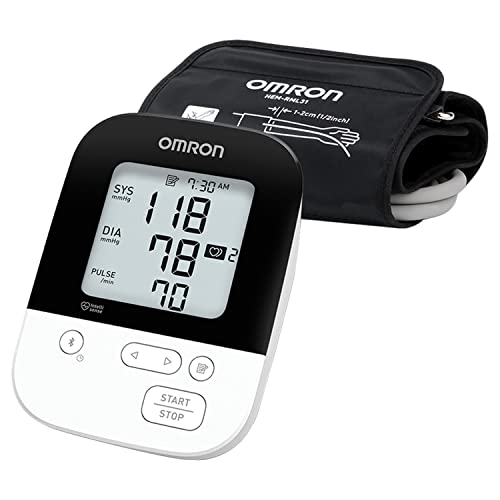
| Spec | Detail |
|---|---|
| Cuff range | 22 to 42 cm (9 to 17 in), wide-range D-ring cuff |
| Memory | 60 readings on device for one user profile |
| Connectivity | Bluetooth Low Energy to the OMRON Connect app |
| Display | LCD digital display with average value symbol |
| Dimensions and weight | About 4.2 x 3.4 x 6.0 in; monitor about 10.2 oz without batteries |
| Power | 4 AA batteries included; optional AC adapter supported |
Why it fits a home device replacement. The 5 Series is the calm replacement: one user, a straightforward screen, and Bluetooth sync that can be treated as a background habit rather than the main event. For someone whose old monitor never connected to anything, this is a gentle step into app history, because the device still shows and stores readings on its own. Its manual notes a battery life of roughly 1,000 measurements on fresh alkaline batteries, so battery swaps become a rare chore.
Trade-offs. Sixty readings of on-device memory fills quickly if you measure twice daily and sync rarely, and the sync symbol exists precisely to warn that older readings will be overwritten once memory is full. There is also no second user profile, so a partner’s readings would mix into the same history.
Best for / Skip if. Best for a single person replacing an ageing basic monitor who wants app records without extra modes. Skip it if two people will share the replacement, or if a backlit screen matters for dim rooms.
OMRON Evolv BP7000

| Spec | Detail |
|---|---|
| Cuff range | 22 to 42 cm (9 to 17 in), integrated ComFit cuff, not replaceable |
| Memory | 100 readings on device for one user |
| Connectivity | Bluetooth Low Energy to the OMRON Connect app |
| Display | OLED display built into the cuff unit; latest reading shown on device |
| Dimensions and weight | About 4.6 x 3.5 x 1 in for the monitor body; about 8.5 oz without batteries |
| Power | 4 AAA batteries, rated for about 300 measurements per set |
Why it fits a home device replacement. Sometimes the thing being replaced is not just old but cumbersome: a separate monitor box, a tube that tangles, and a cuff stored in a different place. The Evolv removes that whole arrangement. The cuff, pump, and display are one piece that wraps on the arm, so the replacement routine is pick it up, wrap, press, read. Earlier readings are viewed in the app, which pushes the household toward phone-based history and away from scrolling on a small screen.
Trade-offs. The integrated cuff cannot be replaced on its own, so cuff wear eventually means replacing the whole unit, which is worth weighing if this purchase is itself a response to a worn cuff. The on-device display shows only the latest reading, and battery life per set is shorter than the AA-powered models above.
Best for / Skip if. Best for anyone whose old setup failed the tidiness test and who is comfortable reviewing history in an app. Skip it if you want to read past readings on the device itself or replace a cuff separately later.
Withings BPM Connect

| Spec | Detail |
|---|---|
| Cuff range | 22 to 42 cm (9 to 17 in), integrated cuff |
| Memory | Up to 8 readings held on device between syncs; unlimited storage in the Withings app and cloud |
| Connectivity | Wi-Fi and Bluetooth to the Withings app on iOS and Android |
| Display | LED matrix display on the cuff body with colour-coded feedback |
| Dimensions and weight | About 50 x 65 x 155 mm; about 250 g |
| Power | Rechargeable battery via micro-USB, up to about two months per charge per Withings |
Why it fits a home device replacement. The BPM Connect changes the replacement equation because syncing no longer depends on a phone being in the room. Once it joins the home Wi-Fi, readings travel to the app on their own, which suits a household where the phone belongs to a different person than the one measuring, or where Bluetooth pairing was the old unit’s weak point. Its slim cylinder form also replaces a bulky monitor with something that fits a shallow drawer.
Trade-offs. Only eight readings sit on the device between syncs, so it leans on connectivity more than any other pick here. Setup requires the app and an account before the first reading, and the LED matrix shows less detail at a glance than a large numeric LCD.
Best for / Skip if. Best for a connected home replacing a monitor and wanting automatic uploads. Skip it if the measuring spot has unreliable Wi-Fi or the user prefers reading a full history on the device screen.
How to choose between these picks
Begin with the reason the old monitor is going. If it still measures well but its app or account became unusable, stay within the same app family if possible, and the two OMRON tabletop models keep you in OMRON Connect. If the old unit’s screen or cuff caused the frustration, prioritise the change that fixes that complaint: the Platinum for a bigger, backlit dual display, the Evolv if tubes and separate parts were the annoyance. If syncing itself was the failure point, the BPM Connect’s Wi-Fi path removes the phone from the middle of the process. If the replacement is for one person who measures alone and wants the fewest decisions each morning, the 5 Series is the simplest handover. In every case, confirm cuff fit with a fresh arm measurement first, because no app feature compensates for a cuff outside its stated range.
Setting up the replacement: a first-week workflow
On day one, unbox beside the old monitor rather than instead of it. Fit the batteries or charge the unit, install the companion app, create the account with an email address that will remain accessible, and pair the monitor while seated where measurements will happen. Take a first reading following the manual: bare upper arm, cuff at heart level, feet flat, back supported, and a few quiet minutes beforehand. During the first week, measure at the same times you used the old device, and let both machines run in parallel on a few occasions to compare ranges. Export or note the old history before any appointment, label the old unit with its retirement date, and only then move it out of the measuring spot. From week two, the new routine should stand on its own: monitor in a fixed place, phone syncing on a regular rhythm, and a monthly glance at the app trend rather than a daily focus on single numbers.
FAQ
Should I keep my old monitor after replacing it? Keep it through the overlap week and until the first appointment where the new history is reviewed. After that, it serves as an emergency backup only if its cuff still fits its stated range and it powers on reliably; otherwise retire it.
Will my old readings move into the new app automatically? Generally no. Histories stay inside the app family that collected them. The practical handover is to export a summary from the old app where that option exists, or bring recent written values to your clinician, while the new app builds its own record going forward.
How many readings should a replacement hold on the device? Enough to cover the gap between syncs. If the phone is always nearby, even the BPM Connect’s eight-reading buffer is workable because uploads happen over Wi-Fi. If syncing is occasional, the Platinum’s 200-reading memory or the Evolv’s 100 readings give far more slack.
Does a replacement monitor need Wi-Fi? No. Bluetooth models sync when the phone is near, which is sufficient for most homes. Wi-Fi helps when the phone is often elsewhere or when readings should appear in the app without any pairing step after setup.
What if my arm measures outside 22 to 42 cm? Do not order any monitor in this guide. Look instead for a model whose included or optional cuff covers your measured circumference, because readings from a cuff used outside its range are not dependable.
Conclusion
For a straightforward home device replacement with the deepest memory and clearest screen, choose the OMRON Platinum BP5450. For one person who wants a quiet, simple handover into app records, choose the OMRON 5 Series BP7250. If the old setup’s clutter is what needs replacing, choose the OMRON Evolv BP7000. If syncing without a nearby phone matters most, choose the Withings BPM Connect. Whichever model takes over, give it the overlap week, keep the old history accessible, and let the new routine prove itself before the old monitor leaves the house.
Related guides
More from Amazon
Programs that pair well with the guide above. Offers and eligibility are set by Amazon and may change.
Set up recurring deliveries of everyday items on eligible products. Terms and savings are set by Amazon.
Explore Subscribe & SaveFree shipping on eligible items, Prime Video and more. Eligible new members can start with a free trial.
Start a Prime free trialAudiobooks and podcasts to listen to on the go. Eligible new members can start with a free trial.
Try Audible freeRead from a large library of eBooks and audiobooks on any device. Check Amazon for current plans.
Explore Kindle UnlimitedAs an Amazon Associate we earn from qualifying purchases.










Write Your Review
No reviews yet. Be the first to share your experience!