
Key takeaways
- Compare five Bluetooth upper-arm blood pressure monitors with smart cuffs, app sync, wide cuff ranges and on-device memory to find the right fit.
What's inside
As an Amazon Associate I earn from qualifying purchases. This post may contain affiliate links at no extra cost to you.
Choosing a Bluetooth blood pressure monitor is really a decision about how your readings get recorded and remembered. A basic cuff shows numbers on a small screen and then forgets them, while a connected monitor sends each reading to a phone app, builds a history over weeks and months, and lets you share that history with a clinician. The choice comes down to cuff fit, how the app handles your data, and whether the monitor suits one person or a whole household.
This guide is for people who track readings at home on a regular schedule, for households where two people share one monitor, and for anyone who wants a clear log to bring to a doctor visit. Every product below was chosen from the name and specifications shown on its Amazon product page, with a focus on Bluetooth sync, a smart upper-arm cuff, and practical features that matter in daily use.
Quick Picks
As an Amazon Associate we earn from qualifying purchases.
| Product | Best for | Key spec from title |
|---|---|---|
| OMRON Evolv BP7000 | Travel and one-piece simplicity | Wireless one-piece upper-arm design with Bluetooth |
| OMRON 10 Series BP7450 | Two-user households | Two-user mode with 200-reading memory and Bluetooth |
| iHealth Track KN-550BT | Easy-to-read color-coded display | Wide-range cuff with Bluetooth for iOS and Android |
| Withings BPM Connect | Automatic sync without a phone nearby | Wi-Fi and Bluetooth sync to the Health Mate app |
| OMRON Platinum BP5450 | Detailed on-device display | 200 readings for two users with Bluetooth sync |
How to Choose
Cuff Fit and Comfort
Cuff fit decides whether a monitor is usable at all, so check the arm circumference range before anything else. Most wide-range cuffs in this guide fit arms from about 22 to 42 centimetres, which covers standard to large adult arms. A cuff that is too small can feel tight and give inconsistent readings, while one that is too loose can slide out of position. Pre-formed cuffs hold their shape and wrap more evenly, and D-ring cuffs let you tighten the band with one hand. If your arm sits near the edge of a stated range, measure it with a tape and pick a monitor whose range has room on both sides.
App Sync and Data History
Bluetooth sync is the point of a smart cuff monitor, but apps differ in what they do with your readings. Some apps store unlimited readings and draw trend charts across weeks, while others only mirror what the monitor holds. Check whether the app works with your phone system, whether it exports data to Apple Health or Google Fit, and whether it supports more than one user profile. A monitor that syncs automatically after each measurement saves you from typing numbers into a notebook, and a clear history view makes patterns easier to spot when you talk with a clinician.
On-Device Memory and Multi-User Support
On-device memory matters when the phone is not nearby or the app is not open. Monitors in this guide hold between 99 and 200 readings, and several split that memory between two users. If two people share a monitor, a two-user mode keeps each person’s history separate instead of mixing them into one list. Also check whether the monitor shows an average of recent readings on its own screen, since that is useful when you want a quick summary without opening the app. A larger memory is a small detail that pays off over months of regular use.
Power, Display and Portability
Power and display shape how a monitor fits into daily life. Battery-powered models run on AA or AAA cells and work anywhere, while rechargeable models remove the need to buy batteries but need a charger nearby. A backlit display with large numbers is easier to read in dim light, and a color-coded indicator gives a quick sense of where a reading falls. For travel, a one-piece design with no tubes packs down smaller and has fewer parts to lose. If the monitor stays on a bedside table, a model with an AC adapter is more convenient because it never runs out of power mid-measurement.
The 5 Best Options
OMRON Evolv BP7000

The Evolv is the most travel-friendly monitor here because the cuff and the unit are one piece, with no tubes or wires to pack. Its wide-range pre-formed cuff fits arms from 9 to 17 inches, and the monitor stores up to 100 readings on the device. Bluetooth sync sends results to the OMRON Connect app, where readings are stored without a limit and can be shared with a clinician. Simple one-button operation and a compact shape make it a natural pick for someone who wants connected tracking with as little fuss as possible.
Specs
- One-piece wireless upper-arm design with no tubes
- Bluetooth sync to the OMRON Connect app for iOS and Android
- Wide-range ComFit cuff fits arms 9 to 17 inches
- Stores up to 100 readings on the device
- Irregular heartbeat indicator during measurement
- Runs on AAA batteries
Best for: People who want a compact, portable Bluetooth monitor for home and travel.
Watch out for: The one-piece cuff is not interchangeable, so confirm the 9 to 17 inch range fits your arm before buying.
OMRON 10 Series BP7450

The 10 Series suits households that want thorough record keeping. Its TruRead mode takes three consecutive readings about a minute apart and calculates the average, which smooths out single-measurement variation. Two-user mode holds 100 readings per person, and Bluetooth sync moves everything to the OMRON Connect app for trend charts and sharing. A multi-color indicator on the display gives quick feedback after each measurement, and the included AC adapter means the monitor can stay plugged in at home.
Specs
- Bluetooth sync to the OMRON Connect app for iOS and Android
- TruRead averaging mode takes three readings and averages them
- Two-user mode with 200 readings total, 100 per user
- Wide-range cuff fits arms 9 to 17 inches
- Multi-color blood pressure level indicator
- AC adapter included, plus 4 AA batteries
Best for: Households where two people track readings and want averaged results.
Watch out for: TruRead mode takes longer than a single measurement, so allow extra time when you use it.
iHealth Track KN-550BT
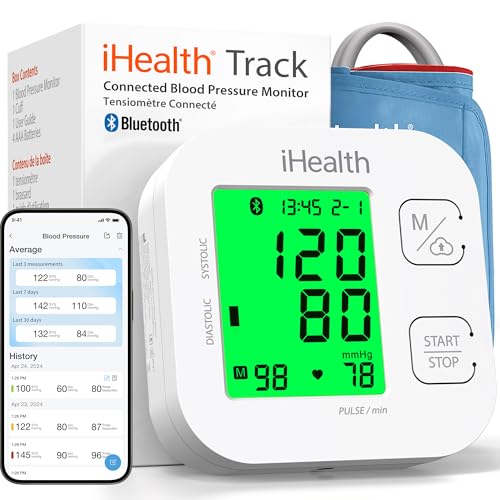
The iHealth Track is built around readability. Its large backlit display uses green, yellow and red color coding so a reading is easy to interpret at a glance, and operation comes down to two buttons. The wide-range cuff fits arms from 8.7 to 16.5 inches, and the monitor holds up to 99 readings on the device while the free MyVitals app stores unlimited readings. Bluetooth 4.0 sync works with iOS and Android, and the app draws trend graphs and supports multiple users.
Specs
- Bluetooth 4.0 sync to the iHealth MyVitals app for iOS and Android
- Large multi-color backlit display with color-coded results
- Wide-range cuff fits arms 8.7 to 16.5 inches, 22 to 42 centimetres
- Stores up to 99 readings on the device, unlimited in the app
- Two-button operation with no calibration required
- Runs on 4 AAA batteries
Best for: People who want the clearest display and simple two-button operation.
Watch out for: The app requires Bluetooth 4.0 or later, so check compatibility with older phones first.
Withings BPM Connect

The BPM Connect is the only monitor here that syncs over Wi-Fi as well as Bluetooth, so readings can reach the Health Mate app even when the phone is in another room. Its compact design packs the monitor and cuff into a small case, and a rechargeable battery lasts for months between charges according to the maker. The display shows systolic, diastolic and heart rate with color-coded feedback, and the integrated cuff fits arms from 22 to 42 centimetres. Unlimited cloud storage in the app keeps a full history that can be shared as a report.
Specs
- Wi-Fi and Bluetooth sync to the Withings Health Mate app
- Rechargeable battery with months of use per charge
- Integrated cuff fits arms 22 to 42 centimetres
- Color-coded feedback on the display after each measurement
- Unlimited readings stored in the app with shareable reports
- Compact design with a carrying case
Best for: People who want automatic sync and a compact monitor for home and travel.
Watch out for: Wi-Fi setup takes a few extra steps during first use, so follow the app instructions carefully.
OMRON Platinum BP5450

The Platinum pairs a high-contrast backlit dual display with the most complete on-device feature set in this guide. It stores 200 readings across two users, shows morning and evening averages, and includes an irregular heartbeat indicator. Bluetooth sync sends readings to the OMRON Connect app, which also works with Apple Health and Google Fit. A D-ring cuff fits arms from 9 to 17 inches, and the box includes an AC adapter and a storage case, making it a strong fit for a monitor that stays in one place.
Specs
- Bluetooth sync to the OMRON Connect app for iOS and Android
- High-contrast backlit dual display
- Two-user mode with 200 readings total, 100 per user
- Morning and evening averaging on the device
- D-ring cuff fits arms 9 to 17 inches
- AC adapter and storage case included
Best for: People who want a detailed display, two-user memory and an AC adapter for home use.
Watch out for: The dual display shows a lot of information at once, so take a moment to learn the layout before your first measurement.
Which One Fits Your Situation
You travel often and want the simplest setup
Pick the OMRON Evolv BP7000. Its one-piece design has no tubes to tangle and packs into a bag without extra parts, and Bluetooth sync keeps your history in the app wherever you are. The wide-range cuff fits most arms, and 100 on-device readings cover a long trip. Just confirm the cuff range fits your arm, since the cuff is built into the unit.
Two people share one monitor at home
Pick the OMRON 10 Series BP7450 or the OMRON Platinum BP5450. Both hold 200 readings split between two users, so each person’s history stays separate. The 10 Series adds TruRead averaging for steadier numbers, while the Platinum adds a larger backlit display and morning and evening averages. Either one pairs with the same app, so the choice comes down to display size and averaging.
You want the clearest screen and the easiest operation
Pick the iHealth Track KN-550BT. Its large color-coded display makes each result easy to read, and two buttons handle the whole measurement. The app stores unlimited readings and draws trend graphs, while the monitor itself holds 99 readings. It is a good match for anyone who wants connected tracking without learning a complicated interface.
You want readings to sync without thinking about it
Pick the Withings BPM Connect. Wi-Fi sync sends readings to the Health Mate app on its own, even when your phone is in another room, and Bluetooth covers the times Wi-Fi is unavailable. The rechargeable battery and compact case suit both home use and travel, and unlimited app storage keeps a complete history for sharing with a clinician.
Common Mistakes
- Buying a monitor without measuring your arm first, then finding the cuff is too small or too loose for consistent use.
- Choosing a model that only syncs over Bluetooth when you wanted readings to upload on their own through Wi-Fi.
- Skipping the app setup and treating a smart cuff like a basic monitor, which wastes the history and trend features you paid for.
- Sharing one user profile between two people, which mixes two histories into a single log and makes trends hard to read.
- Taking a reading right after climbing stairs or drinking coffee, then wondering why the numbers look different from the usual pattern.
Frequently Asked Questions
Do Bluetooth blood pressure monitors need a phone nearby?
A Bluetooth monitor can take a measurement on its own and hold the result in its own memory, then sync when the phone is back in range. Models with Wi-Fi, such as the Withings BPM Connect, can sync without the phone nearby. Check the memory size if you often measure away from your phone, since the monitor can only hold a limited number of readings before syncing.
How do I know which cuff size fits my arm?
Measure the circumference of your upper arm midway between shoulder and elbow with a soft tape, then compare it with the cuff range in the product specifications. Most monitors in this guide fit arms from about 22 to 42 centimetres. If your measurement sits near the edge of a range, pick a monitor with more room on both sides for a comfortable and consistent fit.
Can two people use the same Bluetooth blood pressure monitor?
Yes, several monitors in this guide include a two-user mode that keeps each person’s readings separate, with the OMRON 10 Series and Platinum each holding 100 readings per user. The app can also hold separate profiles. Set up each person as a different user before the first measurement so the histories never mix.
What should I check before buying a smart cuff monitor?
Check the cuff range against your arm measurement, confirm the app works with your phone system, and look at how many readings the monitor stores on its own. Also confirm whether it runs on batteries, a rechargeable cell or an AC adapter, and whether it syncs over Bluetooth only or adds Wi-Fi. These details decide how smoothly the monitor fits into daily use.
Related guides
More from Amazon
Programs that pair well with the guide above. Offers and eligibility are set by Amazon and may change.
Set up recurring deliveries of everyday items on eligible products. Terms and savings are set by Amazon.
Explore Subscribe & SaveFree shipping on eligible items, Prime Video and more. Eligible new members can start with a free trial.
Start a Prime free trialAudiobooks and podcasts to listen to on the go. Eligible new members can start with a free trial.
Try Audible freeRead from a large library of eBooks and audiobooks on any device. Check Amazon for current plans.
Explore Kindle UnlimitedAs an Amazon Associate we earn from qualifying purchases.










Write Your Review
No reviews yet. Be the first to share your experience!