
Key takeaways
- Compare the best baby monitors with multiple cameras for twins and siblings, with split-screen views, long range, and room-by-room coverage in one guide.
What's inside
As an Amazon Associate I earn from qualifying purchases. This post may contain affiliate links at no extra cost to you.
Parents of twins, or families with a baby in one room and a toddler in another, face a simple problem: one camera never covers enough ground. A second camera solves the blind spot, yet two separate monitors on a nightstand create clutter, competing sounds, and twice the charging. A system built for several cameras keeps every room on one parent unit, so checking on each child takes a glance instead of a walk down the hall.
This guide looks at five monitor systems that pair with more than one camera, chosen from Amazon listings and their published specifications. Some ship with two cameras in the box, others ship with one and accept add-ons later, and a few show every feed side by side. Whatever your household looks like, the right pick depends on how many rooms you need to watch, how you want the feeds displayed, and how far the signal must travel.
Quick Picks
As an Amazon Associate we earn from qualifying purchases.
| Product | Best for | Key spec from title |
|---|---|---|
| Infant Optics DXR-8 Pro | Growing families that add rooms over time | 5-inch 720p display, up to 4 cameras, interchangeable lenses |
| VTech VM5463-2 | Two rooms watched at once on one screen | 5-inch HD screen, 2 cameras, split-screen view |
| HelloBaby HB6550 | Large homes and long battery life | 5-inch screen, up to 4 cameras, 1,000-foot range |
| Motorola MBP50-G2 | Two wide-angle views of a shared nursery | 5-inch LCD, 2 HD wide-angle cameras, split screen |
| eufy Security SpaceView Pro E210 | Private monitoring without Wi-Fi | 5-inch screen, 720p, supports up to 4 cameras |
How to Choose
How Many Cameras the System Supports
Begin by counting the rooms you need to watch, not the children. A nursery and a playroom need two cameras even with one child, while twins sharing a crib may need only one wide-angle camera. Most multi-camera systems support two to four cameras on a single parent unit, and the number in the box rarely matches the maximum. A kit that ships with one camera but accepts three add-ons suits a family planning a second child, while a two-camera bundle fits parents who need both feeds from day one. Match the ceiling, not just the initial count, to your household.
Split-Screen View or Scan Mode
A system with two or more cameras shows the feeds in one of two ways, and the difference matters at 3 a.m. Split-screen mode places both rooms side by side, so you see each child at once and hear sound from both. Scan mode shows one camera at a time and cycles through the rest every few seconds, which keeps each image larger but means a moment in the other room can pass unseen. Split-screen suits twins and light sleepers who wake often, while scan mode works when one room needs most of your attention and the second is only a backup. Check which mode your pick provides before ordering.
Range Through Walls and Floors
Published range figures describe open-air distance, not a signal passing through brick, concrete, and two floors of a real house. A monitor rated for 1,000 feet outdoors may reach only a fraction of that once walls, metal ducting, and neighboring wireless networks get in the way. If the parent unit will sit in a kitchen two rooms away, or on a different floor from the nursery, look for the longest stated range and a system that warns you when the signal drops. Place the camera away from thick walls and large appliances where possible, and test the connection from the farthest spot you will actually use before the return window closes.
Adding Cameras Later
Families grow, and a monitor that cannot grow with them becomes a second purchase. Some systems accept add-on cameras from the same model line, while others ship as a fixed pair and will not pair with a third camera at all. Before buying, confirm the maximum camera count and whether the add-on camera is sold on its own, because a system that only sells complete kits forces you to buy another parent unit you do not need. Also check that add-on cameras match your generation: older cameras often will not pair with newer parent units, even from the same brand. A little checking now saves a duplicate purchase later.
The 5 Best Options
Infant Optics DXR-8 Pro

The DXR-8 Pro suits parents who want a private, no-Wi-Fi monitor that can grow from one room to four. Its 5-inch 720p display shows a clear picture, and the patented Active Noise Reduction filters background hum from fans and air purifiers so only your baby’s sounds come through. Remote pan, tilt, and zoom let you follow a crawler across the crib without entering the room, and the interchangeable wide-angle and zoom lenses adapt the view as your child moves from crib to toddler bed. With one camera in the box and room for three more, it fits families planning ahead.
Specs
- 5-inch display with 720p HD resolution
- Supports up to 4 cameras (additional cameras sold separately)
- Patented Active Noise Reduction (ANR)
- No Wi-Fi, closed-loop wireless connection
- Remote pan, tilt, and zoom with interchangeable lenses
- Infrared night vision and room temperature display
Best for: families who want a no-Wi-Fi system that expands to four rooms over time.
Watch out for: the screen shows one camera at a time, so you cycle between rooms instead of seeing them side by side; original DXR-8 cameras do not pair with the Pro.
VTech VM5463-2

The VM5463-2 is the pick for parents who want both rooms on screen at once without touching a button. Two cameras come in the box, and the 5-inch parent unit shows them side by side in split-screen view, with sound from each room. Each camera pans 270 degrees and tilts 25 degrees from the parent unit, with digital zoom for a closer look, and the built-in ceiling light projector and lullabies help settle a restless child. A 12-hour video battery keeps the unit running through the night on a single charge.
Specs
- 5-inch HD LCD parent unit
- 2 cameras included, split-screen view
- Motorised 270-degree pan and 25-degree tilt, 2x digital zoom
- Up to 12 hours of video streaming on battery
- Automatic infrared night vision and temperature sensor
- Ceiling light projector, 7-colour night light, soothing sounds and lullabies
- Two-way talk
Best for: parents of twins or two young children who want both feeds visible at once.
Watch out for: the system is not expandable, so you cannot add a third camera later.
HelloBaby HB6550

The HB6550 fits larger homes, where the parent unit may sit far from the nursery and stay off its charger for hours. Its battery lasts up to 30 hours in audio-only mode, and the stated range reaches 1,000 feet in open air, giving the signal room to cross walls and floors. The system connects up to four cameras, with two-camera, three-camera, and four-camera bundles available, and the 5-inch screen shows a sharp picture day and night. Two-way talk lets you soothe your baby from another room, and eight lullabies play through the camera.
Specs
- 5-inch LCD screen
- Connects up to 4 cameras; 2, 3, and 4-camera bundles available
- Up to 30-hour battery life in audio-only mode
- Up to 1,000-foot range in open air
- Remote pan, tilt, and zoom (355-degree pan, 120-degree tilt)
- Infrared night vision, VOX mode, two-way talk, 8 lullabies
- Room temperature monitor and alert
Best for: large homes where the parent unit travels far from the nursery.
Watch out for: cameras from the 2025 update are not compatible with older HB6550 cameras, so confirm the version when adding a camera later.
Motorola MBP50-G2
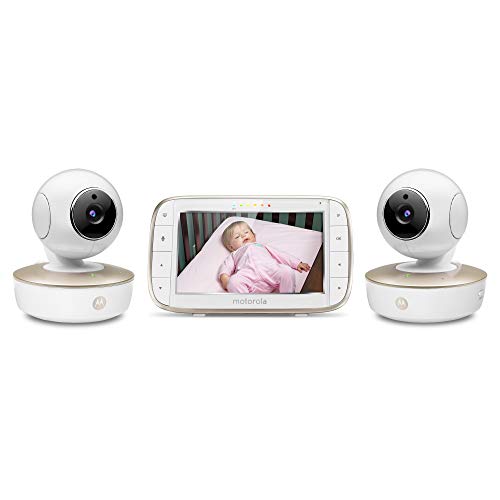
The MBP50-G2 gives two rooms a wide view each, which suits a shared nursery or two cribs in one room. Both wide-angle HD cameras come in the box, and the 5-inch parent display shows them together in split-screen view, so neither child waits for the feed to cycle. Remote pan, tilt, and zoom cover the corners of each room, infrared night vision keeps the picture clear after dark, and the room temperature display helps you keep the nursery comfortable. Sound alerts flag crying without the screen needing to stay on.
Specs
- 5-inch LCD color display with split-screen view
- 2 wide-angle HD cameras included
- Infrared night vision and remote pan, tilt, zoom
- Room temperature display and sound alert
- Two-way talk
Best for: two children sharing a nursery or two rooms that both need a wide view.
Watch out for: camera pairing can vary by generation, so confirm the exact model label when buying a spare camera.
eufy Security SpaceView Pro E210
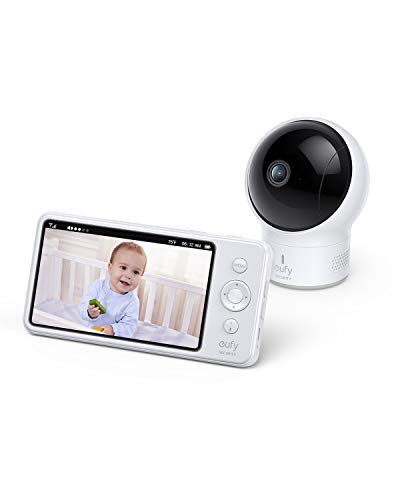
The SpaceView Pro E210 suits parents who want a straightforward monitor with no app, no account, and no wireless network in the nursery. Its 5-inch screen shows 720p video, the camera pans and tilts from the parent unit, and night vision keeps the image clear after dark. The system supports up to four cameras, so a second room joins later without replacing the parent unit, and five lullabies play through the camera to settle a wakeful baby. With no Wi-Fi involved, setup is a matter of plugging in and pairing.
Specs
- 5-inch screen with 720p resolution
- Supports up to 4 cameras
- Remote pan and tilt, night vision
- Two-way audio
- 5 lullabies
- No app required, no Wi-Fi connection
- Wall mount included
Best for: parents who want a private, app-free monitor that can expand to more rooms.
Watch out for: the wide-angle lens is sold separately, so check the box contents if you need a wider view of the crib.
Which One Fits Your Situation
Twins Sharing One Nursery
When two babies share one room, a split-screen system keeps both cribs in view at once. The VTech VM5463-2 shows both cameras side by side and carries sound from each, while the Motorola MBP50-G2 covers the same ground with wide-angle cameras that catch more of the room. Either one saves you from cycling feeds while two babies settle at different times.
A Baby and a Toddler in Separate Rooms
Two rooms on different schedules call for a system that reaches both and shows each clearly. The HelloBaby HB6550 connects up to four cameras and holds its charge through long evenings, while the Infant Optics DXR-8 Pro adds cameras one at a time as the toddler’s room joins the nursery. Pick the HelloBaby for range, the Infant Optics for a private no-Wi-Fi setup.
A Large or Multi-Story Home
Distance and walls decide this one. The HelloBaby HB6550 leads with its long stated range and 30-hour audio battery, so the parent unit can travel from kitchen to garden without dropping the feed. The eufy SpaceView Pro also supports four cameras, which helps when bedrooms sit on different floors. Test the signal from the farthest spot you use before settling in.
A Household That Wants No Wi-Fi in the Nursery
Parents who prefer a closed wireless link have three strong options here. The Infant Optics DXR-8 Pro and the eufy SpaceView Pro both run without Wi-Fi and expand to four cameras, while the VTech VM5463-2 adds split-screen viewing to the same private setup. Choose the Infant Optics for noise reduction and interchangeable lenses, or the VTech when both rooms must stay visible together.
Common Mistakes
- Buying a two-camera bundle without checking whether a third camera can be added later.
- Assuming the stated range holds through walls, floors, and metal ducting.
- Mixing camera generations, since older add-on cameras often will not pair with newer parent units.
- Choosing scan mode when two children wake at different times and need watching at once.
- Placing the camera where a crib rail, curtain, or shelf blocks part of the view.
Frequently Asked Questions
How many cameras can one baby monitor support?
Most multi-camera systems support two to four cameras on a single parent unit. The Infant Optics DXR-8 Pro, HelloBaby HB6550, and eufy SpaceView Pro each accept up to four, while the VTech VM5463-2 and Motorola MBP50-G2 ship as fixed two-camera sets. Always confirm the maximum in the listing before buying, since the cameras in the box do not always show the full limit.
Is split-screen better than scan mode?
Split-screen shows every camera at once, which suits twins or two children who wake at different times. Scan mode shows one larger image and cycles through the rest, which works when one room needs most of your attention. Neither is wrong; the right choice depends on whether you need to watch both rooms continuously or just check the second room now and then.
Can I add a camera to my monitor later?
Only if the system is expandable. The Infant Optics DXR-8 Pro, HelloBaby HB6550, and eufy SpaceView Pro accept add-on cameras, while the VTech VM5463-2 does not. Buy the add-on camera made for your exact model and generation, since cameras from older versions often will not pair with newer parent units even from the same brand.
Do multi-camera monitors need Wi-Fi?
No. Several systems in this guide, including the Infant Optics DXR-8 Pro, HelloBaby HB6550, and eufy SpaceView Pro, use a closed wireless link between the camera and the parent unit, with no app or home network involved. Wi-Fi models exist too, and they add phone viewing from anywhere, but they are not required for watching several rooms from one parent unit.
Related guides
More from Amazon
Programs that pair well with the guide above. Offers and eligibility are set by Amazon and may change.
Set up recurring deliveries of everyday items on eligible products. Terms and savings are set by Amazon.
Explore Subscribe & SaveFree shipping on eligible items, Prime Video and more. Eligible new members can start with a free trial.
Start a Prime free trialAudiobooks and podcasts to listen to on the go. Eligible new members can start with a free trial.
Try Audible freeRead from a large library of eBooks and audiobooks on any device. Check Amazon for current plans.
Explore Kindle UnlimitedAs an Amazon Associate we earn from qualifying purchases.










Write Your Review
No reviews yet. Be the first to share your experience!