
Key takeaways
- Compare the best connected multi-user blood pressure monitors for shared households, with separate profiles, app sync, and simple user switching.
What's inside
As an Amazon Associate I earn from qualifying purchases. This post may contain affiliate links at no extra cost to you.
When two or more people in one home check their blood pressure, a single-user monitor creates a quiet mess. Readings pile up in one shared log, nobody knows whose numbers belong to whom, and the person who measures second has to remember to write everything down somewhere else. A connected monitor built for several users solves that by keeping each person’s history separate, either with on-device user buttons or with separate profiles inside the companion app.
This guide is for couples, parents and adult children, roommates, and anyone who shares a bathroom shelf with another person who also tracks blood pressure. Every monitor below connects to a phone app by Bluetooth or Wi-Fi and supports more than one user, and every detail here comes from the product name and listed specifications on Amazon.
Quick Picks
As an Amazon Associate we earn from qualifying purchases.
| Product | Best for | Key spec from title |
|---|---|---|
| OMRON Evolv BP7000 | Households that want unlimited app users and a travel-friendly one-piece design | Bluetooth wireless upper arm monitor with one-piece design |
| Withings BPM Connect | Households that want Wi-Fi sync and separate app profiles | Wi-Fi smart blood pressure monitor with Health Mate app sync |
| OMRON 10 Series BP7450 | Couples who want two on-device user buttons and side-by-side readings | Dual LCD display with two-user, 200-reading storage |
| OMRON Platinum BP5450 | Couples who want two-user memory plus averaging and AFib detection | Bluetooth monitor storing up to 200 readings for two users |
| iHealth Track KN-550BT | Budget households that track each person in the app | Bluetooth upper arm monitor with wide range cuff |
How to Choose
On-device profiles or app profiles
The first decision is where each person’s history actually lives. Some monitors store two separate user banks right on the device, so each person presses their own user button before measuring and the readings stay apart even when no phone is nearby. Others keep one shared memory on the device and split users inside the companion app, which works well only if every person has their own phone account and remembers to sync. Households where one person has no smartphone, or where the monitor sits in a shared bathroom far from any phone, should lean toward on-device profiles. App-based profiles suit families where everyone carries a phone and is happy to open the app after each session.
How switching users works
Switching users sounds simple until someone forgets. On-device switching usually means pressing a user button or turning a dial before the cuff inflates, and the monitor shows which profile is active on the screen. App-based switching means selecting the right account in the app before syncing, or giving each person a separate login on their own phone. Before buying, picture the least tech-comfortable person in the house and ask whether the switching step is something they will do every single time. A system that depends on remembering a small step will eventually mix two people’s histories, so the simplest switching method your household will actually follow is the right one.
Bluetooth or Wi-Fi syncing
Bluetooth monitors sync when a paired phone is within range and the app is open, which is fine for most daily routines but means readings sit unsynced if the phone is in another room. Wi-Fi monitors can upload readings on their own as soon as a measurement finishes, so the data is already in the app when anyone opens it later. Wi-Fi also helps when the person measuring does not own the phone that holds the family account. The downside is setup: Wi-Fi monitors need a home network password during setup, while Bluetooth pairs in a few taps. Pick Wi-Fi when automatic syncing matters more than a quick setup, and Bluetooth when everyone measures with their own phone beside them.
Cuff fit for different arms
A shared monitor has to fit every arm that uses it, and arm sizes in one household can differ by several inches. Check the cuff range in the listing before buying and measure each person’s upper arm with a tape measure, because a cuff that is too tight or too loose can make the session uncomfortable and hard to repeat. Wide-range cuffs that cover roughly 9 to 17 inches handle most adults, while a cuff that tops out at a smaller size will leave larger arms out. Some households solve this with one monitor and a second cuff in another size, but only buy that route if the listing confirms the extra cuff is compatible with the model.
The 5 Best Options
OMRON Evolv BP7000

The Evolv is the most portable option here, built as a single piece with the monitor attached directly to the cuff, so there is no separate unit or tangle of tubes to carry between rooms or on a trip. It connects by Bluetooth to the free OMRON Connect app, where the app supports unlimited users and readings, so each person in the household keeps a separate account and their own history. The cuff fits arms from 9 to 17 inches, and irregular heartbeat detection is included. It suits households that want one monitor to move around the house and travel with, without giving up separate tracking for everyone.
Specs
- One-piece wireless upper arm design with no separate monitor unit
- Bluetooth sync to the free OMRON Connect app
- Unlimited users and readings in the app
- Cuff fits arms 9 to 17 inches in circumference
- Irregular heartbeat detection during measurement
- Storage case included
Best for: households that want unlimited app users and a monitor that packs away for travel.
Watch out for: multi-user separation happens in the app through separate accounts, so each person needs their own login and the app open when syncing.
Withings BPM Connect

The BPM Connect is the only monitor here that syncs over Wi-Fi as well as Bluetooth, so readings reach the Health Mate app on their own after a measurement, even when nobody opens the app. The app supports multiple user profiles and a guest mode, so a household can keep several people’s histories apart while still letting a visitor take a single measurement without polluting anyone’s log. Its cuff covers 22 to 42 cm, the display gives color-coded feedback right after a reading, and the rechargeable battery is listed for up to six months of use. It suits homes that want syncing to happen quietly in the background.
Specs
- Wi-Fi and Bluetooth sync to the free Health Mate app
- Multiple user profiles plus guest mode in the app
- Color-coded feedback on the device after each reading
- Cuff fits arms 22 to 42 cm
- Rechargeable battery with up to six months of use
- FSA and HSA eligible
Best for: households that want Wi-Fi sync and separate app profiles without opening the app each time.
Watch out for: Wi-Fi setup needs the home network password, and each person still needs their own Health Mate profile to keep histories separate.
OMRON 10 Series BP7450

The 10 Series is the clearest pick for a couple, storing 200 readings on the device itself, split as 100 per user across two user buttons. Each person presses their own button, takes a measurement, and the reading lands in their own bank with no phone involved. The dual LCD display shows the latest reading beside the previous one for an immediate side-by-side comparison, and the TruRead feature averages up to three measurements taken within ten minutes. The pre-formed Easy-Wrap ComFit cuff fits arms 9 to 17 inches, an AC adapter is included, and Bluetooth sync to the OMRON Connect app adds unlimited storage and trend graphs.
Specs
- Dual LCD backlit display showing current and last reading side by side
- Two-user memory with 200 readings total, 100 per user
- TruRead averaging of up to three readings within ten minutes
- Easy-Wrap ComFit cuff fits arms 9 to 17 inches
- Bluetooth sync to the free OMRON Connect app
- AC adapter included
Best for: couples who want two on-device user buttons and no phone needed for separate histories.
Watch out for: only two on-device profiles exist, so a third person in the house has to use the app or share a profile.
OMRON Platinum BP5450

The Platinum gives a couple the same two-user, 200-reading on-device memory as the 10 Series, then adds a few extras that matter in a shared home. TruRead averaging combines up to three measurements within ten minutes, a high morning average indicator flags elevated morning readings, and the listing includes AFib detection during measurement. The backlit dual display is easy to read from across the room, the D-ring cuff fits most adult arms, and Bluetooth sync to the OMRON Connect app opens up unlimited app storage and sharing with a doctor. An AC adapter and a storage case are included in the box.
Specs
- Two-user memory with 200 readings total, 100 per user
- TruRead averaging of up to three readings within ten minutes
- AFib detection during measurement
- High morning average indicator
- Bluetooth sync to the free OMRON Connect app
- AC adapter and storage case included
Best for: couples who want two-user memory plus averaging and AFib detection in one monitor.
Watch out for: as with other two-user devices, a third regular user needs an app account, and the extra indicators add buttons and menus to learn.
iHealth Track KN-550BT
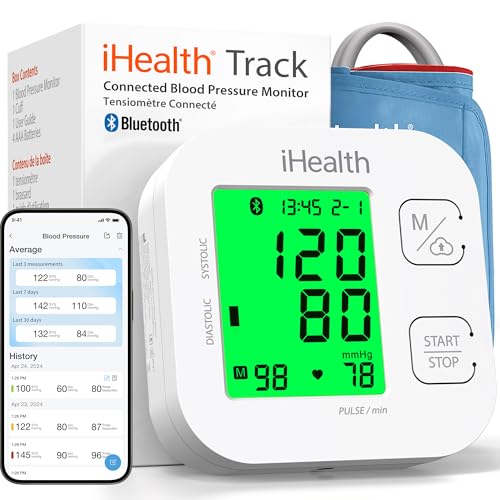
The iHealth Track is the budget entry here, and it earns its place by doing the basics well for households comfortable managing users inside the app. The wide range cuff fits standard to large adult arms, the large display shows systolic, diastolic, and pulse with color-coded indicators, and Bluetooth sync moves readings to the free iHealth MyVitals app on iOS and Android. On the device itself it stores up to 99 readings, and the app holds unlimited readings, so each person can keep a separate account and their own history there. Four AAA batteries power it, and the whole unit is compact enough to share between rooms.
Specs
- Wide range cuff fits standard to large adult arms
- Bluetooth sync to the free iHealth MyVitals app for iOS and Android
- On-device memory for up to 99 readings, unlimited in the app
- Color-coded display indicators
- Four AAA batteries required
- Item model number KN-550BT
Best for: budget households that track each person in a separate app account.
Watch out for: on-device memory pools readings from everyone, so separate histories depend entirely on each person syncing to their own app account.
Which One Fits Your Situation
A couple sharing one monitor
Pick the OMRON 10 Series BP7450 or the Platinum BP5450. Both give each partner a dedicated user button and 100 readings of on-device memory, so no phone and no app are needed to keep histories apart. Choose the 10 Series when the side-by-side display matters most, and the Platinum when averaging and AFib detection add value for either partner.
Three or more people under one roof
Pick the Withings BPM Connect or the OMRON Evolv BP7000. Both handle more than two users through separate app profiles, and the Withings adds Wi-Fi sync so readings upload even when nobody opens the app. Set up one profile per person at the beginning, and agree that a guest uses guest mode rather than anyone’s profile.
One person travels while the other stays home
Pick the OMRON Evolv BP7000. Its one-piece design and included storage case make it the easiest monitor here to pack, and the app keeps each person’s history separate even when the monitor moves between homes. The traveler takes the monitor, and the person at home keeps using their own app account.
A household that wants readings without opening the app
Pick the Withings BPM Connect. Wi-Fi sync uploads readings automatically after each measurement, so the data is waiting in the Health Mate app whenever anyone checks it. This suits households where the monitor is used early in the morning and nobody wants an extra app step before the day begins.
Common Mistakes
- Buying a single-user monitor for a shared home and discovering weeks later that everyone’s readings are mixed in one log.
- Forgetting to press the right user button before measuring, which quietly files one person’s reading under the other person’s profile.
- Letting two people share one app account, which merges histories even when the monitor itself supports separate users.
- Choosing a cuff that fits one person and pinches or slips on another, instead of measuring every arm in the household first.
- Skipping the app setup entirely, which leaves the connected features unused and turns a multi-user monitor into an ordinary one.
Frequently Asked Questions
How many people can share one connected blood pressure monitor?
It depends on the model. Monitors with on-device profiles, such as the OMRON 10 Series and Platinum, support two users with separate memory banks on the device itself. App-based models, such as the OMRON Evolv and Withings BPM Connect, support more people through separate accounts or profiles in the companion app, so the limit is set by the app rather than the device.
Does Bluetooth or Wi-Fi matter for multi-user tracking?
Both work, but they change the routine. Bluetooth syncs when a paired phone is nearby and the app is open, so each person usually syncs with their own phone. Wi-Fi uploads readings automatically after a measurement, which is handy when the person measuring does not hold the phone. Either way, the key step is making sure each reading lands in the right person’s profile.
Can a guest use a shared monitor without mixing up the data?
Yes, on models that offer a guest mode or a separate app account. Guest mode takes a measurement without saving it to any profile, which suits a visitor who will not use the monitor again. For a regular user, set up their own profile or account instead, since repeated guest measurements are not stored anywhere useful.
What should I check before buying a monitor for a household?
Measure every person’s upper arm and compare it with the cuff range in the listing, confirm how many user profiles the model supports and whether they live on the device or in the app, and check that the companion app runs on each person’s phone. Also confirm the monitor connects by Bluetooth or Wi-Fi in the way your household will actually use it day to day.
Related guides
More from Amazon
Programs that pair well with the guide above. Offers and eligibility are set by Amazon and may change.
Set up recurring deliveries of everyday items on eligible products. Terms and savings are set by Amazon.
Explore Subscribe & SaveFree shipping on eligible items, Prime Video and more. Eligible new members can start with a free trial.
Start a Prime free trialAudiobooks and podcasts to listen to on the go. Eligible new members can start with a free trial.
Try Audible freeRead from a large library of eBooks and audiobooks on any device. Check Amazon for current plans.
Explore Kindle UnlimitedAs an Amazon Associate we earn from qualifying purchases.










Write Your Review
No reviews yet. Be the first to share your experience!