
Key takeaways
- Compare five connected blood pressure monitors built for shared households, with separate user profiles, app sync, and cuffs that fit most arms.
What's inside
As an Amazon Associate I earn from qualifying purchases. This post may contain affiliate links at no extra cost to you.
Sharing one blood pressure monitor between two or more people sounds simple until the readings begin mixing together. One household member checks in the morning, another in the evening, and a single shared memory turns into a jumble that belongs to nobody. A connected multi-user monitor solves that problem at the source, keeping each person’s history separate while sending every reading to a phone app where trends are easier to follow.
This guide is for couples, families, and shared households choosing one monitor for more than one user. Every model below was picked from its Amazon listing title and listed specifications, with attention to how many user profiles it supports, how it connects, and how its cuff fits different arm sizes.
Quick Picks
As an Amazon Associate we earn from qualifying purchases.
| Product | Best for | Key spec from title |
|---|---|---|
| Omron 10 Series BP7450 | A couple wanting the most on-device memory | 200 readings for two users, Bluetooth |
| Omron Platinum BP5450 | A household wanting a backlit display and AC adapter | 200 readings for two users, Bluetooth |
| Omron 7 Series BP7350 | A two-person home on a simpler setup | 120 readings for two users, Bluetooth |
| Withings BPM Connect | A larger household sharing one cuff | Up to 8 user profiles, Wi-Fi and Bluetooth |
| iHealth Track KN-550BT | A household with a wide range of arm sizes | Wide-range cuff, Bluetooth, MyVitals app |
How to Choose
Count the user profiles before anything else
The number that matters most in a shared home is how many separate profiles the monitor keeps. Two-user models store a set number of readings per person on the device itself, so a couple can each press their own user button and build a separate history. Larger households need something different: a monitor whose app supports many profiles, such as eight, so a third or fourth person is not locked out. Check whether the profile limit lives on the device or only in the app, because a monitor that pools readings on its screen but separates them in the app behaves differently from one with dedicated on-device user buttons.
Decide how the monitor should connect
Bluetooth is the standard connection on most connected monitors, syncing readings to a phone app when the phone is nearby. Wi-Fi adds a step that Bluetooth cannot match: readings can upload on their own, even when the phone is in another room or the person measuring has not opened the app. That matters in a household where one person is comfortable with apps and another is not. Before settling on a model, confirm the app runs on the phones in the house, and confirm each person can set up a profile on their own device.
Check the cuff against every arm in the house
A cuff that fits one person badly fits the whole household badly. Most upper-arm models in this guide ship with a cuff covering roughly 9 to 17 inches, which suits many adults, while wide-range cuffs stretch further to cover larger arms. Measure each person’s upper arm with a tape measure before ordering, and compare the numbers against the cuff range printed on the listing. A cuff that is too small or too large can make the measurement session uncomfortable and inconsistent, so this one check is worth more than any extra feature.
Look at memory, display, and power together
On-device memory decides how long the monitor can run without a phone nearby, and the numbers vary widely, from under a hundred readings to two hundred split across two users. A clear display matters just as much when several people share a device, since a backlit screen or a dual display showing the previous reading beside the current one makes each session easier to follow. Power is the last piece: some monitors run on AA or AAA batteries, some include an AC adapter, and some recharge over USB, so pick the arrangement that fits where the monitor will live.
The 5 Best Options
Omron 10 Series BP7450

The BP7450 is the strongest fit for a couple that wants the monitor itself to do the heavy lifting. Two user buttons keep up to 200 readings separated on the device, so neither person has to open an app after every session, and Bluetooth syncing to the OMRON Connect app adds unlimited storage and trend graphs when a phone is nearby. Its pre-formed cuff wraps around the arm with less fuss than a flat cuff, which helps when two people with different arm shapes take turns.
Specs
- Bluetooth syncing with the free OMRON Connect app
- Stores up to 200 readings for two users, 100 per user
- Pre-formed Easy-Wrap ComFit Cuff fits arms 9 to 17 inches
- Advanced Accuracy technology measures more data points per reading
- TruRead mode averages three consecutive readings
- AFib screening feature built into the measurement
- AC adapter included
Best for: Couples who want separate on-device histories and the most stored readings without opening an app.
Watch out for: The app works with selected iOS and Android devices only, so confirm compatibility with every phone in the household before buying.
Omron Platinum BP5450

The Platinum BP5450 covers the same two-user ground as the 10 Series, with a different balance of display and power features. Its high-contrast backlit dual display is easy to read in a dim bedroom or hallway, and the included AC adapter means the household is not constantly swapping batteries. Bluetooth syncing carries readings into the OMRON Connect app, where each person’s history stays separate, and the D-ring cuff adjusts across the same 9 to 17 inch range as the other Omron models here.
Specs
- Bluetooth syncing with the free OMRON Connect app
- Stores up to 200 readings for two users, 100 per user
- D-ring upper arm cuff fits arms 9 to 17 inches
- TruRead mode averages three consecutive readings
- Irregular heartbeat detection during measurement
- High-contrast backlit dual display
- AC adapter and 4 AA batteries included
- 6-year limited warranty on the monitor
Best for: Households that want a bright, easy-to-read display and mains power alongside two-user memory.
Watch out for: The D-ring cuff needs a little practice to wrap snugly, so the first few sessions may take longer while each person learns the fit.
Omron 7 Series BP7350
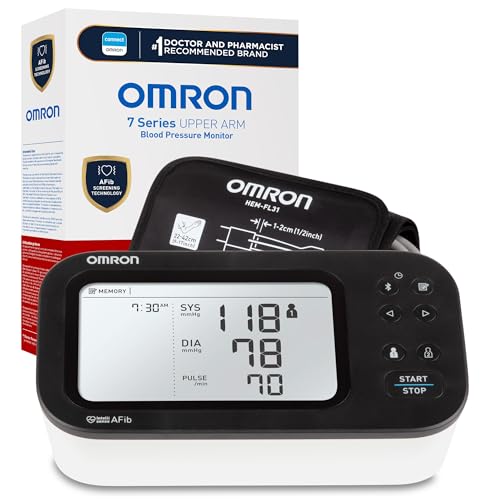
The BP7350 keeps the two-user setup simpler and lighter than its siblings. It stores 120 readings across two profiles, which is ample for a couple checking a few times a week, and its dual LCD shows the previous reading beside the current one, making it easy to spot a change without opening the app. Bluetooth syncing to the OMRON Connect app handles longer histories, and the included AC adapter plus four AA batteries give the household two power options from the beginning.
Specs
- Bluetooth syncing with the free OMRON Connect app
- Stores up to 120 readings for two users, 60 per user
- Pre-formed Easy-Wrap ComFit Cuff fits arms 9 to 17 inches
- Dual LCD display shows the last reading next to the current reading
- Advanced Accuracy technology measures more data points per reading
- Advanced Averaging displays the average of up to the last three readings taken within 10 minutes
- Irregular heartbeat indicator counts irregular heartbeats detected during measurement, up to three
- AC adapter and 4 AA batteries included
- 5-year limited warranty on the monitor
Best for: A two-person home that wants a straightforward connected monitor with a side-by-side comparison display.
Watch out for: On-device memory holds 60 readings per user, so a household measuring daily will need to sync to the app regularly to keep the full history.
Withings BPM Connect

The BPM Connect is the pick for households with more than two users, because its Health Mate app supports up to eight profiles on a single device. Wi-Fi syncing sets it apart from the Bluetooth-only models here: readings upload on their own, so a reading taken by a parent or grandparent lands in the app without anyone touching a phone. The integrated cuff wraps into a compact one-piece design, the battery recharges instead of needing replacements, and color-coded feedback on the display gives an immediate sense of each reading.
Specs
- Wi-Fi and Bluetooth syncing with the free Health Mate app
- Supports up to 8 user profiles in the app
- Integrated cuff fits arms 22 to 42 cm
- Rechargeable battery
- Color-coded feedback on the display
- Stores up to 8 readings on the device without syncing
- FSA and HSA eligible
Best for: Larger households and families who want automatic Wi-Fi syncing and a profile for everyone.
Watch out for: The device holds only 8 readings before it needs to sync, so it relies on a working Wi-Fi connection more than the Bluetooth models do.
iHealth Track KN-550BT
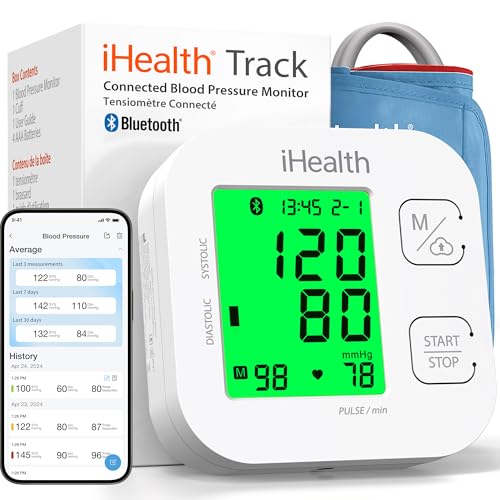
The iHealth Track suits a household where arm sizes vary widely, thanks to a wide-range cuff that covers more ground than the standard 9 to 17 inch range. Bluetooth syncing sends readings to the iHealth MyVitals app, where each person can keep a separate profile and an unlimited history, while the monitor itself holds up to 99 readings. Its large, color-coded display is simple to read at a glance, and the whole unit is compact enough to move between rooms or pack for a trip.
Specs
- Bluetooth syncing with the free iHealth MyVitals app for iOS and Android
- Wide-range cuff fits standard to large adult arms, 22 to 48 cm
- Stores up to 99 readings on the device, unlimited in the app
- Multiple user profiles supported in the app
- Color-coded display aligned with WHO guidance
- Irregular heartbeat detection during measurement
- 4 AAA batteries included
Best for: Households with a wide spread of arm sizes that want a simple Bluetooth monitor with app-based profiles.
Watch out for: Readings are pooled on the device itself, so separate histories depend on each person syncing to their own app profile after measuring.
Which One Fits Your Situation
A couple sharing one monitor daily
The Omron 10 Series BP7450 is the natural choice here. Its 200-reading on-device memory split across two users means both people can measure for weeks without syncing, and the two user buttons keep histories apart from the first session. The Platinum BP5450 is a close alternative when a backlit display matters more than the extra features of the 10 Series.
A household with three or more users
The Withings BPM Connect is built for this situation. Eight app profiles cover parents, adult children, and grandparents on a single device, and Wi-Fi syncing means readings reach the right profile without anyone having to pair a phone first. No two-user model in this guide can cover a household this size on the device alone.
A home where arm sizes differ a lot
The iHealth Track KN-550BT fits this household best. Its wide-range cuff stretches to 48 cm, covering arms that a standard 9 to 17 inch cuff cannot, while the MyVitals app keeps each person’s history separate. Measure the largest arm in the house first, and confirm the cuff range before ordering anything else.
A household that wants minimal phone involvement
The Omron 7 Series BP7350 works well when the phone stays in a pocket. Its dual display shows the previous reading beside the current one, so each person can compare sessions on the spot, and 120 readings of on-device memory cover weeks of use. Syncing to the app can wait until someone wants to look at a longer trend.
Common Mistakes
- Buying a single-user monitor for a shared home, then discovering the readings for two people are mixed into one history.
- Choosing a cuff by guessing arm size instead of measuring each person’s upper arm against the range on the listing.
- Assuming every phone in the house works with the monitor’s app, when some models support only selected iOS and Android devices.
- Forgetting to press the right user button before measuring, which sends a reading into the other person’s history.
- Letting the on-device memory fill up without syncing, so older readings are overwritten before anyone has seen them.
Frequently Asked Questions
How many people can share one connected blood pressure monitor?
It depends on the model. Two-user monitors such as the Omron BP7450, BP5450, and BP7350 keep separate on-device histories for two people, while app-based models go further: the Withings BPM Connect supports up to eight profiles in its app. For a household larger than two, an app with many profiles matters more than on-device memory.
Does each person need their own phone app account?
Each person usually needs their own profile inside the monitor’s app, which may mean a separate account or a profile under one family account, depending on the app. The important step is setting up every profile before the first measurement, so readings land in the right history from the beginning.
What happens if someone forgets to switch user profiles?
The reading is stored under the profile that was active at the time, which mixes one person’s data into another’s history. Most apps allow deleting a misfiled reading, but it is easier to build the habit of checking the user button or profile on the display before pressing the measurement button.
Is Wi-Fi better than Bluetooth for a shared household monitor?
Wi-Fi suits households where not everyone uses a smartphone, because readings upload on their own and reach the app without a phone nearby. Bluetooth works well when each person carries a phone and opens the app regularly. Either connection keeps histories separate, so the choice comes down to who measures and how they use their phone.
Related guides
More from Amazon
Programs that pair well with the guide above. Offers and eligibility are set by Amazon and may change.
Set up recurring deliveries of everyday items on eligible products. Terms and savings are set by Amazon.
Explore Subscribe & SaveFree shipping on eligible items, Prime Video and more. Eligible new members can start with a free trial.
Start a Prime free trialAudiobooks and podcasts to listen to on the go. Eligible new members can start with a free trial.
Try Audible freeRead from a large library of eBooks and audiobooks on any device. Check Amazon for current plans.
Explore Kindle UnlimitedAs an Amazon Associate we earn from qualifying purchases.










Write Your Review
No reviews yet. Be the first to share your experience!