
Our Short List of 3

- Best for: First-time parents who want a screen and an app with the simplest possible setup.
- 1080p Full HD camera with automatic night vision
- 5-inch 720p HD colour display on the parent unit
- Free MyVTech app for iOS and Android, no subscription
- Remote pan 270 degrees and tilt 152 degrees

- Best for: Large nurseries and playrooms where one camera needs to sweep the whole room.
- 1080p Full HD camera with 360-degree pan and 100-degree tilt
- 5-inch 720p HD colour LCD on the parent unit
- 30x digital zoom on the app, 24x on the parent unit
- MyVTech Baby Pro app with free remote access, no subscription

- Best for: Parents who want the biggest parent screen, the longest unplugged battery, and app alerts in one system.
- 5.5-inch 720p IPS parent screen with 5000mAh battery
- Wi-Fi smartphone app for remote viewing and recording
- Secure local link with no Wi-Fi required for the parent unit
- 350-degree pan and 110-degree tilt with AI auto tracking
All 3 Picks at a Glance
| Product | Specs | Action |
|---|---|---|
| VTech VM901 |
| Check price on Amazon |
| VTech RM5766HD |
| Check price on Amazon |
| HelloBaby HB9085 |
| Check price on Amazon |
Key takeaways
- Compare 4 baby monitors with a parent screen and phone app, with 1080p cameras, pan-tilt-zoom, night vision, motion alerts and no subscription fees.
What's inside
As an Amazon Associate I earn from qualifying purchases. This post may contain affiliate links at no extra cost to you.
Choosing a baby monitor used to mean picking between a handheld screen and a phone app. The better question now is whether one system can give you both, because each viewing method covers a different moment in the day. A dedicated parent unit stays on the nightstand, always on, with no messages or notifications from other apps competing for attention. A phone app lets a parent in another room, or a grandparent across town, check the nursery without walking down the hall and risking a wake-up.
This guide looks at four monitors that ship with a real parent screen and a companion phone app, chosen from Amazon listings by their published specifications. Each one streams live video to both screens, provides pan-tilt-zoom control from either device, and sends motion or sound alerts to a phone. Read the decision criteria first, then match the right model to your home, your Wi-Fi setup, and the way your family actually checks on the baby.
Quick Picks
As an Amazon Associate we earn from qualifying purchases.
| Product | Best for | Key spec from title |
|---|---|---|
| VTech VM901 | Simple setup with no subscription | 1080p camera with 5-inch HD parent screen |
| VTech RM5756HD | Sharper zoom and a colour night light | 1080p camera with 2K CMOS sensor and 30x zoom |
| VTech RM5766HD | Full-room panning and humidity tracking | 1080p camera with 360-degree pan and 5-inch screen |
| HelloBaby HB9085 | Longest unplugged viewing and app tracking | 5.5-inch 720p screen with 5000mAh battery |
How to Choose
Screen Size and Picture Quality
Most parent units in this group measure between 5 and 5.5 inches, which is large enough to see a sleeping baby clearly from across a bedroom. Pay attention to two numbers that sound similar but mean different things: the camera resolution and the screen resolution. A 1080p camera can still look soft on a 720p parent screen, while the same feed looks sharper on a phone with a higher-resolution display. An IPS panel matters too, because it keeps colours steady when you glance at the screen from an angle on a nightstand. If you check the monitor mainly at night, infrared night vision quality matters more than daytime sharpness.
App Features and Alerts
The phone app is where these monitors earn their keep, and the differences between apps are bigger than the differences between screens. A good app sends sound, motion and cry alerts as phone notifications, lets you pan, tilt and zoom the camera remotely, and has two-way talk so you can soothe the baby with your voice from another room. Some apps also save short motion-triggered video clips you can replay later, while others only show a live feed. Check whether the app works on both iOS and Android if two parents use different phones. Equally important is what the app does not require: several models in this guide give full remote access with no monthly charges.
Connection Type: Direct, Wi-Fi, or Both
Every monitor here provides two ways to connect, and understanding them avoids the most common setup frustration. Direct mode links the camera straight to the parent unit with no home network involved, so the screen works the moment you plug the camera in. Router mode connects the camera to your home Wi-Fi network, which is what unlocks remote viewing on the phone app from outside the house. A monitor that begins in direct mode by default is the friendlier choice for a first-time setup. If your home Wi-Fi only reaches the nursery weakly, the direct link still keeps the parent unit working, while the app may lag until the signal improves.
Range and Battery Life
Range decides whether the parent unit keeps working when you move to the garden, the garage or the far end of a large house. Manufacturers publish very different range figures for the local link and the Wi-Fi link, so check which one a number describes before comparing two models. The local link usually covers a whole house, while the app works anywhere with an internet connection once the camera is on Wi-Fi. Battery life matters most for the parent unit, since the camera normally stays plugged in. A larger battery stretches unplugged viewing across a whole evening, while a smaller one may need a charger nearby during long naps.
The 4 Best Options
VTech VM901
- Best for: First-time parents who want a screen and an app with the simplest possible setup.
- 1080p Full HD camera with automatic night vision
- 5-inch 720p HD colour display on the parent unit
- Free MyVTech app for iOS and Android, no subscription
- Remote pan 270 degrees and tilt 152 degrees
First-time parents who want a screen and an app with the simplest possible setup.
VTech publishes no range or battery rating for this model in its own materials, so plan on keeping the parent unit near a charger during long stretches.
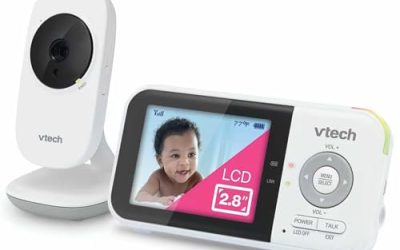
The VM901 is the straightforward pick for parents who want both viewing methods in one system. It pairs a 1080p camera with a 5-inch 720p parent screen, and the free MyVTech app adds remote viewing on iOS and Android with no subscription. The camera pans 270 degrees and tilts 152 degrees from either the parent unit or the phone, so you can follow a baby who has rolled to the far side of the crib. Direct mode works straight out of the box, and router mode adds remote access once the camera joins your home Wi-Fi.
Watch out for: VTech publishes no range or battery rating for this model in its own materials, so plan on keeping the parent unit near a charger during long stretches.
VTech RM5756HD
The RM5756HD steps up the optics, with a 2K CMOS sensor behind its 1080p camera and zoom that reaches up to 30x through the app, so small details like a hand near the face stay visible without moving the camera. Its 5-inch IPS parent screen holds colour and contrast at wide viewing angles, which helps when the unit sits flat on a nightstand. The MyVTech Baby Pro app gives free remote live viewing with no subscription fees, and the camera adds a seven-colour night light, soothing lullabies and a room temperature sensor. Local recording stores motion-detected events you can replay through the app.
Specs
- 1080p Full HD camera with 2K CMOS sensor
- 5-inch IPS colour display on the parent unit
- Up to 30x digital zoom through the app
- MyVTech Baby Pro app with free remote live viewing, no subscription
- Seven-colour night light, lullabies and temperature sensor
- Two-way talk and infrared night vision
- Local recording of motion-detected events
Best for: Parents who want the closest look at the crib, with strong zoom and a night light built into the camera.
Watch out for: This model uses the MyVTech Baby Pro app rather than the standard MyVTech app, so download the app named in the instructions for this exact model.
VTech RM5766HD
- Best for: Large nurseries and playrooms where one camera needs to sweep the whole room.
- 1080p Full HD camera with 360-degree pan and 100-degree tilt
- 5-inch 720p HD colour LCD on the parent unit
- 30x digital zoom on the app, 24x on the parent unit
- MyVTech Baby Pro app with free remote access, no subscription
Large nurseries and playrooms where one camera needs to sweep the whole room.
The app and the parent unit show different zoom limits, so expect the closest zoom only when viewing on your phone.
The RM5766HD is the full-room option, with a camera that pans a complete 360 degrees and tilts 100 degrees up and down, so one camera can cover an entire nursery from a single corner mount. Its 5-inch 720p parent screen and the MyVTech Baby Pro app both control the camera, and zoom reaches 30x on the app or 24x on the parent unit. Beyond video, it tracks room temperature and humidity on the parent display, and a sound and light profile recommended by sleep experts at WeeSleep plays soothing sounds from the camera. The system begins in direct mode with no Wi-Fi needed, then router mode adds remote viewing.
Watch out for: The app and the parent unit show different zoom limits, so expect the closest zoom only when viewing on your phone.
HelloBaby HB9085
- Best for: Parents who want the biggest parent screen, the longest unplugged battery, and app alerts in one system.
- 5.5-inch 720p IPS parent screen with 5000mAh battery
- Wi-Fi smartphone app for remote viewing and recording
- Secure local link with no Wi-Fi required for the parent unit
- 350-degree pan and 110-degree tilt with AI auto tracking
Parents who want the biggest parent screen, the longest unplugged battery, and app alerts in one system.
The app only works once the camera joins your home Wi-Fi, so the phone features depend on a steady signal in the nursery.
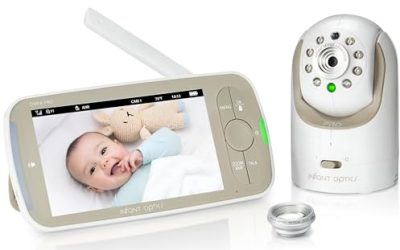
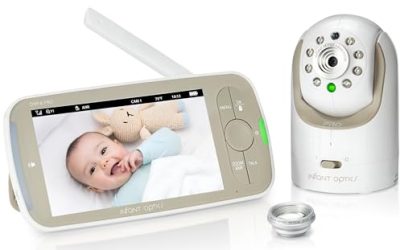
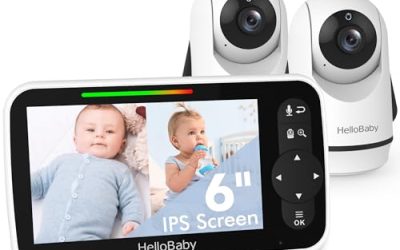
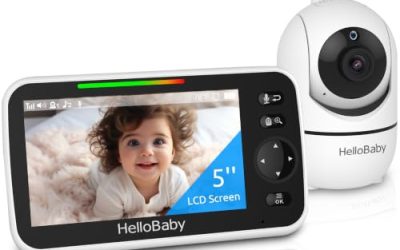
The HelloBaby HB9085 is the only model here from outside the VTech range, and it brings the largest screen and the biggest battery of the four. Its 5.5-inch 720p IPS parent unit runs on a 5000mAh rechargeable battery, and the camera pans 350 degrees and tilts 110 degrees with AI auto tracking that follows movement across the crib. The hybrid design works two ways: a secure local link keeps the parent unit running with no Wi-Fi at all, while the Wi-Fi connection unlocks the smartphone app for remote viewing, photo and video recording, and cry, sound and motion alerts.
Watch out for: The app only works once the camera joins your home Wi-Fi, so the phone features depend on a steady signal in the nursery.
Which One Fits Your Situation
You want the simplest setup with no subscription
Pick the VTech VM901. It works in direct mode the moment you plug it in, the parent screen and the free app cover both viewing styles, and nothing in the system asks for a monthly charge. The 270-degree pan and motion alerts handle an ordinary nursery without extra features to configure.
You share night duty and check from different rooms
Pick the VTech RM5756HD. Its 5-inch IPS screen stays readable from an angle on either bedside table, the strong zoom lets a parent confirm details without entering the room, and the app alerts reach whichever phone is on duty that night. The night light and lullabies also give the parent on shift a way to soothe the baby without picking the child up.
You watch a large room or two children
Pick the VTech RM5766HD. The 360-degree pan and 100-degree tilt sweep a whole playroom from one mount, and the app saves motion clips you can check after the fact. Temperature and humidity readings on the parent display add useful context during seasonal changes, and a second camera can be added for split-screen viewing.
You want the biggest screen and longest battery
Pick the HelloBaby HB9085. Its 5.5-inch screen is the largest here, the 5000mAh battery carries the parent unit through long evenings unplugged, and the AI tracking follows a moving baby so you adjust the camera less often. The secure local link also keeps the screen working even when the home Wi-Fi drops.
Common Mistakes
- Buying a screen-only or app-only monitor when you actually need both, then discovering the missing half after the return window closes.
- Setting the camera up on Wi-Fi before testing direct mode, which makes it harder to tell whether a problem is the camera or the network.
- Mounting the camera where the crib bars block the view, instead of testing the angle on the parent screen first.
- Leaving phone notifications off for the monitor app, so motion and sound alerts never reach you at night.
- Assuming every model uses the same app, when VTech alone ships the MyVTech app and the MyVTech Baby Pro app for different generations.
Frequently Asked Questions
Do these monitors work without Wi-Fi?
Yes, all four work without Wi-Fi in direct mode, where the camera links straight to the parent unit. The parent screen, pan-tilt-zoom controls and two-way talk all keep working. Only the phone app needs Wi-Fi, because remote viewing travels through your home network and the internet.
Can more than one phone use the app?
Yes, the apps support viewing on multiple devices, so both parents can stay signed in and receive alerts. Each phone needs the app installed and signed in to the same account. Check the sharing settings inside the app before handing access to a grandparent or caregiver, since permissions differ between the VTech and HelloBaby apps.
Do I need a subscription to use the phone app?
No subscription is needed for live viewing, alerts, pan-tilt-zoom control or two-way talk on any of the four models here. VTech states that remote access through its apps carries no monthly charges, and the HelloBaby app likewise provides remote viewing without a subscription. Some brands sell extra cloud storage or sleep analysis separately, so confirm what is included before buying.
Can I add a second camera later?
It depends on the model. The VTech VM901 and the RM5766HD support additional cameras, and the RM5766HD can show two feeds in split view or patrol between them. HelloBaby also sells its cameras separately for the HB9085 system. Always match the exact model number when buying an add-on camera, because cameras from one generation do not always pair with another.
Related guides
More from Amazon
Programs that pair well with the guide above. Offers and eligibility are set by Amazon and may change.
Set up recurring deliveries of everyday items on eligible products. Terms and savings are set by Amazon.
Explore Subscribe & SaveFree shipping on eligible items, Prime Video and more. Eligible new members can start with a free trial.
Start a Prime free trialAudiobooks and podcasts to listen to on the go. Eligible new members can start with a free trial.
Try Audible freeRead from a large library of eBooks and audiobooks on any device. Check Amazon for current plans.
Explore Kindle UnlimitedAs an Amazon Associate we earn from qualifying purchases.
Write Your Review
No reviews yet. Be the first to share your experience!