
Key takeaways
- Compare the best baby monitors for NZ parents in 2026: video monitors with night vision, two-way talk, long range and private no-WiFi connection.
What's inside
As an Amazon Associate I earn from qualifying purchases. This post may contain affiliate links at no extra cost to you.
Choosing a baby monitor in New Zealand comes down to a few practical questions rather than a long list of features. Will the signal hold through weatherboard walls and a hallway, or drop out the moment you step into the kitchen? Do you want a monitor that runs on your home WiFi and a phone app, or a closed-loop system that keeps video inside your house? And will the picture stay clear in a dark room at 2am, when that is the only moment that really matters?

This guide is written for first-time parents setting up a nursery, for families in larger homes who need real range, and for grandparents or caregivers who want something simple to switch on and use. Every monitor below was chosen from the product titles and specifications on its Amazon listing, so the details here come from the manufacturer rather than guesswork. All four are video monitors with a dedicated parent unit, infrared night vision and two-way talk, which keeps the comparison fair.
Quick Picks
As an Amazon Associate we earn from qualifying purchases.
| Product | Best for | Key spec from title |
|---|---|---|
| Infant Optics DXR-8 PRO | Sharpest picture with interchangeable lenses | 5-inch 720P display, pan-tilt-zoom, active noise reduction |
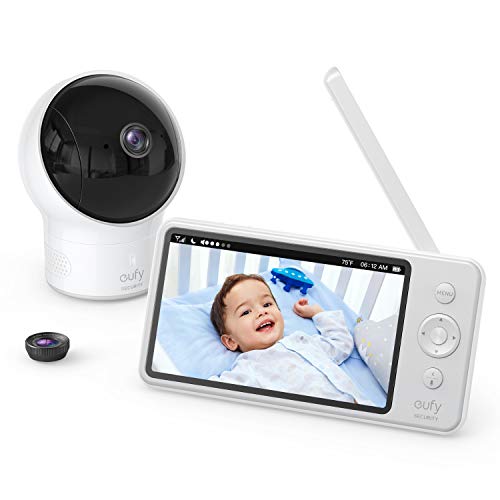
| eufy Security SpaceView | Widest view across the whole nursery | 5-inch 720P display, 330-degree pan, 110-degree tilt |
| VTech VM819 | Longest battery life in a compact unit | 2.8-inch screen, 1,000 ft range, 19-hour video battery |
| HelloBaby HB65 | Compact pan-tilt-zoom for smaller rooms | 3.2-inch colour LCD, remote pan-tilt-zoom, infrared night vision |
How to Choose
Connection Type: WiFi or Closed-Loop
The first decision is how the camera talks to the parent unit. WiFi monitors send video through your home network and usually add a phone app, which suits parents who want to check in from another building or while travelling. Closed-loop monitors use a private wireless link, often FHSS, between the camera and the parent unit, with no internet connection at all. Every monitor in this guide is a closed-loop model, which means setup is simple and the video never leaves your house. That privacy comes with a trade: you cannot view the camera on your phone. If privacy and simplicity matter more than remote viewing, a closed-loop monitor is the safer and calmer choice.
Range Through Real Walls
Manufacturers quote range in open air, which tells you very little about a New Zealand home. A figure of 1,000 feet sounds generous until the signal passes through a weatherboard wall, a brick fireplace and a closed door, each of which shortens it. Two-storey homes add another floor between camera and parent unit, and a sleepout or a deck at the far end of the garden stretches the distance further. Treat quoted range as a ranking rather than a promise, and favour a monitor rated well above the distance you actually need. Think about where the parent unit will sit most of the time: beside your bed, in the living room, or carried around the house.
Screen Size and Battery Life
Screen size shapes how much detail you can see. A 5-inch display shows breathing movements and changes in position more clearly than a 2.8-inch one, which helps when you glance at a sleeping baby from across the room. Smaller screens have their own advantage, though: they draw less power, so the parent unit lasts longer between charges and stays light in your hand. Battery life decides whether the monitor survives a full night without a cable, which is exactly when you need it most. Look for at least 12 hours of quoted video streaming time, and remember that audio-only mode stretches it further on most models. A monitor that dies at 4am is worse than a smaller screen.
Cameras, Night Vision and Two-Way Talk
One camera covers one cot, but many families need more. If you have twins, two children in separate rooms, or a playroom as well as a nursery, a system that pairs with extra cameras saves you buying a second monitor later. Check how many cameras the parent unit supports and whether additional cameras are sold separately. Night vision earns its keep in the dark: infrared should switch on automatically and give a clear picture without a glow that disturbs sleep. Two-way talk lets you soothe your baby with your voice from another room, which can settle a grizzle without a trip down the hallway. Test how the talk button works, since a fiddly control defeats the purpose at 3am.
The 4 Best Options
Infant Optics DXR-8 PRO
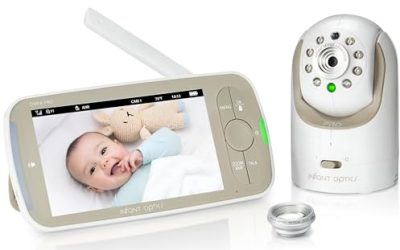
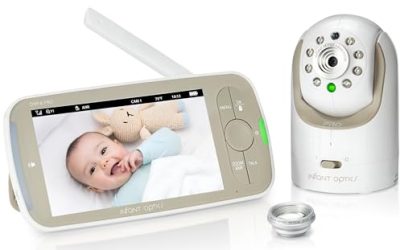
The DXR-8 PRO suits parents who want the clearest picture in this group and are happy to pay attention to the details. Its 5-inch display runs at 720P, and the included optical zoom lens lets you move in close on a sleeping baby without the blur that digital zoom alone creates. Active noise reduction filters out background hum from fans and air purifiers, so the sounds you hear are the ones that matter. The camera pans, tilts and zooms from the parent unit, and the system pairs with up to four cameras, which covers twins or a second room without a second monitor.
Specs
- 5-inch LCD display with 720P resolution
- Active noise reduction (ANR) that can be toggled on or off
- Closed-loop FHSS system with no WiFi connection
- Pan, tilt and zoom camera with interchangeable lenses
- Optical zoom lens included for up to 6x zoom
- Pairs with up to 4 cameras
- Two-way talk back, sleep mode and night vision
- Portable battery pack pairs for up to 24 hours of battery life (sold separately)
- 1-year manufacturer warranty
Best for: Parents who want the sharpest video and plan to watch more than one room.
Watch out for: The predecessor DXR-8 camera units are not compatible with the DXR-8 PRO, so check the model name on any add-on camera before buying.
eufy Security SpaceView
The SpaceView is the pick for parents who want to see the whole nursery at once rather than one corner of it. Its 5-inch 720P display pairs with a camera that pans 330 degrees and tilts 110 degrees, so a single camera covers the cot, the change table and the door. A wide-angle lens comes in the box, and the 2,900mAh battery keeps the parent unit running for up to 15 hours, which covers a full night and the morning nap. Two-way audio lets you speak to your baby from another room, and the system connects with up to four cameras if your family grows.
Specs
- 5-inch 720P LCD display
- Pan 330 degrees and tilt 110 degrees
- Wide-angle lens included
- 2,900mAh rechargeable battery with up to 15 hours of monitoring
- 460 ft range
- Two-way audio
- Night vision
- Connects with up to 4 cameras
- No WiFi connection required
Best for: Larger nurseries where one fixed camera would miss part of the room.
Watch out for: The 460 ft range is the shortest in this guide, so measure the distance to your bedroom and consider wall thickness before choosing it for a large home.
VTech VM819

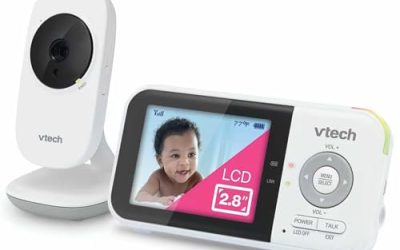
The VM819 is the quiet achiever of this group: a small, light monitor with the longest battery life and the longest quoted range. Its 2.8-inch colour screen will not show the same detail as the 5-inch models, yet the 1,000 ft range and up to 19 hours of video streaming make it the most practical choice for a big house or a sleepout. A temperature sensor shows the nursery temperature on the parent unit, two lullabies and two ambient sounds help settle your baby, and two-way talk lets you respond without walking down the hallway. Setup is plug-and-play, with no app and no account to create.
Specs
- 2.8-inch colour LCD screen
- 1,000 ft range
- 2,600mAh rechargeable battery with up to 19 hours of video streaming
- Automatic infrared night vision with 2X zoom
- Temperature sensor with display on the parent unit
- Two-way talk
- 2 lullabies and 2 ambient sounds
- Private FHSS 2.4GHz transmission with no WiFi
- 1-year manufacturer warranty
Best for: Parents in larger homes who need long range and all-night battery life.
Watch out for: The 480p video resolution is lower than the 720P models here, so the picture is less detailed when you zoom in.
HelloBaby HB65
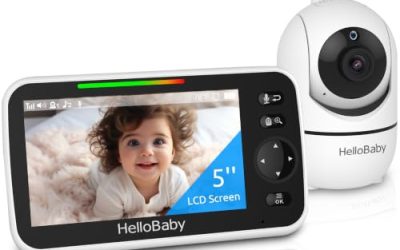
The HB65 is the compact choice for smaller nurseries and for parents who want pan-tilt-zoom control without a large parent unit. Its 3.2-inch colour screen is easy to carry around the house, and the camera moves remotely so you can follow your baby as they shift across the cot. Infrared night vision handles dark rooms, a temperature display keeps you aware of the nursery conditions, and two-way audio lets you talk back from the kitchen or the lounge. VOX mode wakes the screen when sound is detected, which saves battery during quiet stretches of the night.
Specs
- 3.2-inch colour LCD screen
- Remote pan-tilt-zoom camera
- Infrared night vision
- Two-way audio
- Temperature display
- Lullabies built in
- Smart VOX mode
- Up to 1,000 ft range
- FHSS wireless transmission with no WiFi
Best for: Smaller rooms and parents who want a light, portable parent unit.
Watch out for: The 3.2-inch screen shows less detail than the 5-inch models, so it suits a single cot rather than a wide room with two children.
Which One Fits Your Situation
First-Time Parents Setting Up a Nursery
If this is your first baby and you want one monitor that simply works, choose the HelloBaby HB65 or the VTech VM819. Both switch on without an app or account, and their controls are easy to learn. The HB65 adds remote pan-tilt-zoom for checking on a baby who moves around the cot, while the VM819 adds a temperature sensor and longer battery life. Either one covers a standard nursery well, and both keep the video private with a closed-loop connection.
A Larger Home or a Sleepout Down the Garden
Distance is the deciding factor here, so pick the VTech VM819 for its 1,000 ft range and 19-hour battery. It keeps working two rooms away or down a floor, and the battery survives a full night without a charger. The Infant Optics DXR-8 PRO is the alternative if you also want the sharpest picture, since its 720P display and zoom lens show more detail. Avoid the eufy SpaceView for the longest distances, as its quoted range is shorter.
Parents Who Want Privacy Without WiFi
All four monitors in this guide run on a closed-loop connection, so any of them fits this situation. The Infant Optics DXR-8 PRO is the strongest match: its second-generation FHSS system keeps video inside your home, and its active noise reduction keeps the audio clean. The VTech VM819 is the simpler alternative, with the same private connection and a lower learning curve. Whichever you choose, you get video that never travels over your broadband.
Watching Two Rooms or Two Children
To watch twins or two children in separate rooms, choose a monitor that pairs with extra cameras. The Infant Optics DXR-8 PRO and the eufy SpaceView both support up to four cameras on one parent unit, so you can add a camera later. The DXR-8 PRO gives the sharper picture and the zoom lens, while the SpaceView gives the wider pan for covering two cots in one room. Check that any add-on camera matches your exact model.
Common Mistakes
- Placing the camera too close to the cot, where the picture fills with one small patch of blanket instead of the whole baby.
- Running the camera cable within reach of the cot; keep cords well away from where a baby can grab or chew them.
- Choosing a monitor by its open-air range figure, then finding the signal drops through two walls and a closed door.
- Buying a WiFi monitor when you wanted privacy, or a closed-loop monitor when you wanted to check in on your phone.
- Forgetting that US models ship with US plugs and adapters, and failing to arrange a safe New Zealand adapter before the first night.
Frequently Asked Questions
Do baby monitors work in New Zealand homes?
Yes, video baby monitors work in New Zealand homes, and the closed-loop models in this guide do not depend on your broadband at all. They use a private wireless link, so they keep working during an internet outage. The main thing to check is range through your walls, since weatherboard, brick and concrete all reduce the signal. A model rated well above your actual distance gives the best result.
Do I need WiFi for a video baby monitor?
No, you do not need WiFi for a video baby monitor. All four monitors here use a private FHSS connection, with no app and no internet connection. That keeps setup simple and keeps video inside your house. WiFi monitors add phone viewing, but they also need a stable home network and an account. If you only need to watch from inside your home, a closed-loop monitor is enough.
How many cameras do I need?
One camera is enough for a single baby in one cot. Add a second camera for twins, two children in separate rooms, or a playroom you also want to watch. The Infant Optics DXR-8 PRO and the eufy SpaceView both pair with up to four cameras on one parent unit. Buy the extra camera from the same model line, because cameras do not always pair across models.
Can I use a US-bought monitor in New Zealand?
Yes, with one important check: the power adapter. Monitors sold for the US market ship with US plugs, and some adapters are rated for 110 volts only, so read the label first. Use a suitable New Zealand adapter that matches the monitor, and keep the camera cord out of reach of the cot. The wireless link itself works the same in New Zealand as anywhere else.
Related guides
More from Amazon
Programs that pair well with the guide above. Offers and eligibility are set by Amazon and may change.
Set up recurring deliveries of everyday items on eligible products. Terms and savings are set by Amazon.
Explore Subscribe & SaveFree shipping on eligible items, Prime Video and more. Eligible new members can start with a free trial.
Start a Prime free trialAudiobooks and podcasts to listen to on the go. Eligible new members can start with a free trial.
Try Audible freeRead from a large library of eBooks and audiobooks on any device. Check Amazon for current plans.
Explore Kindle UnlimitedAs an Amazon Associate we earn from qualifying purchases.
Write Your Review
No reviews yet. Be the first to share your experience!