
Key takeaways
- Compare the best baby monitors with a camera and phone app for remote viewing, phone alerts, pan and tilt control, and night vision. Find your nursery fit.
What's inside
As an Amazon Associate I earn from qualifying purchases. This post may contain affiliate links at no extra cost to you.
A baby monitor with a camera and phone app changes the real decision parents face: do you want a dedicated parent unit that stays in one room, or a phone that follows you everywhere and lets you check on your baby from the kitchen, the office, or the car? When the phone becomes the parent unit, the app itself becomes the product, so alert speed, remote camera control, and how the feed behaves on a small screen matter far more than a spec sheet full of extra features.

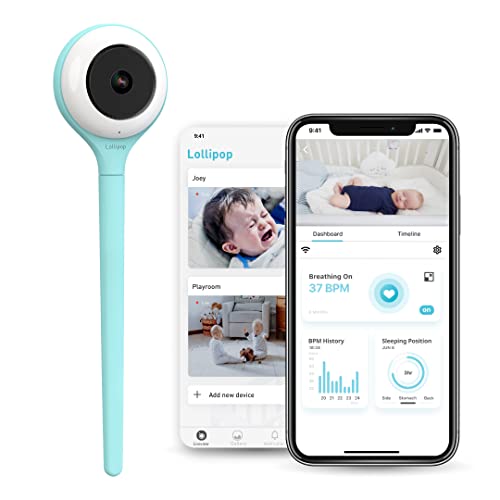
This guide is for parents who live on their phones, for working parents who want to peek in during the day, and for families who share monitoring duties across two phones. Every camera below was chosen from its Amazon product title and listed features, and every one pairs a Wi-Fi camera with a companion app for live viewing, alerts, and two-way audio.
Quick Picks
As an Amazon Associate we earn from qualifying purchases.
| Product | Best for | Key spec from title |
|---|---|---|
| Nanit Pro Smart Baby Monitor with Flex Stand | Sleep tracking with breathing motion alerts on your phone | 1080p Wi-Fi video camera with sensor-free breathing motion tracker |
| Cubo Ai Plus Smart Baby Monitor with Wall Mount | Safety alerts for a covered face or danger zone | 1080p HD night vision camera with cry and temperature detection |
| Lollipop Baby Monitor (Turquoise) | A small, flexible camera that clips onto a crib rail | Smart Wi-Fi camera with true crying detection |
| Miku Pro Smart Baby Monitor | Contact-free breathing and sleep tracking in the app | Smart baby monitor with real-time breathing and sleep tracking |
| eufy Security Baby Monitor E21 | A hybrid monitor with a 4K camera and a phone app | 4K UHD camera with hybrid Wi-Fi and no Wi-Fi connection |
How to Choose
Phone Notification Speed
A phone alert is only useful if it reaches you in time, so judge the app by how it handles motion, sound, and crying alerts, not by how many alert types the box lists. Good apps let you tune sensitivity so a passing car does not wake your phone every ten minutes, and they separate cry alerts from room noise so you learn which buzz means you should get up. Check whether alerts arrive when the app is closed, whether each alert carries a clip or a still image, and whether you can silence non-urgent alerts at night without muting the cry alarm. Slow or noisy alerts turn the phone into a distraction instead of a helper.
Remote Pan and Tilt Control
Pan and tilt matter most when your baby moves around the crib, because a fixed camera shows one corner while the action happens in another. From your phone, you should be able to sweep the room smoothly, zoom in to check breathing movement, and return the camera to a saved home position with one tap. Look for a pan and tilt range that covers both a bassinet and a toddler bed, and check whether two parents can move the camera at the same time. A camera that stutters when you drag it from the app wastes the whole point of phone control.
Camera Resolution and Night Vision
Resolution decides whether you can see a pacifier slip or a blanket shift, and night vision decides whether you can see anything after lights-out. A 1080p feed is enough for most nurseries, while a 4K camera helps when you zoom into a crib from across the room, though it uses more bandwidth and can stutter on weak Wi-Fi. For night vision, look for infrared with no visible red glow, since a glowing camera can disturb a light sleeper. Check the field of view: a wide-angle lens covers a whole crib from a short distance, while a narrow lens needs to sit farther back to show the same scene.
Battery and Data Use on the Phone
A monitor app that drains your phone in two hours is one you will stop using, so battery and data habits deserve attention before you buy. Some apps keep a live feed running in the foreground and chew through battery quickly, while others use an audio-only background mode that sips power and wakes the screen only when sound passes a threshold. If you check in from work or while travelling, find out whether the app streams over mobile data and whether it lets you lower the video quality to save data. Confirm how many phones can sign in at once, since a second parent sharing the feed doubles its value.
The 5 Best Options
Nanit Pro Smart Baby Monitor with Flex Stand
The Nanit Pro suits parents who want the phone to do more than show video, because its app pairs the 1080p live feed with breathing motion tracking and sleep data in one place. The Flex Stand makes it easy to move the camera between the nursery and a grandparent’s house, and the app sends sound, motion, and cry notifications so you can glance at your phone instead of walking to the crib. Its split-screen view also lets you watch two cameras at once, which helps families with twins or a baby and a toddler in separate rooms.
Specs
- 1080p HD Wi-Fi video camera with night vision
- Sensor-free breathing motion tracker with included Breathing Band
- Two-way audio for talking to your baby from the app
- Sound, motion, and cry notifications on iOS and Android
- Flex Stand for portable placement at home or while travelling
- 1-year limited warranty
Best for: Parents who want breathing motion tracking and sleep data inside the phone app.
Watch out for: Some sleep insights and history features need a paid plan after the included trial, so confirm what stays free before you buy.
Cubo Ai Plus Smart Baby Monitor with Wall Mount
The Cubo Ai Plus suits parents who worry most about what the camera can detect on its own, because its app sends proactive alerts for a covered face, a baby entering a danger zone, and changes in temperature. The bird-shaped camera mounts above the crib and gives a clear overhead view, while the 135-degree wide-angle lens and 940nm infrared night vision keep the picture sharp after dark without a visible red glow. Sleep analytics in the app turn each night into a simple timeline, which helps tired parents spot patterns without keeping a paper log.
Specs
- 1080p HD night vision camera with 135-degree wide-angle lens
- 940nm infrared night vision with no visible red light
- Sleep safety alerts for covered face and danger zone
- Cry and temperature detection with built-in temperature and humidity sensor
- Two-way audio and built-in night light
- Wall mount included for an overhead crib view
Best for: Parents who want proactive safety alerts pushed to their phone.
Watch out for: The wall mount needs drilling, so renters should plan the placement or pick a stand option instead.
Lollipop Baby Monitor (Turquoise)
The Lollipop suits parents who need a small camera that goes wherever the baby goes, because its flexible stem bends, wraps, and clips onto a crib rail, a stroller, or a bassinet frame. The phone app is the whole parent unit, showing the live feed, sound levels, and true crying detection that separates a real cry from ordinary nursery noise. Its compact shape also makes it a strong travel pick, since it packs flat and sets up in minutes in a hotel room or at a grandparent’s house.
Specs
- Smart Wi-Fi camera with true crying detection
- Two-way audio with talk-back from the phone app
- Infrared night vision for after-dark viewing
- Flexible stem that clips onto crib rails and stroller handles
- Sound level display and lullabies in the companion app
- Optional in-app plan for breathing monitoring and sleep tracking
Best for: Parents who want a tiny, flexible camera that clips anywhere and runs from the phone.
Watch out for: There is no dedicated parent unit, so the phone must stay charged and nearby whenever the camera is in use.
Miku Pro Smart Baby Monitor
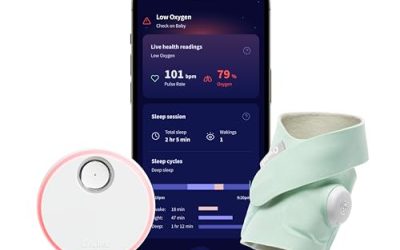
The Miku Pro suits parents who want breathing and sleep data without putting any sensor on their baby, because its camera tracks breathing movement and sleep patterns contact-free and shows the results live in the app. The phone display pairs the video feed with a breathing waveform, room temperature, and humidity, so one glance tells you how the night is going. It connects over dual-band Wi-Fi, works with both wall mounting and a floor stand, and plays lullabies and white noise from the app when your baby needs help settling.
Specs
- Contact-free real-time breathing and sleep tracking
- HD video with advanced infrared night vision
- Dual-band Wi-Fi (2.4GHz and 5GHz) with Bluetooth connectivity
- Live temperature and humidity readings in the app
- Lullabies and white noise controlled from the phone
- Wall mount and floor stand included
Best for: Parents who want contact-free breathing tracking shown live on their phone.
Watch out for: Breathing tracking needs a clear overhead view of the crib, so check the mounting height and angle before the first night.
eufy Security Baby Monitor E21

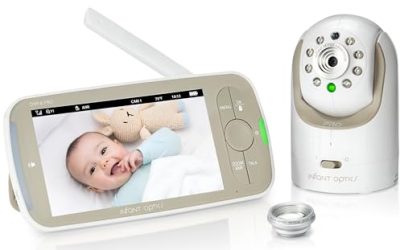
The eufy E21 suits parents who want both a phone app and a backup screen, because it pairs a 4K camera with a 5-inch parent display and lets the app take over whenever you leave the house. From the phone you can pan 330 degrees, tilt, zoom up to 8 times, and look back at 24/7 recordings in the app, while the camera’s built-in battery keeps it running when you move it away from an outlet. A Wi-Fi switch on the camera cuts the internet connection entirely for a local-only mode, which is a rare privacy option in this category.
Specs
- 4K UHD camera with 5-inch 720p parent display
- 330-degree pan, 60-degree tilt, and 8x zoom
- Hybrid Wi-Fi and no Wi-Fi connection with a privacy switch
- 24/7 recording available in the eufy Baby app
- 5,000mAh built-in battery in the camera
- App access can be shared with up to 5 family members
Best for: Parents who want a 4K camera, a parent display, and full phone control in one system.
Watch out for: The 4K feed uses more bandwidth, so a weak nursery Wi-Fi signal can make the app feed lag or drop in quality.
Which One Fits Your Situation
You Work Away From Home During the Day
Pick the Nanit Pro or the eufy E21, because both are built for checking in from anywhere rather than only from the next room. The Nanit app keeps the feed, alerts, and sleep data together, while the eufy app adds 24/7 recordings you can scroll back through after a long shift. Either way, confirm your nursery Wi-Fi is steady before relying on remote viewing every day.
You Want the Phone to Warn You First
Pick the Cubo Ai Plus, because its covered-face and danger-zone alerts are designed to reach your phone before you would notice the problem yourself. Pair it with tuned alert sensitivity so ordinary movement does not flood your lock screen, and keep the app’s notifications allowed in your phone settings so a silenced phone does not miss a real warning.
You Travel Often or Move the Camera Between Rooms
Pick the Lollipop, because its flexible stem and tiny body pack easily and clip onto almost anything in a new room. Set the app up before you leave home so the first night in a hotel is a quick plug-in, and carry a short cable and a portable charger so the phone stays alive through the night.
You Share Night Duty With a Partner
Pick the eufy E21 or the Nanit Pro, because both let two phones share the feed and hand the night shift to whoever is awake. The eufy system shares app access with up to five family members, while the Nanit split screen helps when two children sleep in two rooms. Agree on who answers alerts at night so the same cry does not wake you both.
Common Mistakes
- Buying a camera for its resolution and ignoring how fast its phone alerts arrive, which is what actually wakes you at night.
- Mounting the camera where the crib rail or a mobile blocks the lens, then blaming the app for a poor picture.
- Leaving the app on the highest video quality over mobile data, which drains the phone battery and eats through a data plan in a single afternoon.
- Turning off phone notifications for the monitor app during the day and forgetting to turn them back on at bedtime.
- Skipping a test run of remote viewing from outside the house, then discovering on a work trip that the feed only works on home Wi-Fi.
Frequently Asked Questions
Can I watch a baby monitor camera on my phone while I am away from home?
Yes, if the camera connects through your home Wi-Fi and its app supports remote viewing, you can open the live feed from anywhere with internet access. All five cameras in this guide offer remote viewing through their apps, though the feed quality depends on both your home upload speed and your phone’s connection while you are out.
Do phone app baby monitors work without a parent unit?
Yes, phone-first monitors such as the Nanit Pro, Cubo Ai Plus, Lollipop, and Miku Pro use your phone as the only screen, which keeps the setup small and the cost of extra hardware down. The trade-off is that your phone must stay charged and nearby, and a call or a dead battery can interrupt the feed until you plug the phone back in.
How do I keep monitor alerts from draining my phone battery?
Use the app’s audio-only background mode when it is available, lower the video quality for background streaming, and keep the phone plugged in overnight on your nightstand. Many apps also let you set alert-only mode, where the screen stays dark and wakes only when the camera detects sound, crying, or movement worth your attention.
Is a Wi-Fi baby monitor safe to use on my home network?
A Wi-Fi monitor is as safe as the network it sits on, so use a strong router password, keep the camera firmware updated through its app, and enable two-factor sign-in where the app offers it. The eufy E21 adds a physical Wi-Fi switch for local-only viewing, which is a good option if you want the camera off the internet entirely at night.
Related guides
More from Amazon
Programs that pair well with the guide above. Offers and eligibility are set by Amazon and may change.
Set up recurring deliveries of everyday items on eligible products. Terms and savings are set by Amazon.
Explore Subscribe & SaveFree shipping on eligible items, Prime Video and more. Eligible new members can start with a free trial.
Start a Prime free trialAudiobooks and podcasts to listen to on the go. Eligible new members can start with a free trial.
Try Audible freeRead from a large library of eBooks and audiobooks on any device. Check Amazon for current plans.
Explore Kindle UnlimitedAs an Amazon Associate we earn from qualifying purchases.
Write Your Review
No reviews yet. Be the first to share your experience!