
Key takeaways
- Compare 4 USB blood pressure monitors that export readings to a PC and build downloadable reports for adult home measurement logs for easy sharing.
What's inside
As an Amazon Associate I earn from qualifying purchases. This post may contain affiliate links at no extra cost to you.
A blood pressure monitor that only shows numbers on a screen leaves you copying figures into a notebook, and a hand-written log is easy to lose, hard to sort, and awkward to bring to an appointment. The real decision is not which monitor looks nicest, but which one moves stored readings onto a computer through a USB cable, so the log builds itself and can be saved, printed, or shared as a file. That single difference changes the daily routine from manual copying to a quick plug-in and download.


This guide is for adults who keep home measurement logs, for couples sharing one monitor, and for anyone who wants a dated file of readings to show a clinician. Each monitor below was picked from its Amazon listing for a USB connection, downloadable PC software, on-device memory, and a cuff suited to adult home use. The focus is on export formats, software, memory capacity, and how the report gets from the monitor to a file to keep.
Quick Picks
As an Amazon Associate we earn from qualifying purchases.
| Product | Best for | Key spec from title |
|---|---|---|
| CONTEC08A | A household log shared by three people | 300 sets of memory with USB PC software |
| Beurer BM55 | Two adults sharing one large-cuff monitor | 2 x 60 memory with HealthManager Pro USB upload |
| Beurer BM58 | A touch-screen monitor on a desk or bedside table | 2 x 60 memory with USB HealthManager transfer |
| Beurer BC58 | A compact wrist monitor for travel logs | 2 x 60 memory with USB cable and HealthManager software |
How to Choose
USB Export and PC Software
The USB connection is the feature that matters most for a measurement log, so check exactly how it works before buying. Some monitors ship with a USB cable in the box and free PC software you download from the maker, while others sell the cable separately or expect a phone app instead of a computer program. Look at the listing for the words USB interface and PC software together, and note whether the software runs on Windows only, since several makers offer no Mac version. A monitor that plugs in with a standard cable and opens its readings in a desktop program gives you a repeatable routine: measure, plug in, download, and save the file.
Memory Capacity and User Profiles
On-device memory decides how long you can measure before the monitor runs out of room and overwrites older readings. A monitor with 2 x 60 memory holds 60 readings per user for two users, which covers about a month of twice-daily checks for one person, while a 300-set memory stretches across several months or a whole household. Two-user profiles matter when two adults share a monitor, because separate memories keep each person’s log clean instead of mixing both sets of readings into one list. Check the memory figure on the listing and count how many readings your routine produces each week before settling on a capacity.
Cuff Fit and Display
A cuff that does not fit the arm gives unreliable readings, so match the cuff range on the listing to the arm it will be used on. Upper-arm cuffs cover 22 to 42 centimetres, and a monitor with an extra-large cuff suits larger arms without a separate purchase, while a wrist cuff fits wrists from 14 to 19.5 centimetres and needs the wrist held at heart level during each check. The display matters too when the log is checked daily: a large backlit screen with a colour-coded indicator strip is easier to read in a dim bedroom, and a touch screen keeps the buttons simple for people who prefer fewer physical controls.
Report Sharing and File Habits
A downloadable report is only useful if you can find it, so think about what happens after the export. Good PC software shows trend graphs, morning and evening averages, and a print option, and some programs let you save the data as a file you can attach to an email or carry on a stick. Decide where the files will live, such as a folder named by month, and export on a fixed day each week so the log never depends on the monitor’s memory alone. Also confirm whether the software stores readings locally on your computer or needs an online account, because a local file stays available even when the internet does not.
The 4 Best Options
CONTEC08A
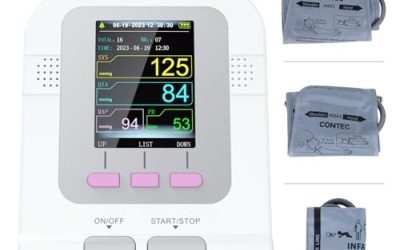
The CONTEC08A suits a household that wants one monitor to serve several people and still keep every reading in a single downloadable file. It stores 300 sets of readings across three user memories, includes three cuff sizes for adult, paediatric, and neonatal use, and connects to a computer with a supplied USB cable for its free PC software. The large colour display is easy to read at a glance, and the software turns stored readings into trend views and printed reports, which makes it a strong pick when the log is shared with a clinician or kept as a long household record.
Specs
- Fully automatic upper-arm monitor with oscillometric measurement
- 300 sets of memory: 100 readings for each of three users
- Free downloadable PC software with USB connection for data download, trend views, and printed reports
- 2.8-inch high-definition colour LCD display
- Three cuffs included: adult, paediatric, and neonatal
- Measurement range 0 to 290 mmHg with 1 mmHg resolution
- Pulse rate range 40 to 240 beats per minute
- USB cable included in the package; cable is for data transfer, not charging
- Runs on 4 AA batteries
Best for: A household of up to three people who want one shared log with 300 stored readings and printed PC reports.
Watch out for: The USB cable transfers data only, so a separate power adapter is needed if you want mains power; the PC software is downloaded from a link in the box, and there is no CD included.
Beurer BM55
The Beurer BM55 suits two adults who share a monitor and want their readings separated into two clean logs. It holds 120 readings in total, 60 per user, and transfers them to a computer through the Beurer HealthManager Pro software over USB, where the data can be viewed as trends and kept as a record. The extra-large cuff covers arms from 22 to 42 centimetres, the large backlit display stays readable in low light, and the patented resting indicator flags when you have not settled enough before a measurement, which helps keep the log consistent from day to day.
Specs
- Fully automatic upper-arm monitor with 2 x 60 memory spaces
- HealthManager Pro USB uploader for data transfer to a computer
- Extra-large universal cuff for arm circumferences of 22 to 42 cm
- Large backlit display with colour-coded risk indicator
- Arrhythmia detection with alarm
- Patented resting indicator
- Two-user memory with separate M1 and M2 profiles
- Carrying case and batteries included
Best for: Two adults sharing one monitor who want separate logs, a large cuff, and a big easy-to-read display.
Watch out for: There is no wireless connection, so every export needs the USB cable and a computer; check that the HealthManager Pro software supports your version of Windows before buying.
Beurer BM58
The Beurer BM58 suits someone who wants a tidy desk or bedside monitor with a modern touch screen and a straightforward USB export routine. It stores 60 readings for each of two users and moves them to a computer through the included USB cable and the free Beurer HealthManager software, where averages for the morning and evening of the last seven days can be viewed alongside the full history. The extra-large black display and sensor touch buttons keep daily use simple, and the cuff holder on the underside keeps the cuff out of the way between measurements.
Specs
- Fully automatic upper-arm monitor with oscillometric measurement
- 2 x 60 memory spaces for two users
- USB interface for transfer to the free Beurer HealthManager PC software
- Sensor touch buttons with an extra-large illuminated black display
- Morning and evening average for the last 7 days
- Arrhythmia detection with warning symbol
- Colour-coded risk indicator
- Standard cuff for arm circumferences of 22 to 30 cm; extra-large cuff available separately
- Runs on 4 AA batteries; optional mains adapter available separately
- USB cable, storage bag, and batteries included
Best for: A single user or a couple who want touch controls, a large display, and weekly morning and evening averages in their exported log.
Watch out for: The included cuff tops out at 30 cm, so larger arms need the extra-large cuff bought separately; the HealthManager software is Windows-based, so check compatibility with your computer first.
Beurer BC58
The Beurer BC58 suits someone who travels or prefers a wrist monitor but still wants a proper downloadable log instead of numbers that live only on the device. It is the most compact monitor, with a touch screen, a large illuminated black display, and 2 x 60 memory spaces for two users, and it connects to a computer with the included USB cable for the free Beurer HealthManager software. The wrist cuff fits wrists from 14 to 19.5 centimetres, and the monitor shows morning and evening averages for the last seven days, so a short trip produces a log that can be downloaded when you get home.
Specs
- Fully automatic wrist monitor with oscillometric measurement
- 2 x 60 memory spaces for two users
- USB cable included for transfer to the free Beurer HealthManager PC software
- Sensor touch buttons with an extra-large illuminated black display
- Morning and evening average for the last 7 days
- Arrhythmia detection with warning symbol
- Colour-coded risk indicator
- Wrist cuff for circumferences of 14 to 19.5 cm
- Runs on 2 AAA batteries; storage box included
Best for: Travellers and wrist-monitor users who want a compact device with a USB export and a downloadable log.
Watch out for: Wrist readings need the wrist held at heart level during each measurement, so the routine takes more care than an upper-arm cuff; there is no wireless transfer, so exports need the cable and a computer.
Which One Fits Your Situation
You Keep One Log for the Whole Household
Pick the CONTEC08A when three people measure on the same device and you want all readings together. Its 300-set memory and three user profiles keep each person’s history separate, and the three included cuff sizes suit different household members. Export weekly through the PC software and save the printed report in a shared folder, so the record stays complete even if the monitor is reset.
Two Adults Share a Monitor and a Cuff
Pick the Beurer BM55 when two adults use one monitor and both need a large cuff. The 22 to 42 centimetre cuff fits most adult arms without an extra purchase, the two-user memory keeps the logs apart, and the large backlit display suits a shared bathroom or bedroom. Export through HealthManager Pro on a fixed day each week, and each person keeps a clean, separate history.
You Want a Tidy Desk Setup With Touch Controls
Pick the Beurer BM58 when the monitor lives on a desk or bedside table and you prefer tapping a touch screen to pressing buttons. The cuff holder keeps the setup neat, the illuminated display is easy to read, and the weekly morning and evening averages give a quick sense of the log before you export it. Just check your arm size against the 30 centimetre cuff limit before ordering.
You Travel and Need a Log That Fits in a Bag
Pick the Beurer BC58 when the monitor needs to travel in a small bag. The wrist design and storage box make it the most portable option, and the USB cable still lets you download the full log into HealthManager when you return home. Hold the wrist at heart level for each measurement, and export the readings as soon as the trip ends so the log stays current.
Common Mistakes
- Buying a monitor with Bluetooth only and then finding there is no USB export or PC file to save when the phone changes.
- Choosing a cuff by guesswork instead of measuring the arm, which leaves readings that are hard to compare over time.
- Letting the monitor fill its memory and overwrite older readings before exporting, which breaks the log at exactly the point you need it.
- Installing the PC software after months of measuring, then finding the older readings were never transferred and the file only covers recent weeks.
- Saving exported files with vague names and no folder habit, so the report you need for an appointment cannot be found when it matters.
Frequently Asked Questions
Do these monitors need a computer to export readings?
Yes, each monitor exports through a USB cable to PC software, so a Windows computer is needed. The software is free from the maker, and the cable is included in the box with every model here. Once the software is installed, plug the monitor in, open the program, and download the readings into a file or a printed report.
What file or report do I get after a USB export?
The PC software shows your readings with dates and times, plus trend graphs and morning and evening averages, and it can print a report of the history. Both Beurer HealthManager and the CONTEC software offer printed reports and on-screen trend views. Keep the exported file in a dated folder so the log is easy to find later.
How often should I export readings from the monitor?
Export once a week for daily measuring, and more often if two people share the device. A monitor with 2 x 60 memory holds a month of daily readings per user, so a weekly export leaves plenty of room and a full memory never overwrites older data. An export day, such as Sunday, makes the habit easy to keep.
Can two people share one monitor and keep separate logs?
Yes, if the monitor has two user memories, which three of the four models here do. Each person selects their profile before measuring, and the readings stay in separate lists on the device and after the USB export. The CONTEC08A goes further with three user profiles, so a household of three can share one monitor without mixing readings together.
Related guides
More from Amazon
Programs that pair well with the guide above. Offers and eligibility are set by Amazon and may change.
Set up recurring deliveries of everyday items on eligible products. Terms and savings are set by Amazon.
Explore Subscribe & SaveFree shipping on eligible items, Prime Video and more. Eligible new members can start with a free trial.
Start a Prime free trialAudiobooks and podcasts to listen to on the go. Eligible new members can start with a free trial.
Try Audible freeRead from a large library of eBooks and audiobooks on any device. Check Amazon for current plans.
Explore Kindle UnlimitedAs an Amazon Associate we earn from qualifying purchases.
Write Your Review
No reviews yet. Be the first to share your experience!