
Key takeaways
- Looking for a baby monitor without WiFi? Compare three closed-signal video monitors with parent units, long range and night vision for November 2026.
What's inside
As an Amazon Associate I earn from qualifying purchases. This post may contain affiliate links at no extra cost to you.
A baby monitor that never touches your home network changes the whole decision. Instead of weighing apps, cloud accounts and monthly plans, you look at the radio link, the parent unit and the camera itself. Many parents arrive at this question after reading editorial guides such as Wirecutter’s baby monitor coverage, where no-WiFi models keep earning attention for privacy and simplicity. The real choice then becomes which closed-system monitor fits your nursery, your house and the way your family sleeps at night.
This guide looks at three no-WiFi video monitors that appear again and again in editorial roundups and on Amazon: the Infant Optics DXR-8 PRO, the eufy SpaceView E110 and the eufy SpaceView Pro. Each one pairs a camera with a dedicated parent unit, skips the internet entirely and works the moment you plug it in. The sections below compare signal, range, screen and battery so you can pick the monitor that matches your home.
Quick Picks
As an Amazon Associate we earn from qualifying purchases.
| Product | Best for | Key spec from title |
|---|---|---|
| Infant Optics DXR-8 PRO | Privacy and interchangeable lenses | 720P HD resolution, 5″ display, no WiFi |
| eufy SpaceView E110 | Wide-angle view of the crib | 720p HD resolution, 5″ display, 110° wide-angle lens |
| eufy SpaceView Pro E210 | Pan, tilt and two-way talk | 720p, 5″ screen, pan and tilt, night vision |
How to Choose
Signal Type and Privacy
Every monitor here uses a closed radio link instead of your home network. The Infant Optics DXR-8 PRO runs on second-generation frequency-hopping spread spectrum, known as FHSS, which hops between channels so the signal stays private. The eufy models use a similar local wireless link between camera and parent unit, with no app and no cloud account in the loop. That design removes the usual worries about accounts, passwords and servers. It also means the monitor keeps working when your broadband goes down. When you compare models, look for the words FHSS or closed-loop in the listing, and confirm that no phone app is needed for the picture to appear.
Range Through Walls
Range decides whether the monitor still shows a picture from the kitchen, the garden or the far bedroom. Infant Optics lists up to 1,000 feet in open space for the DXR-8 PRO, which sounds generous until walls, floors and appliances get in the way. In a real house, thick walls and metal ducting cut that figure down a lot, so treat the headline number as a ceiling rather than a promise. The eufy SpaceView models list shorter ranges, yet they hold a steady picture across a typical two-storey home. Before you buy, picture the longest distance between nursery and the rooms where you spend evenings, and pick a monitor with room to spare.
Screen Size and Night Vision
All three monitors in this guide use a five-inch parent-unit screen, which hits a sweet spot between pocket size and a picture you can read at a glance. A larger screen helps when you want to see breathing movements or check whether a dummy has slipped away, while a smaller one slips into a pocket during the day. Night vision matters just as much, because most checking happens after dark. Each model here switches to infrared at night, so the picture turns black and white but stays clear enough to see your baby move. Look for a screen that stays readable in a dim room without lighting up the whole bedroom.
Battery Life and Camera Features
Battery life shapes how you actually use the parent unit. Some parents leave it plugged in beside the bed, while others carry it around the house and want hours away from a socket. The DXR-8 PRO uses a user-replaceable lithium-ion battery, so a tired battery can be swapped instead of replacing the whole monitor, and a portable battery pack can extend its life further. Camera features matter too: remote pan, tilt and zoom let you follow a crawler without entering the room, and two-way talk lets you soothe from the doorway. A room thermometer and a lullaby player are handy extras, but they should never outweigh signal, range and screen quality.
The 3 Best Options
1. Infant Optics DXR-8 PRO

The DXR-8 PRO is the monitor most parents name when they say they want no WiFi at all. Its camera talks to the parent unit over a second-generation FHSS link, so video never passes through a router or the internet. Active Noise Reduction filters out fans, air purifiers and heaters, which helps when white noise runs in the nursery. The five-inch 720p screen shows a sharp picture, and the camera pans, tilts and zooms from the parent unit. Interchangeable lenses add flexibility: a standard lens and a zoom lens come in the box, and a wide-angle lens is sold separately for a broader view of the room.
Specs
- 720P HD resolution with 5-inch display
- Active Noise Reduction (ANR)
- No WiFi, closed-loop 2nd-generation FHSS system
- Pan, tilt and zoom camera with interchangeable lenses
- Range up to 1,000 feet in open space
- Automatic infrared night vision
- Two-way talk and on-screen room thermometer
- User-replaceable lithium-ion battery
- Supports up to four cameras
- One-year manufacturer warranty
Best for: Parents who want maximum privacy, a replaceable battery and a choice of lenses.
Watch out for: The 720p picture is softer than 1080p smart cameras, and there is no phone app for checking in from outside the house.
2. eufy SpaceView E110

The eufy SpaceView E110 brings the well-known SpaceView design up to date with a wide-angle lens in the box. Its five-inch 720p screen shows the crib clearly, and the included 110-degree lens widens the view so you can see the whole cot without moving the camera. Night vision, a lullaby player and a sound alert cover the basics, while two-way audio lets you answer a cry with your voice. Like the other monitors here, it runs on a local link with no app and no cloud, so setup takes minutes and nothing about your nursery leaves the house.
Specs
- 720p HD resolution with 5-inch display
- 110-degree wide-angle lens included
- Night vision
- Lullaby player
- Sound alert
- Camera and audio in one system
- No app required
Best for: Parents who want a wide view of the whole crib from one fixed camera position.
Watch out for: The wide-angle lens trades a little detail for coverage, so fine movements can look smaller on screen.
3. eufy SpaceView Pro E210
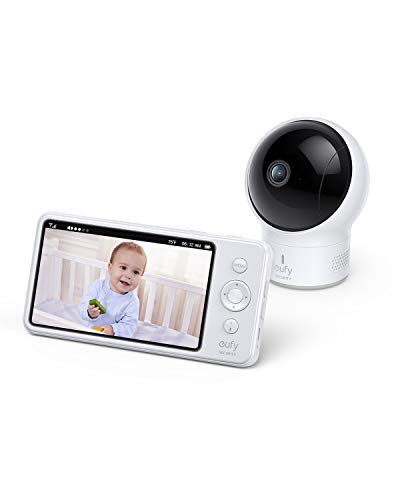
The SpaceView Pro E210 is the pick for parents who like to steer the camera. Remote pan and tilt sweep across the room, and the zoom brings a sleeping baby closer without waking anyone. Its five-inch 720p screen matches the other monitors here, and two-way audio, night vision and a lullaby player round out the feature set. The wide-angle lens is not included with this model, so the standard view is narrower than the E110. What the Pro adds is control: you can check the far corner of the nursery, follow a toddler who has rolled across the cot and still keep the picture private.
Specs
- 720p video with 5-inch screen
- Pan and tilt camera
- Two-way audio
- Night vision
- Lullaby player
- Wide-angle lens not included
- No app required
- Model number T8312
Best for: Parents who want to pan, tilt and zoom around the nursery from the parent unit.
Watch out for: The wide-angle lens is sold separately, and the 720p picture is softer than higher-resolution smart cameras.
Which One Fits Your Situation
You Live in a Small Flat
In a small flat, every monitor here will reach from nursery to living room without trouble. Range stops being the deciding factor, so look at the screen and the sound instead. The DXR-8 PRO earns its place with Active Noise Reduction, which keeps fan and heater hum out of the audio. If you would rather spend less and keep things simple, the SpaceView E110 covers the same small space with a wide-angle lens in the box.
You Live in a Large Two-Storey House
Distance and thick floors change the maths. The DXR-8 PRO lists the longest open-space range of the three, which gives it the best chance of holding a picture from an upstairs nursery to a downstairs kitchen. Keep the parent unit charged and test the signal from the rooms where you spend evenings before settling in. The SpaceView Pro also holds up well across a two-storey home, and its pan and tilt help when the camera sits far from the cot.
You Share Night Duty With a Partner
Two parents on night duty need a monitor that anyone can pick up and use half asleep. A parent unit wins here because there is no phone to unlock, no app to open and no password to remember. The SpaceView E110 is the simplest of the three, with a picture and a lullaby player at the touch of a button. The DXR-8 PRO suits couples who want finer control, since its interchangeable lenses and noise reduction reward a setup time.
You Travel or Visit Grandparents Often
A monitor that travels well needs no home network at the other end. All three models here work the moment you plug them in, which makes them easy to pack for a weekend with grandparents. The DXR-8 PRO is the strongest traveller because its replaceable battery and swappable lenses adapt to unfamiliar rooms. Pack the camera, the parent unit and both power cables in one bag, and test the picture in the guest room before the first night.
Common Mistakes
- Placing the camera where the cord can reach the cot — keep cords well away from the crib and use the wall mount or a high shelf instead.
- Judging range by the open-space number alone — walls, floors and appliances cut the signal, so test the picture from the rooms you use.
- Pointing the camera straight at a window or lamp — bright light behind the baby washes out the picture, especially at night.
- Leaving the parent unit on full brightness all night — a dim screen saves battery and keeps the bedroom dark.
- Buying a monitor with an app when you wanted no WiFi — check the listing for “no app required” and a closed radio link before you buy.
Frequently Asked Questions
Do no-WiFi baby monitors need the internet at all?
No. Each monitor here links its camera to a dedicated parent unit over a closed radio signal, so the video never passes through a router or the internet. You can use one in a house with no broadband, in a hotel or at a grandparent’s home, as long as both units have power. There is no account to create and no app to install.
Can anyone else see the video from a no-WiFi monitor?
The signal stays inside your home because it travels directly between camera and parent unit on a closed link. There is no cloud copy and no web address for a stranger to find. That said, no wireless signal is beyond reach in theory, so keep the camera away from windows facing the street and switch the parent unit off when you no longer need it.
How many cameras can I add to one parent unit?
The Infant Optics DXR-8 PRO supports up to four cameras on a single parent unit, which suits twins or two rooms. The eufy SpaceView models also accept add-on cameras, so check the listing for the matching add-on before you buy. Adding a camera usually means pairing it through the parent-unit menu, a job that takes a few minutes.
What should I do if the picture drops in some rooms?
First, move the camera a little higher and away from thick walls, mirrors and large metal objects, which can block a radio signal. Next, bring the parent unit closer to the nursery or plug it in near the room where you sit in the evening. If the picture still drops, try another camera position, since a small move often restores a steady picture.
Related guides
More from Amazon
Programs that pair well with the guide above. Offers and eligibility are set by Amazon and may change.
Set up recurring deliveries of everyday items on eligible products. Terms and savings are set by Amazon.
Explore Subscribe & SaveFree shipping on eligible items, Prime Video and more. Eligible new members can start with a free trial.
Start a Prime free trialAudiobooks and podcasts to listen to on the go. Eligible new members can start with a free trial.
Try Audible freeRead from a large library of eBooks and audiobooks on any device. Check Amazon for current plans.
Explore Kindle UnlimitedAs an Amazon Associate we earn from qualifying purchases.










Write Your Review
No reviews yet. Be the first to share your experience!