
Key takeaways
- Compare 4 no-WiFi baby monitors led by the Eufy SpaceView, with clear screens, long range and private closed-loop signals for calm nights at home.
What's inside
As an Amazon Associate I earn from qualifying purchases. This post may contain affiliate links at no extra cost to you.
Choosing a baby monitor without WiFi comes down to one clear wish: a private link between the nursery camera and a parent unit, with no app, no account, and no home network in the middle. Parents who pick this route want to glance at a screen, hear a cry, and speak back, while knowing the video stays inside the house. That simple setup also means fewer passwords to manage and fewer settings to change when the household network goes down.
This guide is for new parents, grandparents, and caregivers who want a dedicated monitor that works the moment it is plugged in. The Eufy SpaceView leads the list because its large screen, wide-angle lens, and pan and tilt controls cover a whole crib area with ease. Alongside it, the Infant Optics DXR-8 PRO, the VTech VM819, and the Babysense HD S2 bring different strengths, from interchangeable lenses to a split screen for two cameras, so every household can find a match.
Quick Picks
As an Amazon Associate we earn from qualifying purchases.
| Product | Best for | Key spec from title |
|---|---|---|
| Eufy SpaceView Baby Monitor | Large clear screen and wide nursery view | 5-inch LCD display, 720p HD resolution, wide-angle lens included |
| Infant Optics DXR-8 PRO | Noise reduction and interchangeable lenses | 5-inch display, 720p HD resolution, patented ANR, no WiFi |
| VTech VM819 | Long battery life and simple portable use | 2.8-inch screen, secure transmission, no WiFi, up to 1,000 feet range |
| Babysense HD S2 | Watching two cameras on one screen | 5-inch HD split-screen monitor, 2 cameras, 1,000 feet range |
How to Choose
Check the signal type before anything else
A no-WiFi monitor should use a closed digital link, such as 2.4GHz FHSS, between the camera and the parent unit. That link keeps video and audio inside the home, with no cloud account and no phone app needed to see the picture. Look for clear wording on the Amazon listing that names the signal type and states that no WiFi is needed. If a listing mentions an app, a cloud account, or remote viewing away from home, it belongs in a different group. A closed link also means the monitor keeps working when the home internet drops, which matters during naps and overnight sleep.
Match the range to the size of the home
Range figures on listings usually describe open space, so a home with thick walls, several floors, or a large garden will see a shorter real reach than the headline number. A range near 460 feet suits a flat or a small house, while a range near 1,000 feet gives more room for a larger house or time in the garden. Think about where the parent unit will live during the day, whether that is a kitchen, a home office, or a living room, and how many walls sit between that spot and the nursery. A monitor that loses its link in the far corner of the house will cause more worry than one with a smaller screen.
Pick a screen size that suits tired eyes at night
Screen size changes how easy it is to check on a baby in dim light without walking into the nursery. A 5-inch screen shows more detail and makes it easier to see whether a blanket has moved or a baby has rolled, while a smaller screen near 2.8 inches is lighter to carry from room to room. Resolution matters beside size, because a 720p picture holds more detail than a low-resolution picture on the same screen. Also check brightness controls, because a screen that can dim will feel kinder during night feeds and will not light up a dark bedroom.
Weigh battery life against how the monitor will be used
Battery life decides whether the parent unit can move freely or must stay near a socket. Some units run for many hours with the screen on, while others last far longer in a sound-activated mode where the screen wakes only when the baby makes a sound. Parents who carry the unit around the house, into the garden, or on trips to grandparents will value a longer battery life and a clear low-battery warning. Parents who keep the unit on a bedside table may care less about battery life and more about a steady picture. Check the listing for both figures when both are given.
The 4 Best Options
1. Eufy SpaceView Baby Monitor
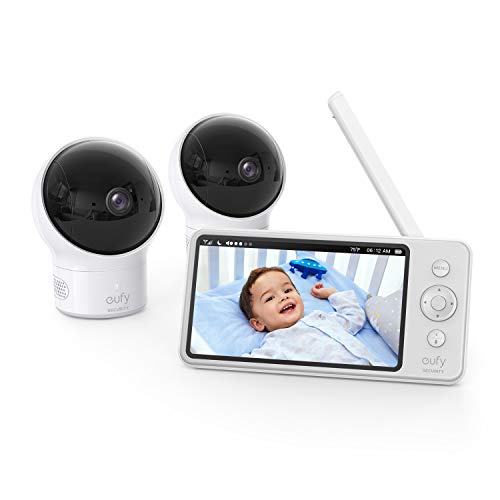
The Eufy SpaceView earns the lead spot with a bright 5-inch screen and a camera that pans across the nursery and tilts from floor to ceiling, so a baby who has moved to a corner stays in view. A wide-angle lens comes in the box, which helps the camera cover a whole crib and the space around it without moving the camera itself. Night vision, two-way audio, and a long range complete a calm, simple setup that needs no app and no home network to work.
Specs
- 5-inch LCD display with 720p HD resolution
- Wide-angle lens included in the box
- Pan 330 degrees and tilt 110 degrees
- Range up to 460 feet
- Night vision and two-way audio
- 2900mAh rechargeable battery built into the parent unit
- No WiFi connection needed
Best for: Parents who want the largest, clearest picture and a camera that can sweep across a whole nursery from one fixed spot.
Watch out for: The camera unit needs mains power at all times, so plan a socket near the crib and keep the cable out of reach.
2. Infant Optics DXR-8 PRO

The Infant Optics DXR-8 PRO suits parents who want control over the picture, because its interchangeable lens system lets the view change from a wide nursery scene to a closer look at the crib. Its patented active noise reduction, known as ANR, filters steady background hum from a fan or an air purifier, so a soft cry comes through more clearly. Pan, tilt, and zoom controls on the parent unit make it easy to follow a baby who has rolled, while the closed link keeps the video private.
Specs
- 5-inch display with 720p HD resolution
- Patented ANR active noise reduction
- No WiFi connection needed
- Pan, tilt, and zoom controls
- Interchangeable lenses included
- Sound-activated LED bar on the parent unit
- Dedicated volume and brightness controls
Best for: Parents who want to cut background hum and change lenses to suit a small nursery or a larger shared room.
Watch out for: The extra lens adds a small part to keep track of, so store it in a fixed place when it is not fitted to the camera.
3. VTech VM819

The VTech VM819 is the simplest monitor in this group, with a compact 2.8-inch screen, a fixed camera view, and controls that need little learning. Its long battery life and long range suit parents who move around the house during the day, from the kitchen to the garden, while still wanting to hear the nursery. Night vision, two-way audio, a temperature sensor, and lullabies cover the daily needs of a nursery without adding an app or a network setup to manage.
Specs
- 2.8-inch LCD screen
- Secure FHSS transmission with no WiFi needed
- Range up to 1,000 feet
- Night vision and two-way audio
- Temperature sensor built into the camera unit
- Lullabies included
- Long battery life for portable use
Best for: Parents and grandparents who want a light, simple monitor with long battery life for use around the house and garden.
Watch out for: The camera view stays fixed, because this model has no pan or tilt, so place it with care to cover the whole crib.
4. Babysense HD S2

The Babysense HD S2 is the pick for a home with two babies or two rooms to watch, because its 5-inch screen can show two cameras side by side at once. Each camera pans, tilts, and zooms from the parent unit, and the set can grow to four cameras as needs change. A night light, white noise, and lullabies sit beside the video features, while the closed FHSS link keeps the picture inside the home with no app and no account to set up.
Specs
- 5-inch HD split-screen display with 720p resolution
- Two cameras included, expandable to four cameras
- Range up to 1,000 feet
- Remote pan, tilt, and zoom with 4x zoom
- Night vision, night light, white noise, and lullabies
- Two-way audio
- 4000mAh battery in the parent unit
- 2.4GHz FHSS connection with no WiFi needed
Best for: Parents of twins, or parents who want to watch a nursery and a playroom on one screen at the same time.
Watch out for: Audio follows one camera at a time, so check which camera the sound is set to when both children are asleep.
Which One Fits Your Situation
You want the clearest picture in one nursery
Pick the Eufy SpaceView when one nursery is the main focus and a large, bright picture matters most. Its wide-angle lens and pan and tilt controls cover a crib, a changing area, and the floor beside it without moving the camera. The 5-inch screen also makes night checks easier, because small movements show up clearly even in a dark room. Keep the camera near a socket, place it high, and the rest of the setup stays simple.
You want to cut fan noise and change the view
Pick the Infant Optics DXR-8 PRO when a fan, an air purifier, or a humidifier hums near the crib and soft sounds get lost. Its active noise reduction filters that steady hum, while the interchangeable lenses let the view shift from wide to close. This suits a nursery where the camera sits far from the crib, or a shared room where the angle needs to change as the baby grows.
You want a light monitor for a grandparent or a small home
Pick the VTech VM819 when simplicity and portability matter more than a large screen. Its compact unit slips into a pocket or a bag, its battery lasts through a long day, and its fixed camera needs little adjustment once placed. Grandparents, caregivers, and parents in a flat will find the controls easy to learn, and the long range covers a garden or a nearby room with ease.
You need to watch two rooms or two babies at once
Pick the Babysense HD S2 when two cameras are needed on one screen. Twins, a nursery plus a toddler room, or a crib plus a play area all suit a split-screen view, and the set can grow to four cameras later. Remember that audio follows one camera at a time, so use the scan mode or switch the audio focus when both children need listening time.
Common Mistakes
- Placing the camera too close to the crib, which narrows the view and makes night vision glare worse instead of clearer.
- Putting the camera beside a WiFi router, a microwave, or another 2.4GHz device, which can disturb the closed link even when no WiFi is in use.
- Leaving the parent unit screen on full brightness all night, which drains the battery and lights up a dark bedroom.
- Mounting the camera where a curtain, a mobile, or a shelf blocks the pan and tilt range, then finding the baby out of view.
- Forgetting to check which camera the audio follows on a two-camera set, so a cry from the other room goes unheard.
Frequently Asked Questions
Does the Eufy SpaceView need WiFi to work?
No, the Eufy SpaceView works without WiFi. Its camera and parent unit talk over a closed digital link, so the picture and sound stay inside the home. Plug in the camera, charge the parent unit, and the monitor shows live video with no app, no account, and no home network needed. That closed link also means the monitor keeps working when the home internet drops.
How far can a no-WiFi baby monitor reach in a real home?
Listing range figures describe open space, so walls, floors, and large metal objects shorten the real reach. A monitor rated near 460 feet suits a flat or a small house, while one rated near 1,000 feet gives more room in a larger home or a garden. Walk around the house with the parent unit before the first night, and note any spot where the picture breaks up.
Can I add a second camera to a no-WiFi monitor later?
Many no-WiFi monitors can grow, but the limit depends on the model. The Babysense HD S2 in this guide can grow to four cameras, while other models have their own limits or none at all. Check the Amazon listing for the words expandable or add-on camera, and buy the matching camera from the same brand and range, because cameras from other brands will not pair.
Is a larger screen always better for a baby monitor?
A larger screen shows more detail and makes night checks easier, but it also adds weight and uses battery power faster. A 5-inch screen suits a bedside table and a fixed nursery, while a 2.8-inch screen suits carrying around the house or on trips. Choose the screen size that matches where the parent unit will live most of the time, not the largest size on the shelf.
Related guides
More from Amazon
Programs that pair well with the guide above. Offers and eligibility are set by Amazon and may change.
Set up recurring deliveries of everyday items on eligible products. Terms and savings are set by Amazon.
Explore Subscribe & SaveFree shipping on eligible items, Prime Video and more. Eligible new members can start with a free trial.
Start a Prime free trialAudiobooks and podcasts to listen to on the go. Eligible new members can start with a free trial.
Try Audible freeRead from a large library of eBooks and audiobooks on any device. Check Amazon for current plans.
Explore Kindle UnlimitedAs an Amazon Associate we earn from qualifying purchases.










Write Your Review
No reviews yet. Be the first to share your experience!