
Key takeaways
- Find a no-WiFi baby monitor with a split screen for two rooms. Compare five dual-camera sets, screen sizes, range, and camera limits before you choose.
What's inside
As an Amazon Associate I earn from qualifying purchases. This post may contain affiliate links at no extra cost to you.
Watching two little ones in separate rooms changes the way a parent shops for a monitor. A single-camera view forces constant switching, and a phone app adds accounts, passwords, and a home network into the middle of bedtime. A dedicated parent unit with no WiFi keeps the picture inside the house, while a true split screen puts both cribs side by side on one display. That combination suits twins, siblings in different rooms, and families who want one glance to cover the whole nursery floor.
This guide looks at five no-WiFi monitors that show two cameras at once, chosen from Amazon titles and listed specifications. Each set below includes two cameras, a parent unit with a split-screen mode, and a closed wireless link instead of a home network connection. Screen size, range, battery life, and camera limits differ from one model to the next, so the sections that follow explain how to weigh those details before picking one.
Quick Picks
As an Amazon Associate we earn from qualifying purchases
| Product | Best for | Key spec from title |
|---|---|---|
| Infant Optics DXR-8 PRO SS | Two rooms with sound from both cameras | 5-inch HD video baby monitor with 2 cameras |
| VTech VM5463-2 | Two rooms with pan-tilt-zoom cameras | 5-inch screen with 2 cameras and pan-tilt-zoom |
| Babysense HD S2 | Long range with a large split screen | 5-inch HD split-screen monitor with 2 cameras |
| Babysense V43 | A smaller parent unit for travel | 4.3-inch non-WiFi monitor with dual split screen |
| HelloBaby HB6560 | The largest screen in this group | 6-inch IPS split screen with 2 cameras, no WiFi |
How to Choose
True Split Screen or Scan Mode
A genuine split screen shows both camera feeds at the same time, side by side, so neither child disappears from view while you watch the other. Scan mode, by contrast, cycles from one camera to the next every few seconds, which means one room is always out of sight. Check the listing wording with care, because some monitors describe multi-camera support without showing two feeds together. Look for the phrase split-screen in the title or the viewing-mode field, and confirm that the bundle includes two cameras. If a set only adds a second camera later, the split-screen claim may depend on a separate purchase.
Screen Size and Picture Clarity
Screen size shapes how much detail you can see when two feeds share one display. A 6-inch screen gives each half more room, while a 4.3-inch screen keeps the parent unit compact enough to carry from room to room. Resolution matters too, because a 720p picture holds up better than a lower-resolution one when the image is divided. Night vision deserves a close look as well, since most checking happens after dark. Consider where the parent unit will sit, how far you will hold it from your eyes, and whether a larger display is worth the extra bulk.
How Many Cameras You Can Add
Two cameras cover twins or two bedrooms, yet some households later need a third view for a playroom or a grandparent’s room. A few systems in this group accept up to four cameras, while others cap the total at two and cannot expand. That limit is easy to miss, because a bundle with two cameras may still describe itself as expandable. Read the camera-count field before buying, and think about whether your family will grow or your rooms will change. Choosing a system with room to add a camera avoids replacing the whole set when a third view becomes useful.
Range, Battery, and Night Use
Range figures come from open-space conditions, so walls, floors, and other electronics in a real home shorten the distance a signal travels. A 1,000-foot claim may still cover a large house, but a smaller home with thick walls can test a weaker link. Battery life also varies with use: a screen left on drains the parent unit far faster than a sound-activated mode that wakes the display only when a child makes noise. Check the battery capacity, the listed hours with the screen on, and whether the cameras need a wall outlet. Those details decide whether the monitor lasts through the night.
The 5 Best Options
Infant Optics DXR-8 PRO SS
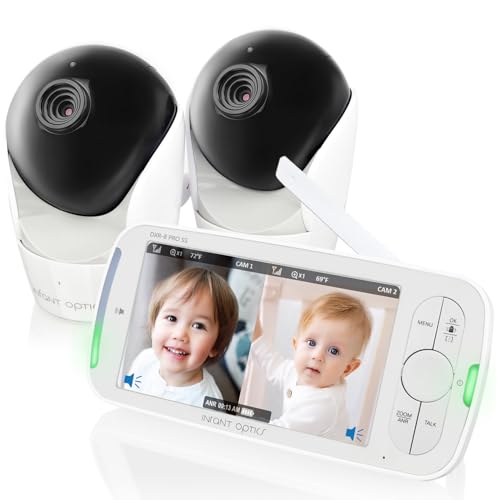
The Infant Optics DXR-8 PRO SS pairs a 5-inch HD parent unit with two cameras and shows both feeds at once, while its simultaneous dual audio lets sound from each room come through together. That pairing sets it apart from monitors that show two pictures but only play one room at a time. Its closed FHSS link runs without home WiFi, and the cameras pan, tilt, and zoom under remote control. Active Noise Reduction filters steady background hum so cries and stirring stand out more clearly, and interchangeable lenses allow a closer or wider view when the room layout changes.
Specs
- 5-inch HD video baby monitor with 2 cameras
- Split-screen and single view modes
- Patented simultaneous dual audio
- Patented Active Noise Reduction
- No WiFi, pan tilt zoom, hack-proof closed link
- Interchangeable lenses
Best for: Parents who want to hear both rooms at once while watching a split screen.
Watch out for: The split-screen model is a separate version from the single-view DXR-8 PRO, so confirm the SS model before buying.
VTech VM5463-2

The VTech VM5463-2 brings two remote pan-tilt-zoom cameras together with a 5-inch parent unit, and its split-screen mode places both rooms side by side without cycling between them. Each camera moves up to 270 degrees side to side and 120 degrees up and down, which helps when a crib sits in a corner or a toddler wanders across a room. A seven-color night light on each camera adjusts to room brightness and responds to sound, while two-way talk lets a parent soothe a child from another room. The secure transmission runs without WiFi, so no app or account is needed.
Specs
- 5-inch screen with 2 cameras
- Pan-tilt-zoom cameras with night light
- Split-screen, single view, and patrol modes
- Two-way talk and secure transmission, no WiFi
- Glow on the ceiling projector
- Expandable up to 2 cameras, both included
Best for: Families who want wide camera movement and a built-in night light in each room.
Watch out for: This system cannot add a third camera, so two rooms is the maximum it covers.
Babysense HD S2

The Babysense HD S2 combines a 5-inch HD split screen with two pan-tilt cameras and a 1,000-foot range, making it a strong match for larger homes and two-room setups. Both cameras appear side by side on the parent unit, and the system pairs with up to four cameras when extra units are added. A 4000mAh battery supports long stretches away from an outlet, and the listing quotes up to 20 hours in ECO mode and 12 hours with the screen on. Night vision, a night light, white noise, lullabies, and two-way audio round out a set that covers day and night use without WiFi.
Specs
- 5-inch HD split-screen baby monitor with 2 cameras
- 1000ft range and two-way audio
- 4X zoom and night vision
- 4000mAh battery
- Night light, white noise, and lullabies
- 2.4GHz FHSS technology, no WiFi
Best for: Larger homes where range and battery life matter as much as the split view.
Watch out for: Audio follows one camera at a time in split-screen mode, so sound from the second room is not heard at the same moment.
Babysense V43

The Babysense V43 uses a 4.3-inch screen to keep the parent unit light and easy to carry, while still showing two cameras side by side in split-screen mode. Its two pan-tilt-zoom cameras cover separate rooms, and the 2.4GHz FHSS link keeps the signal private without WiFi. Lullabies and white noise play from the cameras, two-way audio lets a parent answer a waking child, and auto night vision switches on when the room darkens. A smaller display means each half of the split view is more compact, yet the whole set travels well and fits easily on a nightstand.
Specs
- 4.3-inch non-WiFi baby monitor with 2 cameras
- Dual split screen with pan-tilt-zoom cameras
- Auto night vision and light
- Lullabies and white noise
- Two-way audio
- 2.4GHz FHSS technology
Best for: Parents who want a compact, portable parent unit that still shows two rooms at once.
Watch out for: The 4.3-inch display makes each split-screen half smaller than the halves on 5-inch and 6-inch models.
HelloBaby HB6560

The HelloBaby HB6560 carries the largest display in this group, a 6-inch IPS screen that gives each half of the split view generous room. Two cameras come in the box, both with pan-tilt-zoom control, and the system runs without WiFi over a private wireless link. A battery rated for up to 30 hours supports long use between charges, while VOX mode wakes the screen when sound is detected. Eight lullabies, two-way audio, night vision, and a 1,000-foot range complete a set built for parents who want the biggest picture of two rooms at once.
Specs
- 6-inch IPS split screen baby monitor with 2 cameras
- No WiFi, 30-hour battery
- 2-way audio and pan-tilt-zoom cameras
- VOX mode and night vision
- 8 lullabies
- 1000ft range
Best for: Parents who want the largest split-screen picture for two cribs or two rooms.
Watch out for: The 6-inch parent unit is bulkier than smaller models, so it suits a nightstand better than a pocket.
Which One Fits Your Situation
Twins in One Nursery
Twins sharing a nursery need two angles more than two rooms, and a split screen keeps both cribs in view without moving a camera. Place one camera over each crib, then use pan and tilt to fine-tune the framing as the babies grow and shift position. A model with sound from both cameras helps here, because two infants can stir. The Infant Optics DXR-8 PRO SS fits this setup, since its dual audio covers both cribs at once.
Siblings in Separate Bedrooms
Siblings in separate bedrooms need a monitor that reaches across walls and floors, so range and camera placement matter more than portability. Mount each camera high in its room, angle it toward the bed, and test the signal from the parent’s bedroom. A system that accepts extra cameras also leaves room for a third child later. The Babysense HD S2 suits this layout, thanks to its long range and support for up to four cameras.
A Small Home or Apartment
A small home or apartment rarely tests the limits of range, so screen size and portability can guide the choice instead. A compact parent unit moves easily around the home, and a shorter range still covers every corner. Two cameras still earn their place when a baby naps in one room while a toddler plays in another. The Babysense V43 fits this setting, because its 4.3-inch unit stays light while still showing both rooms side by side.
Grandparents or a Caregiver Watching Two Rooms
Grandparents and caregivers often prefer the simplest controls, a large clear picture, and a battery that lasts through a long visit. A bigger screen reduces squinting when two small feeds share the display, and a long battery life means fewer trips to an outlet. Two-way talk also helps a caregiver answer a child without walking down the hall. The HelloBaby HB6560 fits this situation, with its 6-inch screen, long battery life, and straightforward split-screen view.
Common Mistakes
- Buying a monitor that only scans between cameras and expecting a true split screen with both feeds visible at once.
- Assuming a two-camera bundle can always add a third camera, when some systems cap the total at two.
- Trusting an open-space range figure without testing the signal through the walls and floors of your own home.
- Choosing the smallest screen to save space, then finding each half of the split view too small to read at night.
- Placing cameras where a crib rail, curtain, or shelf blocks part of the view, then blaming the picture quality.
Frequently Asked Questions
Does a no-WiFi baby monitor still need an internet connection?
No, a no-WiFi monitor links its cameras to the parent unit over a closed wireless signal, usually FHSS, with no router, app, or account involved. The picture stays inside your home, and you cannot view it from a phone away from the house. That closed link is the main reason many parents choose this type over app-based monitors.
Can I see both cameras at the same time on a split screen?
Yes, when the monitor has a true split-screen mode, both camera feeds appear side by side on the parent unit at the same time. Some models only cycle between cameras in scan mode, which is not the same thing. Check the listing for split-screen wording and confirm two cameras come in the box before buying.
How many cameras can I add to a split-screen monitor?
That depends on the model. Some systems in this guide accept up to four cameras, while others cap the total at two and cannot expand. The camera limit appears in the listing specifications, so read it before buying if a third room may need coverage later. Adding a camera from a different brand will not work with a closed system.
Is split-screen audio available from both cameras at once?
Most split-screen monitors play sound from one camera at a time, even while showing both pictures. A few models, such as the Infant Optics DXR-8 PRO SS with simultaneous dual audio, play sound from both rooms together. If hearing both children at once matters to you, check the audio description in the listing rather than assuming the video mode applies to sound.
Related guides
More from Amazon
Programs that pair well with the guide above. Offers and eligibility are set by Amazon and may change.
Set up recurring deliveries of everyday items on eligible products. Terms and savings are set by Amazon.
Explore Subscribe & SaveFree shipping on eligible items, Prime Video and more. Eligible new members can start with a free trial.
Start a Prime free trialAudiobooks and podcasts to listen to on the go. Eligible new members can start with a free trial.
Try Audible freeRead from a large library of eBooks and audiobooks on any device. Check Amazon for current plans.
Explore Kindle UnlimitedAs an Amazon Associate we earn from qualifying purchases.










Write Your Review
No reviews yet. Be the first to share your experience!