
Key takeaways
- Compare connected multi-user blood pressure monitors with large, easy-to-read displays. Find the right model for shared households and simple app syncing.
What's inside
As an Amazon Associate I earn from qualifying purchases. This post may contain affiliate links at no extra cost to you.
Sharing one blood pressure monitor between two or more people sounds simple until the histories get mixed up. One person checks a reading from last Tuesday and cannot tell whose it was, or the numbers on the screen are too small to read without glasses. A connected monitor with separate user profiles and a clear display solves both problems at once, keeping each person’s stored readings apart while showing the latest result in large, legible figures.
This guide is for couples, families, and shared households where more than one person uses the same monitor, and for anyone who wants a display that is easy to read at arm’s length. Every model below was chosen from its Amazon listing title and listed specifications, with attention to how many users it stores, how its display presents results, and how it connects to a phone app.
Quick Picks
As an Amazon Associate we earn from qualifying purchases.
| Product | Best for | Key spec from title |
|---|---|---|
| OMRON Platinum BP5450 | Two-person households wanting a backlit display | High-contrast backlit dual display, 200 readings for two users |
| OMRON 10 Series BP7450 | Couples who want averaging and app storage | TruRead averaging, 100 readings per user, Bluetooth |
| OMRON 7 Series BP7350 | Side-by-side reading comparisons | Dual LCD comparison display, 60 readings per user |
| Withings BPM Connect | App-first households with several profiles | Wi-Fi and Bluetooth sync, color-coded feedback display |
| A&D Medical UA-767FAC | Four-person households without phone dependence | Four user profiles, 60 readings per user |
How to Choose
Separate user profiles
Begin with how many people will actually use the monitor, because that number decides whether a model fits at all. A two-user monitor stores one history for each of two people, usually selected with a switch before measuring, while a four-user model gives every person in a larger household a separate slot. Guest mode matters too: it lets a visitor take a single measurement without overwriting anyone’s stored history. Before ordering, count the regular users in your home, then check that the monitor stores at least that many profiles on the device itself, not only inside the phone app.
Display readability
A monitor is only useful if the person using it can read the result straight away, so look closely at how the display is described. Large digits, a backlit screen, and high contrast all help in dim rooms and for eyesight that is not as sharp as it used to be. Some screens show the current reading beside the previous one, which makes a quick comparison possible without opening memory menus. Color coding adds another cue, using a different shade to mark where a reading sits. If possible, check the listed display type and the layout shown in the product images before deciding.
Connectivity and app storage
Bluetooth and Wi-Fi change what happens after a measurement is taken. A Bluetooth monitor sends readings to a phone app when the phone is nearby, while a Wi-Fi model can sync without the phone being in the room. App storage is usually unlimited, which matters when on-device memory fills up after a few months of regular use. Check which phones the app supports, because listings often note compatibility with selected iOS and Android devices. Also confirm whether the app keeps separate profiles, since that is what stops one person’s history from blending into another’s.
Cuff fit and everyday setup
Cuff size decides comfort and fit more than any other physical detail, so measure the upper arm before ordering. Many of the monitors below come with a wide-range cuff that fits arms from about 22 to 42 cm, while others use a pre-formed cuff in a similar range. A cuff that is too tight or too loose is awkward to position and hard to keep in place. Power matters as well: some models run on AA batteries, some include an AC adapter, and one charges over USB. Think about where the monitor will live, who will set it up, and whether a mains adapter or rechargeable battery suits that spot better.
The 5 Best Options
OMRON Platinum BP5450

The Platinum sits at the top of this list for households that want a bright, easy-to-read screen and straightforward two-user storage. Its high-contrast backlit dual display shows the current reading alongside the previous one, so a quick glance gives context without digging through menus. Bluetooth sends readings to the OMRON Connect app, where history can be kept beyond the 200 readings stored on the device. An included AC adapter means it can stay plugged in at a bedside table or kitchen counter.
Specs
- Upper-arm monitor with Bluetooth connectivity to the OMRON Connect app
- High-contrast backlit dual display
- Stores up to 200 readings for two users, 100 readings each
- Wide-range D-ring cuff
- Irregular heartbeat indicator
- Includes AC adapter, four AA batteries, and a storage case
Best for: Two-person households that want a bright backlit display and app syncing.
Watch out for: Check phone compatibility for the OMRON Connect app before ordering, since the listing notes selected iOS and Android devices.
OMRON 10 Series BP7450

The 10 Series suits couples who take readings often and want the monitor to handle averaging for them. Its TruRead feature takes three consecutive measurements and shows the average, which reduces the effect of a single unusual reading. Two-user storage holds 100 readings per person on the device, and Bluetooth syncing moves history into the OMRON Connect app for longer-term keeping. The wide-range cuff and the large display keep the daily routine simple, with no small buttons to hunt for.
Specs
- Upper-arm monitor with Bluetooth connectivity to the OMRON Connect app
- TruRead averaging across three consecutive measurements
- Stores up to 100 readings per user for two users
- Advanced Accuracy technology, measuring more data points per reading
- Wide-range cuff
- Irregular heartbeat indicator
Best for: Couples who measure often and want averaged readings plus app history.
Watch out for: Averaging takes three measurements in a row, so allow extra time compared with a single-measurement routine.
OMRON 7 Series BP7350
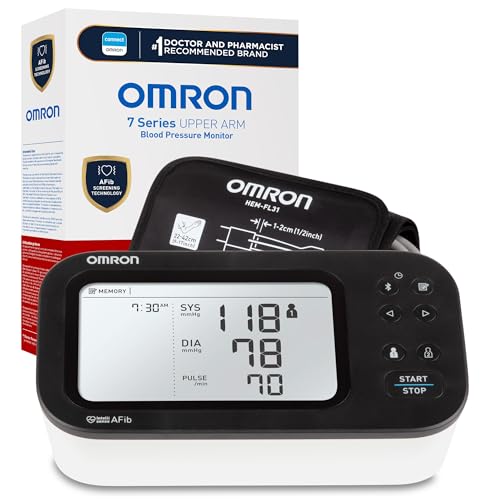
The 7 Series earns its place through its dual LCD, which places the latest reading beside the previous one for an instant comparison. That layout is genuinely helpful when two people share the device and want to see change at a glance rather than scrolling through stored results. It stores 60 readings per user for two users, with a guest mode for a one-off measurement that should not be saved. Bluetooth connects to the OMRON Connect app, and the pre-formed Easy-Wrap ComFit cuff helps the cuff sit correctly on the arm.
Specs
- Upper-arm monitor with Bluetooth connectivity to the OMRON Connect app
- Dual LCD display showing current reading beside the previous reading
- Stores 60 readings per user for two users, 120 readings in total
- Guest mode for a single measurement without saving
- Easy-Wrap ComFit cuff fitting arms 9 to 17 inches (22 to 42 cm)
- Irregular heartbeat indicator and body movement detection
Best for: Households that want to compare each new reading with the last one on screen.
Watch out for: The screen is an LCD without backlighting, so it is harder to read in a dim room than a backlit model.
Withings BPM Connect

The Withings BPM Connect takes a different approach, packing the monitor into the cuff itself and leaning on the Health Mate app for history. Wi-Fi and Bluetooth both sync readings, and the app supports multiple user profiles plus a guest mode, so several people can share one device without mixing their records. Results appear on the device with color-coded feedback, giving a quick visual cue before the full numbers are checked in the app. A rechargeable battery lasts for months between charges, which suits a monitor that moves between rooms.
Specs
- Upper-arm monitor with Wi-Fi and Bluetooth connectivity to the Health Mate app
- Color-coded feedback on the device display
- Multiple user profiles and guest mode in the app
- Integrated cuff fitting arms 22 to 42 cm
- Rechargeable battery with up to six months of use per charge
- Heart rate shown alongside blood pressure readings
Best for: App-first households that want Wi-Fi syncing and several profiles in one account.
Watch out for: The on-device display is compact, so detailed history and trends live in the app rather than on the monitor itself.
A&D Medical UA-767FAC

The A&D UA-767FAC is the pick for larger households that want four separate histories without depending on a phone. It stores 60 readings for each of four users directly on the device, selected before measuring, which keeps every person’s record apart even if nobody installs an app. Snapshot Averaging calculates an average from stored readings, and the wide-range cuff fits arms from 8.6 to 16.5 inches. An AC adapter and four AA batteries are included, along with a carrying case for storage between uses.
Specs
- Upper-arm monitor with four separate user profiles
- Stores 60 readings per user, 240 readings in total
- Wide-range cuff fitting arms 8.6 to 16.5 inches (22 to 42 cm)
- Snapshot Averaging from stored readings
- Irregular heartbeat indicator
- Includes AC adapter, four AA batteries, and a carrying case
Best for: Four-person households that want separate on-device histories without phone syncing.
Watch out for: Confirm which app features, if any, are listed for this exact model, since some listings for this family describe app syncing differently.
Which One Fits Your Situation
Two people sharing one monitor
Pick the OMRON Platinum BP5450 when two people share a monitor and readability matters most. Its backlit dual display is the clearest screen in this list, and 100 readings per person gives both users plenty of on-device history. The OMRON 10 Series BP7450 is the alternative when averaging matters more, since TruRead smooths out single unusual readings before they are stored.
A larger household with three or four users
Choose the A&D Medical UA-767FAC, because it is the only model here with four on-device user profiles. Each person gets 60 stored readings, and nobody needs a phone app to keep the histories separate. For households where everyone is comfortable with an app, the Withings BPM Connect can also cover several profiles through Health Mate, though its history lives mainly on the phone.
Low light or weaker eyesight
Go for a backlit display first, which points to the OMRON Platinum BP5450. Large digits and a lit screen make results readable without leaning in or switching on a bright lamp. The OMRON 10 Series BP7450 is a second option with a large display, while the OMRON 7 Series BP7350 is best avoided in dim rooms because its LCD has no backlight.
App-first tracking and sharing
Choose the Withings BPM Connect when syncing and sharing matter most. Wi-Fi sends readings to the Health Mate app without the phone nearby, and multiple profiles keep each person’s history separate in one account. The OMRON models are the fallback when a large on-device display matters as much as the app, since they show more detail on the monitor itself.
Common Mistakes
- Skipping the user switch before measuring, so a reading lands in the other person’s stored history.
- Choosing a monitor by the series name alone, since brands reuse names such as 7 Series for wrist and upper-arm models with different features.
- Assuming every phone works with the companion app, when listings often limit support to selected iOS and Android devices.
- Ordering without measuring the upper arm, then finding the included cuff does not fit comfortably.
- Relying on on-device memory alone and never syncing, so older readings are lost once the stored limit is reached.
Frequently Asked Questions
How many users can a connected blood pressure monitor store?
Most connected upper-arm monitors in this guide store two users on the device, with 60 to 100 readings per person depending on the model. The A&D UA-767FAC stores four users with 60 readings each. Companion apps often support additional profiles beyond the on-device limit, so check the app description when more than two people will use the monitor regularly.
What makes a display accessible on a blood pressure monitor?
An accessible display uses large digits, strong contrast, and a layout that shows systolic, diastolic, and pulse readings without crowding. Backlighting helps in dim rooms, and a dual display that shows the previous reading beside the current one adds useful context. Color-coded feedback gives a quick visual cue, though the numbers themselves remain the part to check.
Do connected monitors need a phone to work?
No, all five monitors here take measurements and show results on the device without a phone. The phone connection adds storage, trend views, and sharing, and some models sync over Wi-Fi without the phone nearby. Without the app, history is limited to what the monitor stores on the device, so syncing matters for long-term records.
Can a guest use a shared monitor without saving a reading?
Yes, several models include a guest mode that takes a single measurement without adding it to any stored user history. On monitors without a named guest mode, the usual workaround is to take the measurement and delete it afterwards, though that is less reliable. Check the listing or manual for guest mode before ordering when visitors will use the monitor.
Related guides
More from Amazon
Programs that pair well with the guide above. Offers and eligibility are set by Amazon and may change.
Set up recurring deliveries of everyday items on eligible products. Terms and savings are set by Amazon.
Explore Subscribe & SaveFree shipping on eligible items, Prime Video and more. Eligible new members can start with a free trial.
Start a Prime free trialAudiobooks and podcasts to listen to on the go. Eligible new members can start with a free trial.
Try Audible freeRead from a large library of eBooks and audiobooks on any device. Check Amazon for current plans.
Explore Kindle UnlimitedAs an Amazon Associate we earn from qualifying purchases.










Write Your Review
No reviews yet. Be the first to share your experience!