
Key takeaways
- Find the best baby monitor for Singapore homes: WiFi and no-WiFi picks with strong range, clear night vision and two-way audio for HDB flats and condos.
What's inside
As an Amazon Associate I earn from qualifying purchases. This post may contain affiliate links at no extra cost to you.
Choosing a baby monitor in Singapore means weighing a different set of trade-offs than a buyer in a large suburban house. HDB flats and condos pack bedrooms, living rooms and kitchens into compact floor plans divided by concrete walls, so a monitor can lose its signal two rooms away. Parents here also juggle helpers, grandparents and night feeds, which makes two-way audio, clear night vision and a screen a tired adult can read at 3 a.m. matter far more than a long feature list.

This guide is for parents setting up a nursery in a flat, for grandparents who watch the baby while parents are at work, and for families who want a monitor that a helper can use without fuss. Every product below was chosen from its Amazon title and listed specifications, with a mix of WiFi and no-WiFi models so you can match the monitor to your home, your internet habits and your comfort with apps.
Quick Picks
As an Amazon Associate we earn from qualifying purchases.
| Product | Best for | Key spec from title |
|---|---|---|
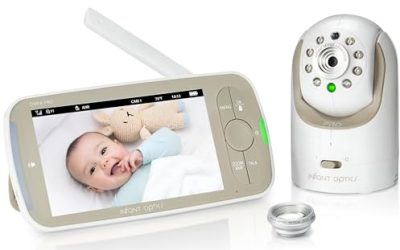
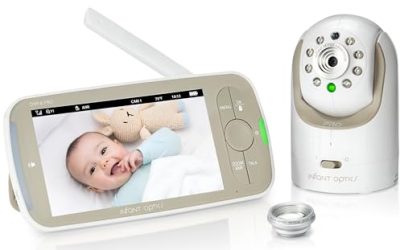
| Infant Optics DXR-8 Pro | Privacy-first homes that want no WiFi at all | 720p HD, 5-inch display, no WiFi |
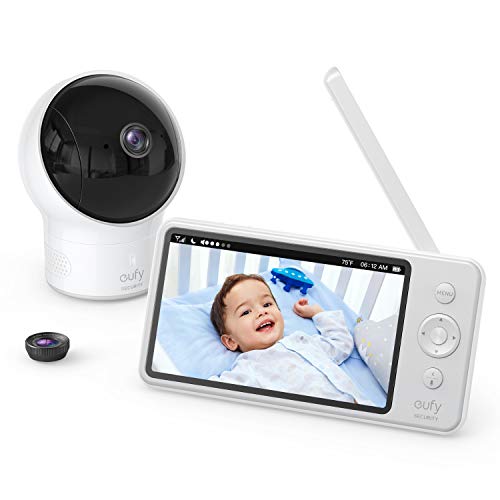
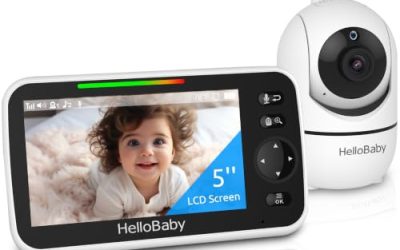
| eufy Security SpaceView | Long battery life and a wide view of the cot | 5-inch 720p LCD, 460 ft range |
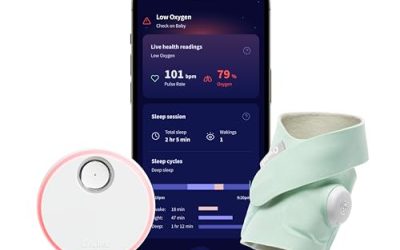
| Nanit Pro with Flex Stand | Phone-based viewing with sleep tracking | 1080p WiFi camera, breathing band included |
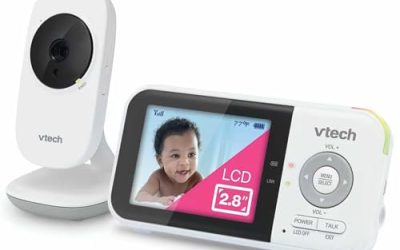
| VTech VM901 | A parent unit plus a free phone app | 1080p camera, 5-inch HD IPS display |
How to Choose
Range Through Concrete Walls
Range figures on a box are measured in open air, and a Singapore flat is anything but. Concrete walls, metal doors and a neighbour’s WiFi network all eat into signal, so treat the headline range as a best case. A no-WiFi monitor uses its own closed radio link, which often holds up better through two or three walls than home WiFi stretched to a far bedroom. Think about where the camera will sit and where you will carry the parent unit: kitchen, living room and study. If the signal must cross the whole flat, a strong dedicated link and an out-of-range alert matter more than a bigger screen.
Camera Clarity and Night Vision
Night vision does most of the work in a baby monitor, because the hours you check most are the hours the room is dark. Look for a camera that switches to infrared automatically and shows a clear image of the cot, and check the resolution in the listing title: 720p shows whether your baby is awake, while 1080p shows finer detail such as a hand near the face. Pan, tilt and zoom matter in a small nursery, where a fixed camera may catch only half the cot once your baby can roll. A wide-angle lens helps in tight rooms, and a camera that pans from the parent unit lets you follow a crawling baby without waking them.
Audio That Cuts Through the Noise
A monitor is only useful if you can hear your baby over the sounds of a working flat: the air conditioner, the fan, the washing machine and traffic from the road below. Two-way audio lets you soothe your baby with your voice before you get out of bed. Active noise reduction, found on some no-WiFi models, filters steady background hum so cries come through clearly instead of being buried under fan noise. Sound-activated lights on the parent unit are useful too, because they let you glance at the monitor during a phone call or while the television is on. Check whether the listing mentions adjustable volume and a sound-level indicator before you buy.
Parent Unit or Phone App
The biggest fork in the road is whether you want a dedicated parent unit or a phone app. A parent unit is always on, needs no WiFi, and can be handed to a grandparent or helper who may not want another app on their phone. A WiFi camera with an app lets you check on the baby from the office or the supermarket, and it usually adds notifications for sound, motion and crying. Some models give you both, with a parent unit for home and an app for when you are out. If a helper or grandparent uses it most, a simple parent unit wins, while parents who travel or work late get more from an app.
The 4 Best Options
Infant Optics DXR-8 Pro
The DXR-8 Pro suits parents who want a monitor that simply works, with no WiFi, no app and no account to set up. Its closed radio link keeps video private inside your home, and its interchangeable lenses widen the view in a small nursery or zoom in on the cot. Active noise reduction filters out fan and air-conditioner hum so you hear your baby rather than the room. In an HDB flat, its direct link holds up through concrete walls, and the parent unit is easy for a grandparent to use.
Specs
- 720p HD resolution video
- 5-inch display on the parent unit
- No WiFi connection needed
- Pan, tilt and zoom camera control
- Interchangeable lenses included
- Patented Active Noise Reduction (ANR)
- Sound-activated LED bar
Best for: Families who want a private, no-WiFi monitor that is simple for grandparents and helpers to use.
Watch out for: No phone app, so you cannot check the camera when you are away from home; confirm the US plug works with a Type G adapter in Singapore.
eufy Security SpaceView
The SpaceView is a strong fit for parents who want a big, clear screen and a battery that lasts through the night and into the next day. Its five-inch 720p display shows the cot in sharp detail, the camera pans wide across the room, and the included wide-angle lens covers a whole nursery corner without moving the camera. With a listed range of 460 feet in open air and a battery rated for long monitoring, it handles a full flat better than most no-WiFi rivals. Two-way audio and night vision round out a package that needs no internet and no subscription.
Specs
- 5-inch 720p LCD display
- 460 ft range in open air
- Night vision
- Two-way audio
- 2900mAh rechargeable battery with 15-hour monitoring
- 330-degree pan and 110-degree tilt
- Wide-angle lens included
Best for: Parents who want a large screen, a long-lasting battery and a wide view of the nursery without WiFi.
Watch out for: Some older listings show limited availability, so confirm the listing is live before ordering; the US plug needs a Type G adapter for Singapore sockets.
Nanit Pro with Flex Stand
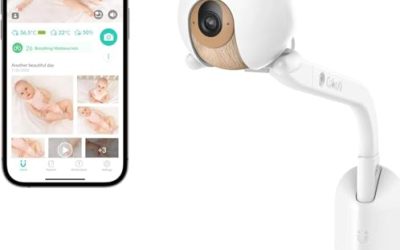
The Nanit Pro is the pick for parents who live on their phones and want more than a live picture. Its 1080p WiFi camera pairs with an app that sends sound, motion and cry notifications, and the included breathing band works with the camera to track sleep and breathing motion through the night. The flex stand makes it easy to move the camera between rooms or take it along when visiting grandparents, which suits families who split childcare between homes. In a compact flat, the overhead view from the stand gives a clear picture of the whole cot without mounting anything on the wall.
Specs
- 1080p Wi-Fi video camera
- Sensor-free sleep and breathing-motion tracker
- Two-way audio
- Sound, motion and cry notifications
- Night vision
- Breathing band included
- Flex stand included
Best for: Tech-comfortable parents who want phone viewing, notifications and sleep tracking from one camera.
Watch out for: It needs stable home WiFi, so a weak router in a far bedroom can hurt performance; check whether any app features need a paid plan.
VTech VM901

The VM901 gives Singapore families the best of both worlds: a dedicated five-inch parent unit for use at home and a free app for checking in when you are out. Its 1080p camera and HD IPS display show a bright, clear picture, while remote pan, tilt and zoom let you follow a moving baby from the sofa. Motion and temperature alerts add peace of mind during afternoon naps in a warm flat, and two-way talk lets you soothe your baby without entering the room. For a household where parents, grandparents and a helper take turns, the mix of parent unit and app is hard to beat.
Specs
- 1080p FHD camera
- 5-inch HD IPS display on the parent unit
- Free app with remote access
- Remote pan, tilt and zoom
- Night vision
- Motion detection alerts
- Two-way talk and temperature alerts
Best for: Households where parents, grandparents and a helper share baby duty and want both a parent unit and an app.
Watch out for: The WiFi features depend on your home network, so place the camera within good router range; the US plug needs a Type G adapter in Singapore.
Which One Fits Your Situation
You live in a small HDB flat and want privacy
Pick the Infant Optics DXR-8 Pro. Its closed no-WiFi link keeps video inside your home and pushes through concrete walls reliably, while the interchangeable lenses and noise reduction suit a compact nursery with a fan or air conditioner running. There is no app to set up and no account to manage.
You want a big screen and a battery that lasts all night
Pick the eufy Security SpaceView. The five-inch 720p display is easy to read from across the room, the wide-angle lens covers the whole cot, and the long battery life means the parent unit stays alive from bedtime through the morning without a mid-night recharge, so you can leave the charger in a drawer until the next day.
You check on your baby from your phone
Pick the Nanit Pro with Flex Stand. Its 1080p WiFi camera, app notifications and breathing band give you a full picture of the night from anywhere, and the flex stand lets you move it between rooms or carry it to a grandparent’s home with ease. You can check in from the office, and the sleep tracking shows patterns across the week.
Grandparents and a helper share the watching
Pick the VTech VM901. The dedicated parent unit is simple enough for anyone to use at home, while the free app lets working parents check in from the office, and two-way talk helps the whole household coordinate without shouting across the flat. No one needs to learn a new app, and each person can use whichever screen suits them.
Common Mistakes
- Buying on headline range alone: open-air range means little once concrete walls and a neighbour’s WiFi get in the way, so favour a strong dedicated link or a camera placed near the router.
- Mounting the camera too close to the cot: a camera pressed against the cot shows only a corner of the mattress, while a little distance and a wide lens show the whole sleeping area.
- Ignoring the plug: Amazon US listings ship with a US plug, so check the adapter label for 100-240V support and use a Type G adapter before plugging in.
- Picking WiFi when the router is weak: a camera in a far bedroom on a struggling router will drop out at night, so test your WiFi strength in the nursery first.
- Forgetting who else will use it: a monitor only the parents can operate fails when a grandparent or helper takes over, so choose controls they can manage too.
Frequently Asked Questions
Do I need WiFi for a baby monitor in Singapore?
No, and many families prefer not to use it. No-WiFi monitors such as the Infant Optics DXR-8 Pro and the eufy SpaceView use a closed radio link between camera and parent unit, which works through concrete walls and keeps video off the internet. WiFi models add phone viewing and notifications, so choose based on whether you need to check in while away from home.
Will a US baby monitor work with Singapore power sockets?
Singapore uses Type G three-pin sockets at 230V, while Amazon US listings ship with a US plug. Most modern monitor adapters support 100-240V, but always read the label on the adapter itself before use. You will need a Type G travel adapter, and a model with a USB-powered parent unit is the easiest to charge locally.
What range do I need for an HDB flat?
A typical HDB flat is far smaller than the open-air range on any box, but concrete walls cut signal sharply. A monitor rated for a few hundred feet in open air usually covers a three- to five-room flat comfortably. If the nursery sits far from the living room, favour a no-WiFi model with a dedicated link or keep a WiFi camera within strong router range.
Can grandparents and helpers use these monitors easily?
Yes, if you pick the right type. A dedicated parent unit with physical buttons is the easiest for grandparents and helpers, since there is no app, login or phone needed. Models like the VTech VM901 pair that simple parent unit with an app for parents, so each person in the household can use whichever screen suits them best.
Related guides
More from Amazon
Programs that pair well with the guide above. Offers and eligibility are set by Amazon and may change.
Set up recurring deliveries of everyday items on eligible products. Terms and savings are set by Amazon.
Explore Subscribe & SaveFree shipping on eligible items, Prime Video and more. Eligible new members can start with a free trial.
Start a Prime free trialAudiobooks and podcasts to listen to on the go. Eligible new members can start with a free trial.
Try Audible freeRead from a large library of eBooks and audiobooks on any device. Check Amazon for current plans.
Explore Kindle UnlimitedAs an Amazon Associate we earn from qualifying purchases.
Write Your Review
No reviews yet. Be the first to share your experience!