
Key takeaways
- Compare the best value baby monitors for New Zealand homes: sharp night vision, long range, two-way talk and room for a second camera, minus the extras.
What's inside
As an Amazon Associate I earn from qualifying purchases. This post may contain affiliate links at no extra cost to you.
Choosing a baby monitor on a budget is less about finding the lowest number and more about matching the features to the way your household actually lives. A monitor earns its place when its signal reaches the bedroom at the far end of the hall, its night vision shows your baby clearly in a dark room, and its two-way talk lets you soothe from the kitchen without waking anyone. Extras such as apps, sensors and cloud storage sound impressive, yet many families never use them — and each one adds setup steps or another thing that can go wrong at night.


This guide is for parents in New Zealand homes with thick walls or two levels, for grandparents who want a simple screen with no app, and for families watching two rooms at once. Every monitor below was chosen from its Amazon title and listed specifications, and each one is a video monitor with a dedicated parent unit — no audio-only models and no breathing sensors in this set.
Quick Picks
As an Amazon Associate we earn from qualifying purchases.
| Product | Best for | Key spec from title |
|---|---|---|
| HelloBaby HB65 | A first monitor for one room on a tight budget | 3.2-inch LCD with remote pan-tilt-zoom |
| HelloBaby HB6351Plus-2 | Watching two rooms on one split screen | 6-inch IPS split screen with 2 cameras |
| HelloBaby HB6560 | Long nights away from a power point | 6-inch IPS screen with 30-hour battery |
| Motorola MBP36S-2 | Two rooms with a trusted brand name | Two cameras with 3.5-inch LCD screen |
How to Choose
Range That Reaches Every Room
Range is the first thing to check, because a monitor that drops its signal halfway down the hall is useless no matter how sharp its picture looks. Most models in this guide list a range of around 1000 feet, yet walls, floors and appliances all shorten that figure inside a real house. In a New Zealand home with concrete block walls or a timber-framed two-storey layout, the usable distance can fall to a fraction of the headline number. Look for a model with a clear out-of-range alert so you know the moment the link breaks, and place the camera high on a shelf or wall mount where furniture and bedding cannot block the signal path to the parent unit.
Screen Size and Night Vision
Screen size decides how much you can actually see without squinting at a tiny display in a dark lounge. A 3.2-inch screen keeps the parent unit pocket-sized and easy to carry from room to room, while a 6-inch IPS screen shows more detail and stays readable from a wider angle when the unit sits on a bedside table. Night vision matters just as much: infrared LEDs let the camera show your baby in a completely dark nursery, and a good sensor keeps the picture steady rather than flickering as the room light changes. Check that the camera switches to night mode on its own, so you never have to remember to turn it on after the lights go out.
Cameras: One, Two, or Room to Grow
One camera covers one cot, and for many families that is all they will ever need. A second camera becomes worth having when a toddler moves into a separate room, when twins share the nursery in two cots, or when you want a view of the play area as well as the bedroom. Two-camera bundles cost more than a single-camera set, yet they usually work out better than buying a second camera later, since add-on cameras are not always sold on their own and may not pair with an older parent unit. Before you settle on a single-camera model, check whether the parent unit can pair with extra cameras at all, and how many it supports.
Battery Life and Everyday Extras
Battery life decides whether the parent unit stays by your side through the night or spends the evening tethered to a charger. Models with a power-saving mode switch the screen off while the audio keeps running, then wake the display the moment your baby stirs — and that feature can stretch a charge across a night. Look for VOX mode, two-way talk and lullabies as the extras that help: VOX keeps the screen quiet until there is sound to hear, two-way talk lets you comfort your baby without entering the room, and lullabies can settle a restless one. Temperature alerts are handy too, since a nursery that drifts too warm or too cold is easy to miss in the dark.
The 4 Best Options
HelloBaby HB65
The HB65 is the simplest way into a video monitor, and its value comes from doing the basics well rather than piling on extras. Its 3.2-inch screen is small enough to slip into a pocket or rest on a bedside table, while pan, tilt and zoom let you follow your baby around the cot without entering the room. Infrared night vision keeps the picture visible after dark, the temperature display warns you when the nursery drifts out of range, and two-way audio means you can soothe with your voice from the next room. In power-saving mode it runs for up to 12 hours, which covers a night for most families.
Specs
- 3.2-inch color LCD screen
- Remote camera pan-tilt-zoom
- Infrared night vision
- Room temperature display
- Built-in lullabies
- Two-way audio
- Up to 12 hours in power-saving mode
Best for: A first video monitor for one room, or a travel spare.
Watch out for: This is a single-camera set, so check that one camera covers your whole nursery before you buy.
HelloBaby HB6351Plus-2
Two rooms, one screen — that is the whole point of this HelloBaby set, and it is where its value shows most clearly. The 6-inch IPS display splits to show both cameras at once, so you can watch a baby in the nursery and a toddler in the next room without switching back and forth. Each camera pans, tilts and zooms from the parent unit, night vision keeps both pictures visible after dark, and temperature monitoring watches both rooms for you. Because the link runs without Wi-Fi, setup stays simple: plug in the cameras, pair them once, and the monitor is ready to use.
Specs
- 6-inch IPS large screen
- Split-screen view with 2 cameras included
- Remote pan-tilt-zoom camera
- Night vision
- Temperature monitoring
- No-WiFi connection
Best for: Families watching two rooms on one screen.
Watch out for: The split screen shows each camera smaller than a full-screen view, so check the picture still feels clear enough at a glance.
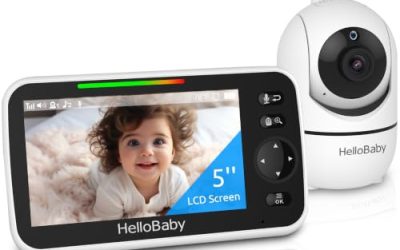
HelloBaby HB6560
The HB6560 suits parents who want a big, clear screen and a battery that does not quit halfway through the night. Its 6-inch IPS display is the largest in this guide, and the wide viewing angle means the picture stays readable when the unit sits at an angle on a nightstand. A battery life of up to 30 hours is generous even with the screen in regular use, and VOX mode stretches it further by switching the display off until your baby makes a sound. Pan-tilt control, infrared night vision, two-way talk, eight lullabies and temperature alerts round out a set that asks little of you in return.
Specs
- 6-inch IPS screen
- Up to 30-hour battery life
- No-WiFi secure connection
- Pan-tilt video camera
- Infrared night vision
- VOX mode
- Two-way talk
- 1000ft range
- 8 lullabies
- Temperature alerts
Best for: Parents who want the biggest screen and the longest battery life in this guide.
Watch out for: A 6-inch parent unit is bulkier than a pocket-sized one, so check it fits where you plan to keep it overnight.
Motorola MBP36S-2
Motorola brings a familiar name to this two-camera set, and the MBP36S-2 pairs that reassurance with a straightforward feature list. Two cameras watch two rooms from day one, and the 3.5-inch LCD screen keeps the parent unit compact enough to carry around the house. Remote pan, tilt and zoom let you scan each room without walking down the hall, infrared night vision keeps both pictures visible after dark, and five lullabies give you a way to settle a restless baby from another room. Room temperature display and two-way audio complete a kit that covers the essentials for two rooms without adding an app or a subscription.
Specs
- Two cameras included
- 3.5-inch LCD color screen
- Remote pan, tilt and zoom
- Two-way audio
- Infrared night vision
- 5 lullabies
- Room temperature display
- 1000ft range
Best for: Two-room households that prefer a well-known brand.
Watch out for: The 3.5-inch screen is the smallest here, so two-camera viewing means a smaller picture for each room.
Which One Fits Your Situation
One Bedroom in a Small Flat
Pick the HelloBaby HB65. One room needs one camera, and the HB65 covers it with pan-tilt-zoom, night vision and two-way talk in a unit small enough to carry anywhere. Its power-saving mode runs through the night, and there is nothing extra to set up or learn. Keep the second-camera models in mind only if a second child is on the way soon.
A Two-Storey or Long Hallway Home
Pick the HelloBaby HB6560. Range and battery matter most when the nursery sits far from the lounge, and this model pairs a 1000ft range with up to 30 hours of battery, so the parent unit stays live through the night even when it cannot sit near a charger. The large 6-inch screen stays readable across the room, and VOX mode keeps it quiet until your baby needs you.
Two Children in Two Rooms
Pick the HelloBaby HB6351Plus-2 or the Motorola MBP36S-2. Both include two cameras, so each child gets a dedicated view without buying extra hardware later. Choose the HelloBaby when you want both rooms on one big split screen; choose the Motorola when a smaller parent unit and a familiar brand matter more. Either way, mount each camera high so one view covers the whole cot.
Grandparents or a Second Caregiver
Pick the HelloBaby HB6560 or the HB65. Both work without Wi-Fi, so there is no app to install, no account to create and no router password to remember — the monitor simply pairs with its camera and works. The HB6560 suits a grandparent who wants a large, easy-to-read screen, while the HB65 suits a smaller home where a compact unit is easier to carry. Hand over the parent unit charged and the camera already plugged in.
Common Mistakes
- Buying for the headline range instead of the range through your walls — concrete block and timber floors shorten the signal, so check the usable distance in your own home during the first week.
- Choosing a single-camera set when a second child is due soon, then finding add-on cameras are hard to pair or no longer sold.
- Mounting the camera where the cot bars or bedding block the view, instead of high on a wall or shelf with a clear line to the whole cot.
- Leaving the parent unit on full brightness all night, which drains the battery before morning — use VOX or power-saving mode instead.
- Placing the camera where sunlight hits the lens during the day, which washes out the picture and can confuse the night-vision sensor.
Frequently Asked Questions
Do I need Wi-Fi for a baby monitor?
No. Every monitor in this guide uses a direct wireless link between the camera and the parent unit, so it works without a router, an app or an internet connection. That also means the video stays inside your home rather than travelling through a cloud service. Wi-Fi models suit parents who want to check in from a phone away from home, but they add setup steps and accounts to manage.
How many cameras do I need?
One camera covers one cot in one room, and that is enough for most first-time parents. Add a second camera when a second child sleeps in another room, when twins use two cots, or when you want a view of the play area too. Two-camera bundles are usually the simpler path, since an add-on camera bought later may not pair with an older parent unit.
Can I use these monitors in New Zealand?
Yes — the monitors in this guide are video monitors with a dedicated parent unit, so they work anywhere you can plug them in, with no reliance on local mobile networks or regional apps. Check that the power adapter matches New Zealand sockets or use a suitable adapter, and confirm the camera and parent unit are both included in the box before you buy.
What should I check when the monitor arrives?
Pair the camera with the parent unit, then test the picture and sound from the farthest room you will use it in, with doors closed. Check night vision after dark, test two-way talk, and confirm the out-of-range alert sounds when you walk too far away. Charge the parent unit fully, then note how long the battery lasts overnight with your usual settings before you rely on it.
Related guides
More from Amazon
Programs that pair well with the guide above. Offers and eligibility are set by Amazon and may change.
Set up recurring deliveries of everyday items on eligible products. Terms and savings are set by Amazon.
Explore Subscribe & SaveFree shipping on eligible items, Prime Video and more. Eligible new members can start with a free trial.
Start a Prime free trialAudiobooks and podcasts to listen to on the go. Eligible new members can start with a free trial.
Try Audible freeRead from a large library of eBooks and audiobooks on any device. Check Amazon for current plans.
Explore Kindle UnlimitedAs an Amazon Associate we earn from qualifying purchases.
Write Your Review
No reviews yet. Be the first to share your experience!