
Key takeaways
- Looking for a budget video baby monitor in New Zealand? Compare four low-cost models with night vision, two-way talk, pan-tilt cameras and long range.
What's inside
As an Amazon Associate I earn from qualifying purchases. This post may contain affiliate links at no extra cost to you.
Parents in New Zealand who are watching the budget face a genuine trade-off when they shop for a baby monitor. The cheapest unit on the shelf may lose its signal through a brick wall, while a feature-heavy model can swallow money better spent elsewhere in the nursery. The real decision is narrower than that: which essentials must survive the cut, and which extras can go. A clear picture at night, a signal that reaches the kitchen, and a parent unit that lasts until morning matter far more than a touchscreen or a phone app.


This guide is for first-time parents setting up a nursery, for grandparents who want a simple monitor for visits, and for families in rentals who need gear that works without drilling holes or joining a home network. Every model below was chosen from its Amazon listing title and specifications, and each one is a video monitor with a camera and a parent unit — no audio-only units, no breathing sensors, and nothing that needs an app.
Quick Picks
As an Amazon Associate we earn from qualifying purchases.
| Product | Best for | Key spec from title |
|---|---|---|
| HelloBaby HB65 | Small nurseries and tight budgets | 3.2-inch screen with remote pan-tilt-zoom |
| HelloBaby HB6550 | All-night use without recharging | 5-inch screen, 30-hour battery |
| VTech VM819 | Parents who want privacy without Wi-Fi | 2.8-inch screen, 19-hour battery, 1000ft range |
| VTech VM819-2 | Two rooms or twins | Two cameras, 2.8-inch screen, 1000ft range |
How to Choose
Range That Reaches Through Your Home
A 1,000-foot range figure sounds generous until you remember it is measured in open air. Inside a New Zealand home, plasterboard, brick veneer and concrete block all eat into that signal, and a floor between the nursery and the lounge eats into it further. Budget models often keep the same radio hardware as dearer ones, which is good news, but a parent unit still needs a clear out-of-range alert so a lost signal never goes unnoticed. Before choosing, map the longest distance in your home, count the walls between the nursery and the places you sit in the evening, and favour a monitor whose alert you can hear from another room.
Screen Size and Camera Movement
Screen size is the most visible difference between budget monitors, and it shapes daily use more than any other feature. A 2.8-inch display keeps the parent unit light enough to carry in a pocket, while a 5-inch screen is kinder on tired eyes during night feeds. The camera matters just as much: a fixed camera shows one corner of the cot, while a pan-tilt-zoom camera lets you follow a baby who has rolled across the mattress without entering the room. Budget models cut costs here first, so check whether the camera moves by remote control or only by hand, and whether the zoom is digital, which softens the picture as it closes in.
Night Vision, Two-Way Talk and Settling Sounds
Most of the work a monitor does happens after dark, so night vision deserves a close look rather than a tick on a box. Infrared night vision turns a dark nursery into a grey-green picture that is clear enough to see whether your baby is asleep, stirring or tangled in a blanket. Two-way talk lets you soothe with your voice before you get out of bed, which can settle a grizzly baby without a full waking. Lullabies and soothing sounds play from the camera, and a temperature display gives a quick sense of whether the room feels comfortable. None of these features needs Wi-Fi, and on budget models they are usually the features that survive the cut.
Battery Life and What Budget Models Leave Out
Battery life decides whether the parent unit stays beside your bed all night or dies at 3 a.m., so compare the figures with care. A listing may quote one number for video streaming and a longer one for audio-only or power-saving mode, and the real figure in your home will sit somewhere between the two. Budget monitors keep the essentials and drop the extras: no Wi-Fi, no app, no touchscreen, and often a single camera instead of two. That is a fair trade for many families, since a private radio link is simpler and harder to disturb than a home network. Check how the unit charges, and keep a spare cable where you sit in the evening.
The 4 Best Options
HelloBaby HB65
The HelloBaby HB65 is the simplest way into video monitoring, which is why it suits a first nursery. Its 3.2-inch screen is small enough to carry around the house, while the remote pan-tilt-zoom camera lets you follow a baby who has rolled to the far corner of the cot without re-entering the room. Infrared night vision keeps the picture usable after dark, the temperature display gives a quick sense of whether the room feels comfortable, and VOX mode keeps the screen quiet until your baby makes a sound. For parents who want the core job done without extra menus or an app, this is a sensible place to begin.
Specs
- 3.2-inch colour LCD screen
- Remote pan-tilt-zoom camera, 355-degree pan and 120-degree tilt
- Infrared night vision
- Two-way audio
- Room temperature display
- VOX mode and lullabies
- Up to 1000ft range
- No Wi-Fi, FHSS 2.4GHz connection
Best for: First nurseries and small rooms where a compact parent unit matters.
Watch out for: The 3.2-inch screen feels small if you check the monitor often; confirm the camera angle covers the whole cot before mounting it.
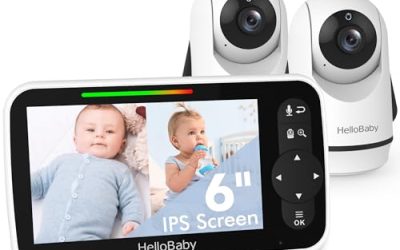
HelloBaby HB6550
If the HB65 feels a little small, the HB6550 answers with a 5-inch screen and a battery that the listing puts at 30 hours, which means the parent unit can stay beside the bed all night with charge left in the morning. The camera pans, tilts and zooms from the parent unit, night vision covers dark rooms, and two-way talk lets you soothe your baby with your voice before you get up. Eight lullabies are built in for settling time, and the connection runs over a private FHSS link with no Wi-Fi involved. It suits parents who check the monitor often and dislike recharging it every day.
Specs
- 5-inch screen
- 30-hour battery life
- Pan-tilt-zoom camera with night vision
- VOX mode and two-way talk
- 8 lullabies
- Up to 1000ft range
- No Wi-Fi operation
Best for: Parents who want a large screen and a battery that lasts through the night.
Watch out for: The bigger screen makes the parent unit heavier in a pocket; check that the charging cable reaches your bedside.
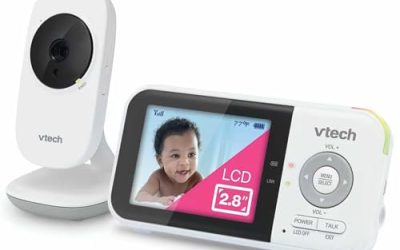
VTech VM819
VTech has built its name on nursery gear that does one job well, and the VM819 follows that pattern. The 2.8-inch screen is the smallest in this guide, but it keeps the parent unit light enough to slip into a pocket while you move around the house, and the listing quotes 19 hours of video streaming or 29 hours in power-saving mode. A temperature sensor, soothing sounds and lullabies, two-way talk and infrared night vision cover the nightly routine, and the FHSS connection stays private without Wi-Fi or an app. Parents who value privacy and simplicity over a large display will feel at home here.
Specs
- 2.8-inch colour LCD screen
- Up to 1000ft range
- 19-hour video battery life, 29-hour power-saving mode
- Infrared night vision
- Temperature sensor
- Soothing sounds and lullabies
- Two-way talk-back intercom
- Secure FHSS transmission, no Wi-Fi
Best for: Privacy-minded parents who want no Wi-Fi and a pocket-sized parent unit.
Watch out for: The 2.8-inch screen is the smallest here, and the camera angle adjusts by hand rather than by remote control.
VTech VM819-2
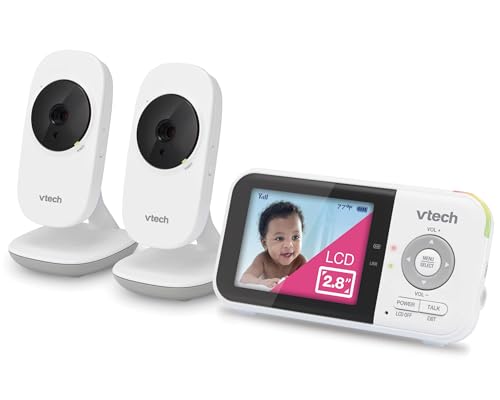
Twins, or two children sleeping in separate rooms, change the maths of a monitor purchase, and the VM819-2 answers by packing two cameras into one box. Both cameras share the same 2.8-inch parent unit, each with night vision, a temperature sensor, lullabies and two-way talk, and you can switch between rooms without carrying two monitors. The listing quotes a 1,000-foot range and 19 hours of battery life, so the setup works across a family home as well as a flat. It costs more than a single-camera kit, yet it replaces two separate purchases, which is the whole point.
Specs
- Two cameras included
- 2.8-inch colour screen
- Up to 1000ft range
- 19-hour battery life
- Infrared night vision
- Temperature sensor and lullabies
- Two-way audio
- Secure FHSS transmission, no Wi-Fi
Best for: Twins or two children sleeping in separate rooms.
Watch out for: Two cameras mean two power points and two sets of cables to keep away from cots; check that both cameras pair before the first night.
Which One Fits Your Situation
You Live in a Two-Storey or Long, Narrow Home
Range matters more than screen size here. Choose the VTech VM819 or the VM819-2, both quoted at 1,000 feet in open air, and listen for the out-of-range alert when you move to the far end of the house. Mount the camera high in a corner so one unit covers the whole cot, and keep the parent unit charged where you spend the evening rather than beside the nursery door.
You Have Twins or Two Children in Separate Rooms
One camera cannot watch two rooms, so the VTech VM819-2 is the natural pick, with two cameras sharing one parent unit. You can switch between rooms without carrying two monitors, and each camera brings its own night vision, temperature sensor and two-way talk. Set both cameras up well before the first night, and label which camera belongs to which room so a midnight check never confuses the two.
You Want Nights Without a Phone or an App
If you would rather leave your phone charging in the kitchen, pick the HelloBaby HB6550 or the VTech VM819. Both run on a private radio link with no Wi-Fi and no app, so there is nothing to log into at 2 a.m. VOX mode wakes the screen only when your baby makes a sound, the lullabies play from the camera, and two-way talk lets you soothe with your voice before you get up.
You Are Setting Up a Nursery in a Rental
Renters need gear that works without drilling or rewiring, and the HelloBaby HB65 fits that brief. It works straight from the box on a private radio link, the camera sits on a shelf or chest of drawers, and the compact parent unit moves from room to room. When the tenancy ends, the whole kit packs into a single box, and nothing is left fixed to the walls.
Common Mistakes
- Choosing on screen size alone, then finding the signal drops through the walls between the nursery and the lounge.
- Mounting the camera where the cot bars block the view, or so close that the picture shows only a blanket.
- Leaving VOX sensitivity at its default, so soft sounds never wake the screen — or setting it so high that the screen never sleeps.
- Buying a second camera without checking that its model number pairs with the parent unit you already own.
- Placing the parent unit beside a microwave, a thick concrete wall or a tangle of other wireless gear, then blaming the monitor for dropouts.
Frequently Asked Questions
Do budget baby monitors need Wi-Fi?
No. Every monitor in this guide uses a direct FHSS radio link between the camera and the parent unit, so there is no home network, no app and no account to set up. The picture stays private to your home, and the monitor keeps working when your broadband drops. It also means you cannot check the camera from your phone, which is the trade you accept for the simpler setup.
How far will a budget monitor reach inside a house?
A 1,000-foot figure is measured in open air, so treat it as a ceiling rather than a promise. Plasterboard, brick veneer, concrete block and a floor between rooms all shorten the practical distance. In most New Zealand homes the monitors in this guide cover the nursery to the lounge and kitchen without trouble. If your home is long or two-storey, favour a model with a clear out-of-range alert.
Is a bigger screen always better?
Not always. A 5-inch screen is kinder on tired eyes during night feeds. A 2.8-inch screen keeps the parent unit light enough to carry in a pocket, and smaller screens often pair with longer battery life. The right choice depends on how you use the monitor: frequent checkers gain from the larger display, while parents who carry the unit may prefer the lighter one.
Can I add a second camera later?
It depends on the model. The VTech VM819-2 already ships with two cameras, so there is nothing extra to buy for a second room. The single-camera models accept extra cameras only when the camera model matches the parent unit, so check the listing for a compatible add-on camera before you buy. Pair the new camera in daylight and confirm both cameras hold their signal from the places you sit.
Related guides
More from Amazon
Programs that pair well with the guide above. Offers and eligibility are set by Amazon and may change.
Set up recurring deliveries of everyday items on eligible products. Terms and savings are set by Amazon.
Explore Subscribe & SaveFree shipping on eligible items, Prime Video and more. Eligible new members can start with a free trial.
Start a Prime free trialAudiobooks and podcasts to listen to on the go. Eligible new members can start with a free trial.
Try Audible freeRead from a large library of eBooks and audiobooks on any device. Check Amazon for current plans.
Explore Kindle UnlimitedAs an Amazon Associate we earn from qualifying purchases.

Write Your Review
No reviews yet. Be the first to share your experience!