
Key takeaways
- Compare three WiFi upper-arm blood pressure monitors with app sync, wide cuffs, and clear displays to find the model that fits your home routine.
What's inside
As an Amazon Associate I earn from qualifying purchases. This post may contain affiliate links at no extra cost to you.
A WiFi upper-arm blood pressure monitor changes one small but stubborn part of home measuring: getting the numbers off the device and into a log you can actually look back on. With Bluetooth-only models, the phone has to be nearby and paired at the moment you measure, and a missed sync can leave a gap in the record. A WiFi model sends each reading to its companion app over the home network on its own, so the log builds itself while the cuff goes back in its case.


This guide is for people who measure at home on a regular schedule, for households where more than one person shares a monitor, and for anyone helping a parent or relative keep a log from another home. Every monitor below is an upper-arm model with WiFi syncing, chosen from Amazon listings by the features printed on the listing: cuff size, display type, on-device memory, user profiles, and power source.
Quick Picks
As an Amazon Associate we earn from qualifying purchases.
| Product | Best for | Key spec from title |
|---|---|---|
| Withings BPM Vision | Large, easy-to-read screen with guided steps | 2.8-inch high-resolution LCD screen |
| Withings BPM Connect | Compact cuff that syncs without a phone nearby | WiFi and Bluetooth sync to Health Mate app |
| iHealth Clear BPM1 | Big display with WiFi sync and dual-user memory | 4.3-inch LED display with WiFi sync |
How to Choose
WiFi syncing and what it does on its own
The point of WiFi in a blood pressure monitor is simple: the reading reaches the app without a phone in the room. Check the listing for WiFi alongside Bluetooth, because many wireless monitors are Bluetooth-only and still need the phone nearby to transfer a reading. With WiFi, the monitor connects to the home network after setup and uploads each measurement by itself. That matters most when the phone is often in another room, or when a family member follows the log from elsewhere. Confirm the app works on the phones in the household, and check whether the monitor stores a few readings on the device when the network is briefly unavailable.
Cuff size and fit on the upper arm
An upper-arm cuff that does not fit the arm properly is the most common reason home measurements feel inconsistent. Measure the upper arm around its middle with a soft tape, then compare that number with the cuff range printed on the listing before ordering. The three monitors in this guide all ship with a standard cuff that fits arms from 22 to 42 cm, and one of them also has a larger cuff option for arms up to 52 cm. When an arm sits near the top of the standard range, a separate larger cuff is the safer choice. Look for clear markings showing which way the cuff wraps.
Display size and on-device feedback
The display decides how comfortable the monitor is to use without opening the app. A larger screen with large digits is easier to read at arm’s length, especially in dim morning light, and color-coded feedback gives a quick visual cue next to the numbers. Some monitors show systolic pressure, diastolic pressure, and pulse together, while others cycle through them or show only part of the result on the device. Guided on-screen steps can also help when more than one person uses the same monitor, because each person follows the same prompts. If the monitor will sit on a bedside table, a display that stays readable without leaning in is worth more than extra app charts.
Memory, user profiles, and power
Memory and user profiles decide whether a shared monitor keeps everyone’s log separate. On-device memory ranges from a handful of readings to more than a hundred, and the app usually holds an unlimited history once readings sync. Check how many user profiles the monitor supports, because a two-person household needs at least two, and a family log may need more. Power matters too: rechargeable models remove the recurring task of buying batteries, and a long interval between charges suits a monitor that lives on a shelf. Battery-powered models are simpler to keep going with spares at home, but the battery type and count should be clear before the first measurement.
The 3 Best Options
Withings BPM Vision
The BPM Vision suits buyers who want the clearest screen in this group and a monitor that walks through each measurement with on-screen guidance. Its 2.8-inch LCD shows systolic pressure, diastolic pressure, and heart rate with color-coded feedback, so the result is easy to read without opening the phone. WiFi and Bluetooth syncing send readings to the Withings app, where the history is stored and reports can be shared. The protective case doubles as a stand that holds the monitor at a readable angle, and the standard cuff fits most adult arms, with a larger cuff option for bigger arms.
Specs
- 2.8-inch high-resolution LCD screen with color-coded feedback
- WiFi and Bluetooth syncing to the Withings app
- Upper-arm cuff fits 22 to 42 cm, with an optional cuff for arms up to 52 cm
- Up to 8 user profiles with 16 readings stored per user on the device
- Single-lead ECG with atrial fibrillation detection listed on the product page
- Battery life of up to 12 months on a single charge
- Protective case doubles as a stand
- Compatible with iOS and Android
Best for: Households that want a large, guided display and a log that syncs over WiFi without a phone nearby.
Watch out for: The listing notes the monitor is not compatible with pacemakers, so check that note against the household’s needs before buying.
Withings BPM Connect
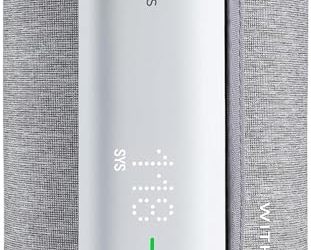
The BPM Connect is the most compact monitor here, built as a single tube-shaped unit with the cuff wrapped around it, so it packs away neatly between measurements. Its LED matrix display shows systolic pressure, diastolic pressure, and heart rate with color-coded feedback, and a single button begins the measurement. WiFi syncing uploads each reading to the Health Mate app without a phone in the room, with Bluetooth as a second syncing route. The rechargeable battery is listed as lasting up to six months on a charge, which suits a monitor used a few times a week and stored on a shelf.
Specs
- LED matrix display with color-coded feedback
- WiFi and Bluetooth syncing to the Health Mate app
- Integrated upper-arm cuff fits 22 to 42 cm
- Up to 8 user profiles with 8 readings stored on the device
- Unlimited history in the app once readings sync
- Rechargeable battery charged over micro-USB
- One-button operation
- Compatible with iOS and Android
Best for: People who want a compact, portable WiFi monitor that uploads readings on its own.
Watch out for: Only 8 readings are stored on the device, so the monitor should sync to WiFi regularly to keep the full history in the app.
iHealth Clear BPM1
The iHealth Clear is the pick for buyers who want the biggest display of the three and a straightforward WiFi setup. Its 4.3-inch LED screen shows the result in large digits, and the monitor syncs over WiFi to the iHealth cloud and the MyVitals app, so no Bluetooth pairing is needed for the log to update. The cuff fits arms from 22 to 42 cm, and the monitor supports two users, which covers a couple sharing one device at home. One-button operation keeps the routine short, and the monitor runs on four AAA batteries, so there is no charging cable to keep track of.
Specs
- 4.3-inch LED display with large digits
- WiFi syncing to the iHealth cloud and MyVitals app
- Upper-arm cuff fits 22 to 42 cm
- Dual-user memory
- Oscillometric measurement with automatic inflation and deflation
- Runs on 4 AAA batteries
- One-button operation
- Compatible with iOS and Android
Best for: Buyers who want the largest on-device display and simple WiFi logging for two people.
Watch out for: The monitor runs on disposable batteries rather than a rechargeable cell, so keep spare AAA batteries at home.
Which One Fits Your Situation
You want the easiest screen to read
Choose the iHealth Clear BPM1 if the display matters most. Its 4.3-inch LED screen has the largest digits in this guide, and the result is easy to read from a normal sitting position. The Withings BPM Vision is the next choice, with a 2.8-inch LCD, guided steps, and a case that doubles as a stand, which helps when the monitor sits on a table.
You measure alone and want the log to update itself
Choose the Withings BPM Connect or the Withings BPM Vision. Both sync over WiFi, so the reading reaches the app even when the phone is in another room. The BPM Connect is the more compact of the two, while the BPM Vision adds the larger screen and more on-device storage per user.
Two or more people share one monitor
Choose the Withings BPM Vision, which supports up to 8 user profiles and stores 16 readings per user on the device. The Withings BPM Connect also supports 8 profiles but keeps fewer readings on the device, and the iHealth Clear BPM1 covers two users, which is enough for a couple but not for a larger household.
You want the simplest setup with no charging
Choose the iHealth Clear BPM1. It runs on four AAA batteries and syncs over WiFi, so there is no charging cable and no Bluetooth pairing step in the daily routine. Keep spare batteries nearby, and check that the WiFi network is set up once at the beginning so readings upload without further steps.
Common Mistakes
- Buying a Bluetooth-only monitor when the goal was WiFi syncing, then finding the phone has to be nearby for every reading.
- Skipping the arm measurement and ordering a cuff that sits at the edge of its stated range.
- Wrapping the cuff over a thick sleeve or with the tube in the wrong position, then wondering why consecutive readings differ.
- Measuring right after climbing stairs, eating, or drinking coffee instead of sitting and resting for a few minutes first.
- Sharing one user profile between two people, which mixes two logs into a single history that is hard to separate later.
Frequently Asked Questions
Do WiFi blood pressure monitors need a phone nearby to sync?
No, that is the main difference from Bluetooth-only models. Once a WiFi monitor is set up on the home network, it uploads each reading to its companion app on its own, so the phone can be in another room. Bluetooth remains useful as a second syncing route when the monitor is away from home, and the app still holds the full history once readings arrive.
What cuff size do I need for an upper-arm monitor?
Measure around the middle of the upper arm with a soft tape and compare the result with the cuff range on the listing. The monitors in this guide ship with a standard cuff for arms from 22 to 42 cm. If the measurement sits near the top of that range, look for a larger cuff option, such as the one listed for the Withings BPM Vision, before ordering.
How many readings can these monitors store without syncing?
It depends on the model. The Withings BPM Vision stores 16 readings per user for up to 8 users, the Withings BPM Connect stores 8 readings on the device, and the iHealth Clear BPM1 holds a dual-user memory. In every case the app keeps a longer history once readings sync over WiFi, so regular syncing matters more than the on-device count.
Can more than one person use the same WiFi monitor?
Yes, when the monitor supports multiple user profiles. The Withings BPM Vision and BPM Connect both support up to 8 profiles, while the iHealth Clear BPM1 supports two users. Each person should use their own profile so their readings stay in separate logs, and the cuff should be refitted for each person before measuring.
Related guides
More from Amazon
Programs that pair well with the guide above. Offers and eligibility are set by Amazon and may change.
Set up recurring deliveries of everyday items on eligible products. Terms and savings are set by Amazon.
Explore Subscribe & SaveFree shipping on eligible items, Prime Video and more. Eligible new members can start with a free trial.
Start a Prime free trialAudiobooks and podcasts to listen to on the go. Eligible new members can start with a free trial.
Try Audible freeRead from a large library of eBooks and audiobooks on any device. Check Amazon for current plans.
Explore Kindle UnlimitedAs an Amazon Associate we earn from qualifying purchases.
Write Your Review
No reviews yet. Be the first to share your experience!