
Key takeaways
- Compare 3 WiFi upper-arm blood pressure monitors for caregivers who record readings for a loved one, with app sync, cuff fit, and setup compared.
What's inside
As an Amazon Associate I earn from qualifying purchases. This post may contain affiliate links at no extra cost to you.
A caregiver who records blood pressure for a parent, spouse, or relative faces a practical problem. The reading has to land somewhere useful without copying numbers from a small screen onto paper, and it has to be there later, when a clinician asks what the pattern looked like over the past few weeks. A WiFi upper-arm monitor solves the transfer part of that job, because each measurement can upload itself to an app as soon as it finishes, even when the phone is in another room.


This guide is written for family caregivers who take readings for someone else and keep the log, for adult children checking in from another household, and for anyone who shares a home with a person who finds small screens and app menus difficult. Every monitor below was chosen from its Amazon listing title and listed specifications, and every one connects over WiFi as well as Bluetooth, so a reading does not depend on a phone sitting beside the chair.
Quick Picks
As an Amazon Associate we earn from qualifying purchases.
| Product | Best for | Key spec from title |
|---|---|---|
| Withings BPM Connect | Caregivers who want readings to upload without a phone nearby | Wi-Fi and Bluetooth sync to the Health Mate app |
| Withings BPM Vision | Caregivers who want a large screen the person being measured can read | 2.8-inch LCD screen with Wi-Fi and Bluetooth |
| iHealth Clear BPM1 | Caregivers who want spoken results and a large color display | 4.3-inch color display with WiFi and voice output |
How to Choose
WiFi sync that works without a phone in the room
The point of WiFi in this category is simple: the monitor talks to the home network directly, so a measurement uploads to the companion app even when the caregiver’s phone is charging in another room. Bluetooth-only monitors need a paired phone within range at the moment of the reading, which adds a step that is easy to forget. Before buying, confirm the listing itself names WiFi, not just wireless or app-connected, because many listings use the word wireless for Bluetooth alone. Also check that the app lets more than one person view the log, since the caregiver and the person being measured may not share a phone.
Cuff fit for the arm being measured
An upper-arm cuff that is too small or too large will not sit the way the maker intended, and that matters more than any app feature. Most of the monitors in this guide use a wide-range cuff covering roughly 22 to 42 cm, which fits a large share of adult arms, but arms outside that range need a different cuff size, so measure the upper arm before ordering. A pre-formed cuff that holds its shape is easier for one person to slide on without help, while a soft cuff takes more coordination. If two people in the household will use the same monitor, check whether the cuff range suits both arms.
A log the caregiver can actually read later
A recorded measurement is only useful if the caregiver can find it again, in order, with the date and time attached. Look for an app that keeps an unlimited history rather than a fixed number of on-device readings, and that shows trends over days and weeks instead of a single list of numbers. The ability to export the log as a file or share it with a clinician saves the caregiver from retyping numbers before an appointment. Some apps support several user profiles on one monitor, which keeps two people’s logs separate; without that, readings from two arms end up mixed in one timeline.
A display and controls the person being measured can use
The caregiver may set everything up, but the person wearing the cuff often begins the measurement alone, so the device itself has to be forgiving. A large, high-contrast screen with clear systolic, diastolic, and pulse figures helps someone with weaker eyesight read the result without waiting for the app. One-button operation beats a menu, and a color-coded indicator gives a quick visual cue alongside the numbers. Voice output, where included, reads the result aloud, which helps when the screen faces away from the person wearing the cuff. Keep the charging or battery routine simple, because a dead monitor on a Sunday morning is a missed reading.
The 3 Best Options
Withings BPM Connect
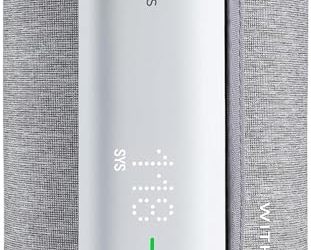
The BPM Connect suits caregivers who want the log to take care of itself, because its WiFi connection uploads each reading to the Health Mate app without a phone in the room, and the app keeps the full history with trends the caregiver can check from anywhere. Its compact one-piece design wraps the monitor and cuff into a single unit, so there is no separate tube or console to position, and the color-coded feedback on the device gives the person being measured an immediate visual cue next to the numbers. A rechargeable battery that runs for months between charges means the caregiver is not swapping batteries every few weeks.
Specs
- Wi-Fi and Bluetooth sync to the Withings Health Mate app
- Upper-arm cuff, 22 to 42 cm
- Color-coded feedback on the device display
- Rechargeable battery with up to 6 months of use per charge
- Unlimited measurement history in the app
- Compatible with iOS and Android
Best for: Caregivers who record readings for someone in another household and want each measurement to appear in the app on its own.
Watch out for: The on-device display is small, so the caregiver should plan to read detailed history in the app rather than on the cuff itself.
Withings BPM Vision
The BPM Vision fits households where the person being measured wants to see the result clearly the moment the cuff deflates, because its 2.8-inch LCD screen shows systolic, diastolic, and pulse figures in large type with a color bar alongside them. Like the BPM Connect, it syncs over WiFi and Bluetooth to the Withings app, so the caregiver still gets the automatic log, and the app stores an unlimited history that can be shared. It also carries a built-in ECG sensor, which adds a second type of reading to the same session for caregivers who want that data in the log.
Specs
- Wi-Fi and Bluetooth sync to the Withings app
- 2.8-inch high-resolution LCD screen
- Upper-arm cuff, 22 to 42 cm
- Built-in ECG sensor with atrial fibrillation detection
- Color-coded feedback on the screen
- Unlimited measurement history in the app
- Compatible with iOS, Android, Apple Health, and Google Health
Best for: Caregivers whose loved one reads the screen directly and wants the largest, clearest display of the three monitors here.
Watch out for: The listing notes the device is not compatible with pacemakers, so check that detail against the household’s situation before buying.
iHealth Clear BPM1
The iHealth Clear BPM1 is the most approachable option here for a person who measures alone, because its 4.3-inch color display shows the result in large digits and a voice output reads the numbers aloud, so the person wearing the cuff does not need to twist around to see the screen. It connects over WiFi to the iHealth MyVitals app, where readings upload automatically and can be exported as a file for sharing, and it supports two user profiles, which keeps two people’s logs separate on one device. The monitor compares each new reading with earlier ones on the display, which helps a caregiver spot a change at a glance.
Specs
- WiFi sync to the iHealth MyVitals app
- 4.3-inch TFT color display with voice output
- Upper-arm cuff, 22 to 42 cm
- Two user profiles with separate memories
- Result comparison shown on the display
- Rechargeable lithium-ion battery, 2200 mAh
- AC adapter included
Best for: Caregivers who want spoken results and a big color screen for a parent or relative who measures without help.
Watch out for: The unit is larger than the two Withings models, so it takes more space on a bedside table and is less convenient to carry between rooms.
Which One Fits Your Situation
You live apart from the person you care for
Choose the Withings BPM Connect. Its WiFi upload means the reading reaches the app without anyone’s phone nearby, so the caregiver can check the log from another household the same morning. The compact one-piece cuff also travels well in a bag, which helps when the caregiver visits and wants to take a reading during the stay.
The person being measured reads the screen themselves
Choose the Withings BPM Vision. The large 2.8-inch screen and color bar make the result easy to read at arm’s length, and the person does not need to open an app to know the numbers. The caregiver still gets the automatic WiFi log, so nothing is lost by letting the screen do the talking.
The person being measured has weak eyesight or measures alone
Choose the iHealth Clear BPM1. The voice output announces the result, the 4.3-inch color display is the largest here, and the two-user memory keeps logs separate when a spouse also uses the monitor. Its size is the trade-off, so keep it in one fixed spot rather than moving it around the house.
Two people in one household share a single monitor
Choose the iHealth Clear BPM1 for its two user profiles, or the Withings BPM Connect if both people are comfortable reading the app. Either way, set up a separate profile for each person before the first measurement, because a shared log mixes two people’s numbers into one timeline and is hard to untangle later.
Common Mistakes
- Buying a Bluetooth-only monitor and assuming it will sync over WiFi, when the listing only promises a phone connection.
- Ordering without measuring the upper arm, then finding the cuff range does not fit the person being measured.
- Setting up the app under one account and letting two people share a single profile, which mixes their logs together.
- Placing the monitor somewhere the WiFi signal is weak, so readings sit on the device instead of uploading.
- Skipping the export or sharing step until an appointment, then trying to reconstruct weeks of numbers from memory.
Frequently Asked Questions
Does a WiFi blood pressure monitor need a phone nearby to record a reading?
No. A WiFi monitor connects directly to the home network, so it can upload a reading to the companion app even when no phone is in the room. Bluetooth-only monitors need a paired phone within range at the time of the measurement. The caregiver should still open the app later to confirm the reading arrived, since a weak WiFi signal can delay the upload.
Can one monitor keep separate logs for two people?
Yes, if the monitor or its app supports more than one user profile. The iHealth Clear BPM1 stores two user profiles on the device, while the Withings models keep separate profiles in the app. Set up each profile before the first measurement, and make sure the right profile is active, so the two logs stay separate from the beginning.
What cuff size should a caregiver check before buying?
Measure the upper arm at its widest point with a tape, then compare that number with the cuff range on the listing. Most monitors in this guide cover 22 to 42 cm, which suits many adult arms, but an arm outside that range needs a different cuff. A cuff that is too tight or too loose will not sit the way the maker intended.
How should a caregiver share recorded readings with a clinician?
Use the companion app’s export or share function to send the log as a file, rather than copying numbers by hand. The Withings and iHealth apps both store a dated history that can be shared or exported. Bring the full log to the appointment, with dates and times attached, so the clinician can see the pattern instead of a single reading.
Related guides
More from Amazon
Programs that pair well with the guide above. Offers and eligibility are set by Amazon and may change.
Set up recurring deliveries of everyday items on eligible products. Terms and savings are set by Amazon.
Explore Subscribe & SaveFree shipping on eligible items, Prime Video and more. Eligible new members can start with a free trial.
Start a Prime free trialAudiobooks and podcasts to listen to on the go. Eligible new members can start with a free trial.
Try Audible freeRead from a large library of eBooks and audiobooks on any device. Check Amazon for current plans.
Explore Kindle UnlimitedAs an Amazon Associate we earn from qualifying purchases.
Write Your Review
No reviews yet. Be the first to share your experience!